About Audit
Audit is an MCP server published by apisec-inc in the AI category: see what your AI agents can access. Scan MCP configs for exposed secrets, shadow APIs, and AI models. Generate AI-BOMs for compliance.
The repository has 164 stars and 45 forks, with the last commit a month ago. Recent commit activity is the strongest signal that reported issues will get attention.
Install
claude mcp add audit -- npx -y @aethereumdev/mcp-auditnpx -y @aethereumdev/mcp-audituvx mcp-auditspip install mcp-auditsThis server has no ConduID identity, so agent calls to it are not receipted. Pin the version you install and review the source before granting it credentials.
Ask AI
Ask AI about Audit
Powered by Claude · Grounded in docs
Security checks
Static checks derived from the repository 8 hours ago. Heuristics on the source, not an audit.
- ✓README presentThe repository ships documentation.
- ✓License declaredUsable under a stated license.
- ✓Tests presentA test suite exists in the repository.
- ✓Dependencies pinnedA lockfile pins dependency versions.
- !No dynamic code executionSource scan found eval or shell execution. Review how tool inputs reach it before granting credentials.
- !Scoped permissionsDoesn't declare a permission scope. Assume it can do anything its process can.
Releases
README
MCP Audit


See what your AI agents can access - before they go live.
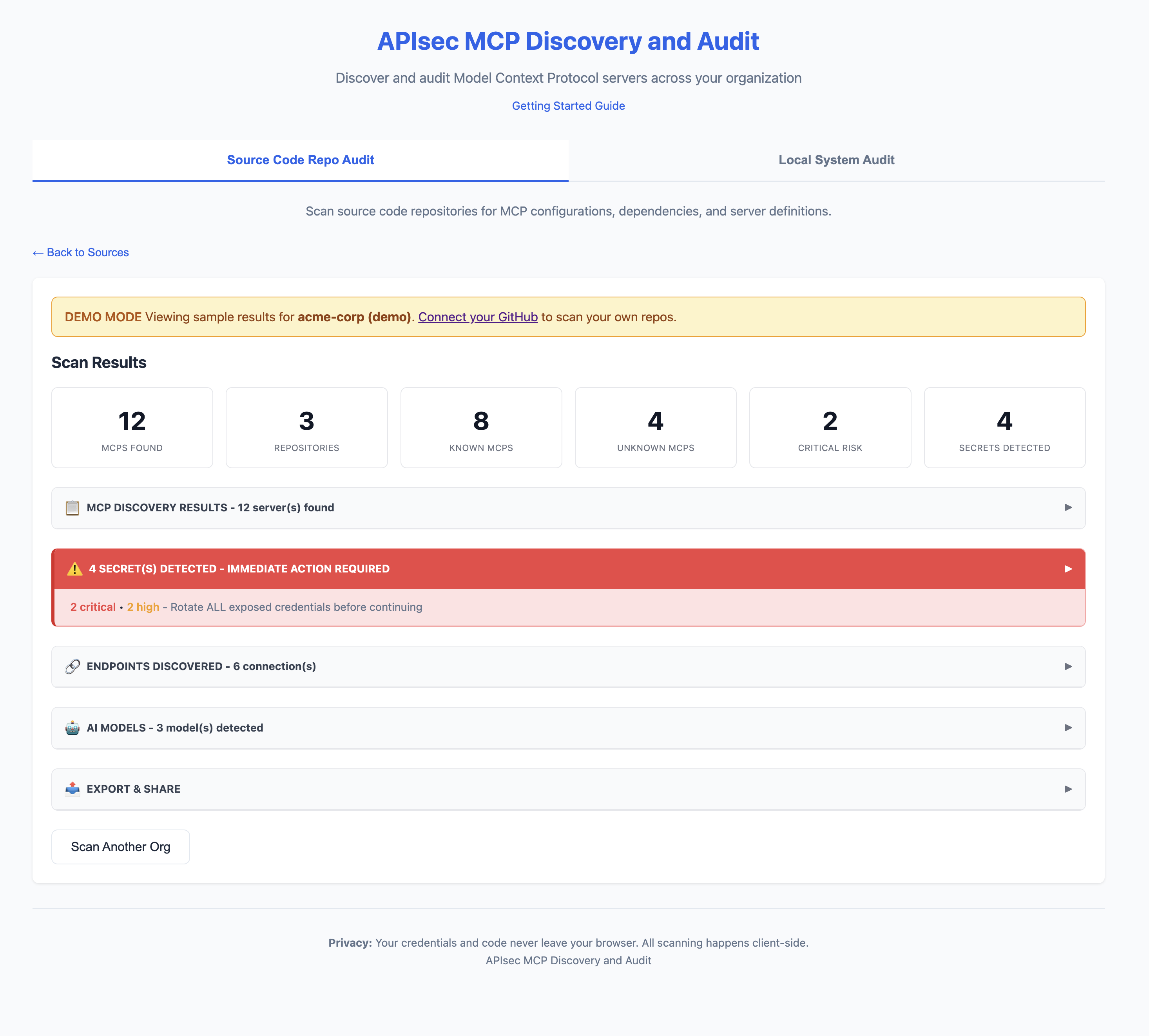
Web App
CLI
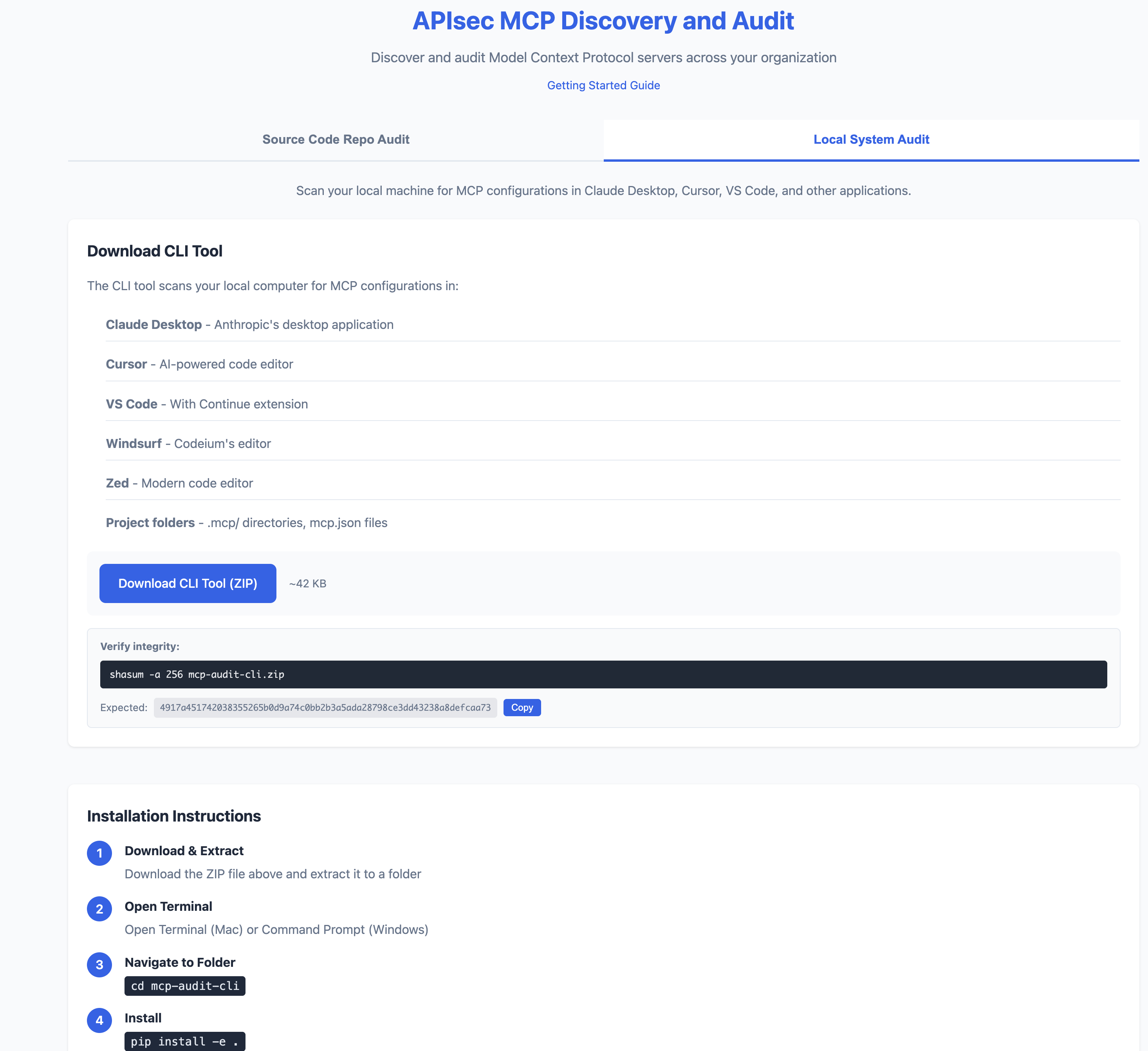
Quick Start
# Install
pip install -e .

# Scan your machine
mcp-audit scan

# Or try the web app (no install)
# https://apisec-inc.github.io/mcp-audit/?demo=true
What It Does
MCP Audit scans your AI development tools (Claude Desktop, Cursor, VS Code) and reveals:
- Secrets - Exposed API keys, tokens, database passwords
- APIs - Every endpoint your AI agents connect to
- AI Models - Which LLMs are configured (GPT-4, Claude, Llama)
- Risk Flags - Shell access, filesystem access, unverified sources
⚠️  2 SECRET(S) DETECTED - IMMEDIATE ACTION REQUIRED

[CRITICAL] GitHub Personal Access Token
  Location: github-tools → env.GITHUB_TOKEN
  Remediation: https://github.com/settings/tokens → Delete → Recreate

[HIGH] Database Connection String
  Location: postgres-mcp → env.DATABASE_URL
  Remediation: Rotate credentials, use secrets manager
Source-level Scanning (new in v1.1)
mcp-audit scan inventories MCP server configurations. The new mcp-audit source-scan command goes one level deeper — it reads the MCP server's own source code and flags code-level vulnerabilities the server author may have introduced.
Today it catches the "Prompt In, Shell Out" attack chain: an MCP server that pipes an LLM-controlled tool argument into a shell-spawning API (child_process.exec, util.promisify(exec), subprocess.run(shell=True), os.system, os.popen) without sanitization. An attacker controlling the LLM input can inject shell metacharacters and execute arbitrary code on the host running the MCP server.
$ mcp-audit source-scan ./packages/my-mcp-server

MCP source-scan: packages/my-mcp-server
1 critical · 0 high · 1 finding(s) total

  Severity  Conf  File:Line      API                                          Snippet
  CRITICAL  high  server.js:19   util.promisify(child_process.exec) ...       const { stdout } = await execAsync(
Outputs:
--format table(default, human-readable)--format json(CI integrations, jq pipelines)--format sarif(upload to GitHub code-scanning / GitLab / similar)
Gate merges on critical findings:
mcp-audit source-scan ./my-mcp --exit-code
The scanner is intentionally narrow — it only opens files that look like MCP server source (imports an MCP SDK). It won't try to find shell-injection bugs in random Node / Python code; that's not the job.
After running mcp-audit scan, you'll see a nudge in the summary suggesting source-scan against any in-house or unverified servers it discovers.
What It Finds (and Doesn't Find)
What It Finds
| Scan Type | Finds |
|---|---|
| GitHub Scan | MCP configs committed to repositories (mcp.json, .mcp/, claude_desktop_config.json, etc.) |
| Local Scan | MCP configs on your machine (Claude Desktop, Cursor, VS Code, Windsurf, Zed) |
| Source Scan (v1.1) | Code-level vulnerabilities in MCP server source (JS/TS/Python): shell-injection sinks (child_process.exec, util.promisify(exec), subprocess.run(shell=True), os.system, os.popen) called with interpolated tool arguments |
What It Won't Find
| Blind Spot | Why |
|---|---|
| Secrets in environment variables at runtime | We scan config files, not running processes |
| Configs pulled from secrets managers | Vault, AWS Secrets Manager, etc. are not scanned |
| Dynamically generated configs | Configs created at runtime aren't in files |
| MCPs installed but not configured | No config file = nothing to scan |
| Private repos you don't have access to | GitHub scan is limited by your PAT scope |
| Encrypted or obfuscated secrets | Pattern matching won't catch encoded values |
| Non-standard config locations | Custom paths outside known locations |
Important
A clean scan does not mean zero risk.
- Developers may have MCPs configured on machines you haven't scanned
- Configs may exist in repos outside your GitHub org
- Runtime behavior may differ from static configuration
MCP Audit provides visibility, not guarantees. Use alongside runtime monitoring and security reviews.
CI/CD Integration
Fail builds on critical risks:
# .github/workflows/mcp-audit.yml
name: MCP Security Audit
on: [push, pull_request]

jobs:
  audit:
    runs-on: ubuntu-latest
    steps:
      - uses: actions/checkout@v4

      - name: Install MCP Audit
        run: pip install mcp-audit

      - name: Run Security Scan
        run: mcp-audit scan --path . --format json -o mcp-report.json

      - name: Fail on Critical
        run: |
          CRITICAL=$(jq '[.mcps[] | select(.risk == "critical")] | length' mcp-report.json)
          if [ "$CRITICAL" -gt 0 ]; then
            echo "❌ Found $CRITICAL critical-risk MCPs"
            exit 1
          fi

      - name: Upload AI-BOM
        uses: actions/upload-artifact@v4
        with:
          name: ai-bom
          path: mcp-report.json
Source-level scan in CI (v1.1)
If you ship an in-house MCP server, gate merges on critical code-level findings:
# .github/workflows/mcp-source-scan.yml
name: MCP Source Scan
on: [pull_request]

jobs:
  source-scan:
    runs-on: ubuntu-latest
    steps:
      - uses: actions/checkout@v4
      - run: pip install mcp-audit

      # Fail the PR if any critical shell-injection findings are detected.
      - name: Source-scan in-house MCP server
        run: mcp-audit source-scan ./packages/my-mcp-server --exit-code

      # OR: upload findings to GitHub code-scanning instead of failing.
      - name: Source-scan -> SARIF
        run: mcp-audit source-scan ./packages/my-mcp-server --format sarif --output mcp.sarif
      - uses: github/codeql-action/upload-sarif@v3
        with:
          sarif_file: mcp.sarif
Export Formats
# JSON (for CI/CD)
mcp-audit scan --format json -o report.json

# AI-BOM (CycloneDX 1.6)
mcp-audit scan --format cyclonedx -o ai-bom.json

# SARIF (GitHub Security integration)
mcp-audit scan --format sarif -o results.sarif

# CSV / Markdown
mcp-audit scan --format csv -o report.csv
mcp-audit scan --format markdown -o report.md

# PDF Report via Email
mcp-audit scan --email security@company.com
Key Features
| Feature | Description |
|---|---|
| MCP Discovery | Find MCPs in Claude Desktop, Cursor, VS Code, Windsurf, Zed |
| Secrets Detection | 25+ secret patterns with provider-specific remediation |
| API Inventory | Database, REST, SSE, SaaS, Cloud endpoints |
| AI Model Detection | OpenAI, Anthropic, Google, Meta, Mistral, Ollama |
| OWASP LLM Top 10 | Maps findings to OWASP LLM Top 10 (2025) framework |
| AI-BOM Export | CycloneDX 1.6 for supply chain compliance |
| SARIF Output | GitHub Security integration with OWASP tags |
| Registry | 50+ known MCPs with risk classifications |
Two Ways to Use
| Web App | CLI Tool | |
|---|---|---|
| Scans | GitHub repositories | Local machine |
| Install | None (browser) | Python 3.9+ |
| Best for | Org-wide visibility | Deep local analysis |
| Privacy | Token stays in browser | 100% local |
Web App: https://apisec-inc.github.io/mcp-audit/
CLI Reference
Scan Commands
mcp-audit scan                    # Full inventory scan
mcp-audit scan --secrets-only     # Only secrets
mcp-audit scan --apis-only        # Only API endpoints
mcp-audit scan --models-only      # Only AI models
mcp-audit scan --verbose          # Detailed output
mcp-audit scan --path ./project   # Specific directory
Source-level Scan Commands (new in v1.1)
source-scan is a separate command from scan. scan inventories MCP configurations; source-scan reads MCP server source code and flags code-level vulnerabilities. See docs/SOURCE_SCAN.md for the full guide.
mcp-audit source-scan ./my-mcp                         # Table output (default)
mcp-audit source-scan ./my-mcp --format json           # JSON for jq pipelines
mcp-audit source-scan ./my-mcp --format sarif          # SARIF for code-scanning
mcp-audit source-scan ./my-mcp --output mcp.sarif      # Write to file
mcp-audit source-scan ./my-mcp --exit-code             # CI gate (non-zero on critical)
mcp-audit source-scan ./my-mcp --explain               # Inline remediation guidance
Export Options
mcp-audit scan --format json -o report.json       # JSON output
mcp-audit scan --format csv -o report.csv         # CSV output
mcp-audit scan --format markdown -o report.md     # Markdown output
mcp-audit scan --format cyclonedx -o ai-bom.json  # CycloneDX 1.6 AI-BOM
mcp-audit scan --format sarif -o results.sarif    # SARIF for GitHub Security
mcp-audit scan --email security@company.com       # PDF report via email
Registry Commands
mcp-audit registry                    # List all known MCPs
mcp-audit registry --risk critical    # Filter by risk
mcp-audit registry lookup "stripe"    # Search registry
Explain a Risk Flag
mcp-audit explain shell-injection-in-source   # Full remediation guidance
mcp-audit explain --list                      # All known risk flags
Risk Levels
| Level | Meaning | Examples |
|---|---|---|
| 🔴 CRITICAL | Full system access | Database admin, shell access, cloud IAM |
| 🟠 HIGH | Write access | Filesystem write, API mutations |
| 🟡 MEDIUM | Read + limited write | SaaS integrations, read-only DB |
| 🟢 LOW | Read-only | Public APIs, memory storage |
Detected Secrets
| Severity | Types |
|---|---|
| 🔴 Critical | AWS Keys, GitHub PATs, Stripe Live Keys, DB Credentials |
| 🟠 High | Slack Tokens, OpenAI Keys, Anthropic Keys, SendGrid |
| 🟡 Medium | Webhooks, Generic API Keys |
Privacy
- Web App: GitHub token never leaves your browser
- CLI: Runs 100% locally, no telemetry
- PDF Reports: Only summary data sent (no secrets)
Installation
Option 1: Python (pip)
# Clone and install
git clone https://github.com/apisec-inc/mcp-audit.git
cd mcp-audit
pip install -e .

# Verify
mcp-audit --help
Requires Python 3.9+
Option 2: Docker
# Build image
docker build -t mcp-audit .

# Scan current directory
docker run -v $(pwd):/scan mcp-audit scan

# Scan with JSON output
docker run -v $(pwd):/scan mcp-audit scan --format json -o /scan/report.json
Verify Download Integrity
All MCP Audit releases include SHA256 checksums.
Verify CLI Download
# Download the checksum file
curl -O https://github.com/apisec-inc/mcp-audit/releases/latest/download/CHECKSUMS.txt

# Verify the zip file
shasum -a 256 -c CHECKSUMS.txt --ignore-missing
Expected output:
mcp-audit-cli.zip: OK
Current Release Checksum
| File | SHA256 |
|---|---|
mcp-audit-cli.zip |
4917a451742038355265b0d9a74c0bb2b3a5ada28798ce3dd43238a8defcaa73 |
Full checksums: CHECKSUMS.txt
Documentation
- Risk Scoring - How risk levels and flags are assigned
- Contributing - Guidelines for contributors
License
MIT - see LICENSE
Built by APIsec
README fetched from the repository 8 hours ago. The original is authoritative.