About Fastapi MCP Langgraph Template
Fastapi MCP Langgraph Template is an MCP server published by NicholasGoh in the Data category: a modern template for agentic orchestration — built for rapid iteration and scalable deployment using highly customizable, community-supported tools like MCP, LangGraph, and more.
The repository has 558 stars and 86 forks, with the last commit 7 months ago. Six months or more without a commit doesn't mean the server is broken, but check the open issues before depending on it in production.
Install
git clone https://github.com/NicholasGoh/fastapi-mcp-langgraph-templateThis server has no ConduID identity, so agent calls to it are not receipted. Pin the version you install and review the source before granting it credentials.
Ask AI
Ask AI about Fastapi MCP Langgraph Template
Powered by Claude · Grounded in docs
Security checks
Static checks derived from the repository 4 days ago. Heuristics on the source, not an audit.
- ✓README presentThe repository ships documentation.
- ✓License declaredUsable under a stated license.
- !Tests presentNo tests found. Behaviour changes may go unnoticed between versions.
- ✓Dependencies pinnedA lockfile pins dependency versions.
- ✓No dynamic code executionSource scan found no eval, dynamic Function, or shell execution.
- !Scoped permissionsDoesn't declare a permission scope. Assume it can do anything its process can.
Releases
README
FastAPI MCP LangGraph Template
A modern template for agentic orchestration — built for rapid iteration and scalable deployment using highly customizable, community-supported tools like MCP, LangGraph, and more.
Visit the Github: 

[!NOTE] Read the docs with demo videos here. This repo will not contain demo videos.
- FastAPI MCP LangGraph Template
Core Features

- Seamlessly integrates LLM with growing list of community integrations found here
- No LLM provider lock in


- Native streaming for UX in complex Agentic Workflows
- Native persisted chat history and state management
Technology Stack and Features
for Python backend API
for Python SQL database interactions (ORM + Validation).
- Wrapper of
- Wrapper of
for LLM Observability and LLM Metrics
for Data Validation and Settings Management.
for DB RBAC
Relational DB
Vector Store
Reverse Proxy
for development and production.

Planned Features
for scraping Metrics
for visualizing Metrics
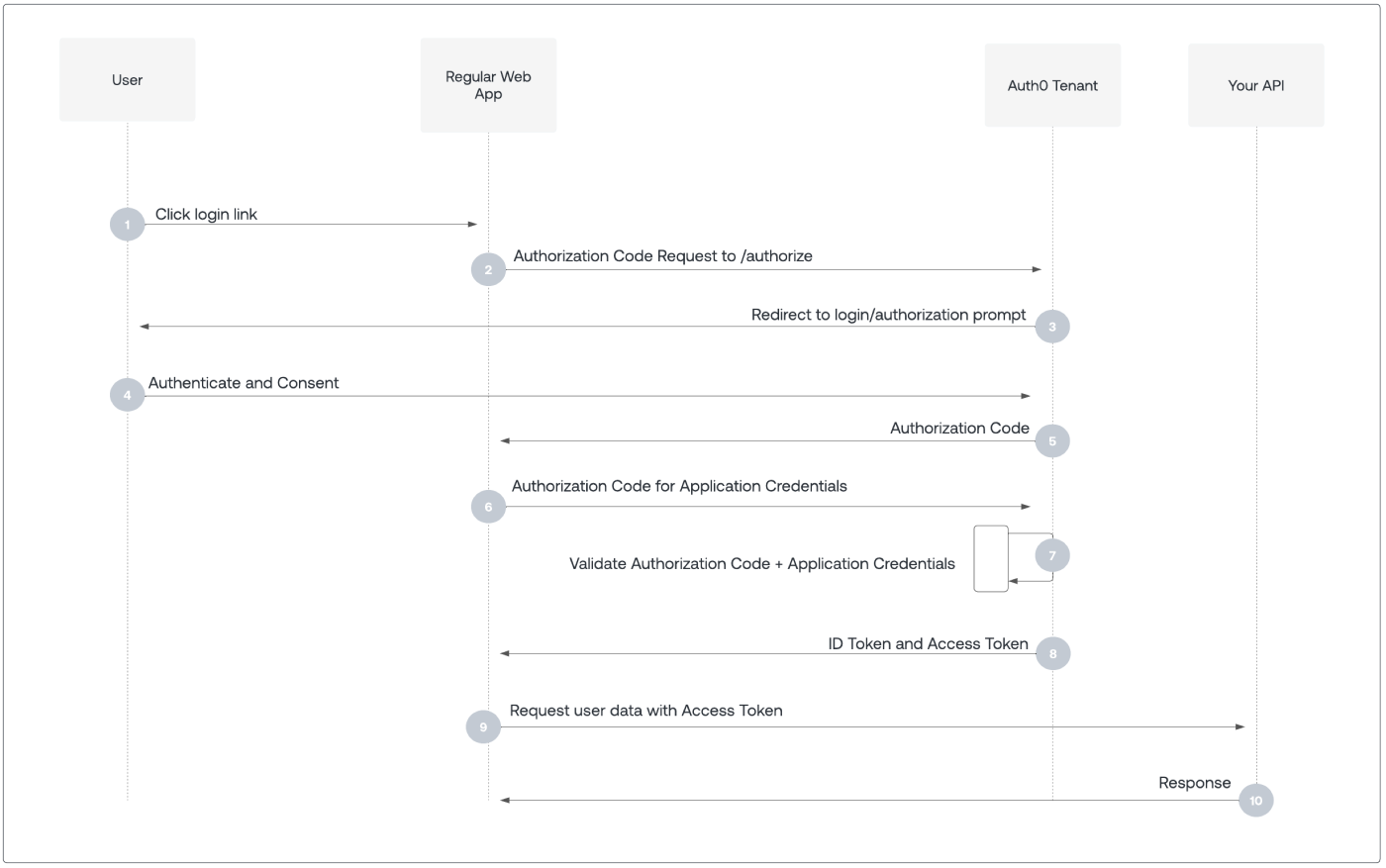
SaaS for Authentication and Authorization with OIDC & JWT via OAuth 2.0
- CI/CD via Github Actions
- :dollar: Deploy live demo to

- Provision with
IaC
- Push built images to ECR and Dockerhub
- :dollar: Deploy live demo to
Architecture
This section outlines the architecture of the services, their interactions, and planned features.
Inspector
Inspector communicates via SSE protocol with each MCP Server, while each server adheres to MCP specification.
graph LR

  subgraph localhost
    A[Inspector]
    B[DBHub Server]
    C[Youtube Server]
    D[Custom Server]
  end

  subgraph Supabase Cloud
    E[Supabase DB]
  end

  subgraph Google Cloud
    F[Youtube API]
  end

  A<-->|Protocol|B
  A<-->|Protocol|C
  A<-->|Protocol|D
  B<-->E
  C<-->F
Template Setup
The current template does not connect to all MCP servers. Additionally, the API server communicates with the database using a SQL ORM.
graph LR

  subgraph localhost
    A[API Server]
    B[DBHub Server]
    C[Youtube Server]
    D[Custom Server]
  end

  subgraph Supabase Cloud
    E[Supabase DB]
  end

  A<-->|Protocol|D
  A<-->E
Reverse Proxy
Can be extended for other services like Frontend and/or certain backend services self-hosted instead of on cloud (e.g., Langfuse).
graph LR
  A[Web Browser]

  subgraph localhost
    B[Nginx Reverse Proxy]
    C[API Server]
  end

  A-->B
  B-->C
Planned Features Diagrams
Monitoring and Observability
graph LR

  subgraph localhost
    A[API Server]
  end

  subgraph Grafana Cloud
    B[Grafana]
  end

  subgraph Langfuse Cloud
    C[Langfuse]
  end

  A -->|Metrics & Logs| B
  A -->|Traces & Events| C
Authentication and Authorization
Quick Start
Setup to run the repository in both production and development environments.
Build community youtube MCP image with:
./community/youtube/build.sh
:::tip
Instead of cloning or submoduling the repository locally, then building the image, this script builds the Docker image inside a temporary Docker-in-Docker container. This approach avoids polluting your local environment with throwaway files by cleaning up everything once the container exits.
:::
Then build the other images with:
docker compose -f compose-dev.yaml build
Copy environment file:
cp .env.sample .env
Add your following API keys and value to the respective file: ./envs/backend.env, ./envs/youtube.env and .env.
OPENAI_API_KEY=sk-proj-...
POSTGRES_DSN=postgresql://postgres...

LANGFUSE_PUBLIC_KEY=pk-lf-...
LANGFUSE_SECRET_KEY=sk-lf-...
LANGFUSE_HOST=https://cloud.langfuse.com

ENVIRONMENT=production

YOUTUBE_API_KEY=...
Set environment variables in shell: (compatible with bash and zsh)
set -a; for env_file in ./envs/*; do source $env_file; done; set +a
Start production containers:
docker compose up -d
Development
First, set environment variables as per above.
VSCode Devcontainer
:::warning
Only replace the following if you plan to start debugger for FastAPI server in VSCode.
:::
Replace ./compose-dev.yaml entrypoint to allow debugging FastAPI server:
  api:
    image: api:prod
    build:
      dockerfile: ./backend/api/Dockerfile
    # highlight-next-line
    entrypoint: bash -c "sleep infinity"
    env_file:
      - ./envs/backend.env
Then:
code --no-sandbox .
Press F1 and type Dev Containers: Rebuild and Reopen in Container to open containerized environment with IntelliSense and Debugger for FastAPI.
Without VSCode Devcontainer
Run development environment with:
docker compose -f compose-dev.yaml up -d
Debugging
Sometimes in development, nginx reverse proxy needs to reload its config to route services properly.
docker compose -f compose-dev.yaml exec nginx sh -c "nginx -s reload"
Refactored Markdown Files
The following markdown files provide additional details on other features:
MCP
LangGraph
Supabase
Langfuse
Grafana Stack
[!NOTE] Click above to view live update on star history as per their article: Ongoing Broken Live Chart you can still use this website to view and download charts (though you may need to provide your own token).
README fetched from the repository 4 days ago. The original is authoritative.