About fiji-mcp-server
fiji-mcp-server is an MCP server in the Browser category: model Context Protocol (MCP) server for Fiji/ImageJ: macros, discovery, screenshots, and workflows via PyImageJ.
Install
uvx fiji-mcp-serverpip install fiji-mcp-serverThis server has no ConduID identity, so agent calls to it are not receipted. Pin the version you install and review the source before granting it credentials.
Tools (9)
compare_screenshotsCompare two saved raster paths visually and, when sizes match, numerically.
Parameters not published.
get_resultsRead an ordered, paginated page from Fiji's live Results table.
Parameters not published.
get_stateRead Fiji lifecycle, active/open images, and Results-table state.
Parameters not published.
open_imageOpen an existing local image and make it current.
Parameters not published.
run_commandRun one resolved installed command with supported parameters or options.
Parameters not published.
run_scriptRun one trusted IJM or Groovy script.
Parameters not published.
save_imageSave the active image to a new exact lowercase supported path.
Parameters not published.
screenshotReturn and optionally save a PNG of the active plane or Results.
Parameters not published.
search_commandsSearch registered SciJava and ImageJ1 commands and inspect their routes.
Parameters not published.
Ask AI
Ask AI about fiji-mcp-server
Powered by Claude · Grounded in docs
Security checks
- ✓README presentThe repository ships documentation.
5 checks have not been run yet.
README
Fiji MCP Server




Ask your AI Agent in plain English to use Fiji / ImageJ to quickly analyze microscopy image also set pipelines from Cursor, Claude, Gemini, etc. You simply paste the image or ask it to navigate to the correct file.
The goal is that the AI agent should use the right ImageJ plugin, see what you are seeing and then verify its own results by writing codes without relying on vibes. I plan to setup SKILL and AI plugins in future. Would be happy to collaborate.
See it in action
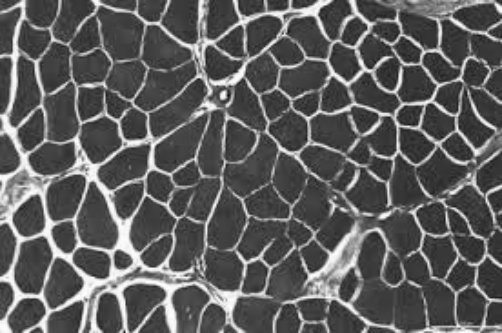
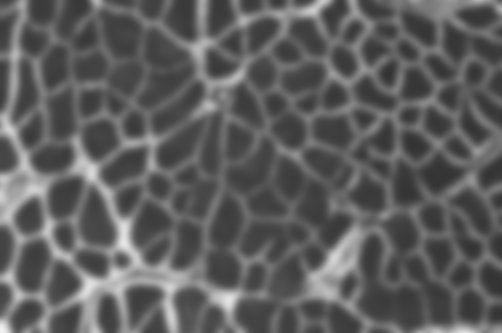
"Open the image, apply a Gaussian blur, show me before and after."
| Before | After |
|---|---|
 |
 |
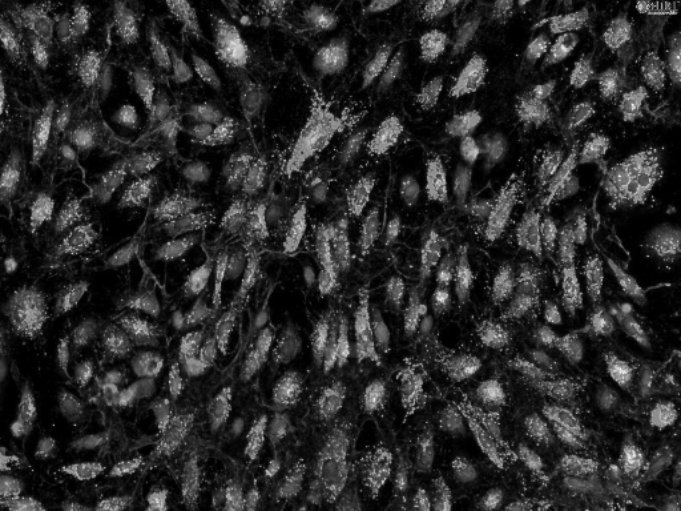
"Threshold the bright spots, outline each object, report area and circularity."
| Input | Outlined objects |
|---|---|
 |
 |
| # | Area | Circularity |
|---|---|---|
| 1 | 1052 | 0.89 |
| 2 | 2840 | 0.72 |
| 3 | 641 | 0.91 |
| 4 | 1902 | 0.68 |
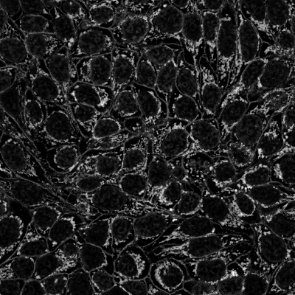
"Skeletonize the mask and summarize branches per tree."
| Mask | Skeleton |
|---|---|
 |
 |
| Tree | Branches | Junctions |
|---|---|---|
| 1 | 14 | 6 |
| 2 | 9 | 7 |
Get started in 3 steps
1 — Install
pip install fiji-mcp-server
You need Python 3.10+, Fiji installed on your machine, and Java (required by PyImageJ). See quickstart if anything needs clarification.
2 — Connect to your AI app
Replace /Applications/Fiji with your actual Fiji folder (the one containing jars/ and plugins/).
| App | One command |
|---|---|
| Claude Desktop | fiji-mcp-install install claude-desktop --fiji-path /Applications/Fiji |
| Cursor | fiji-mcp-install install cursor --fiji-path /Applications/Fiji |
| Claude Code | fiji-mcp-install install claude-code --fiji-path /Applications/Fiji |
| Gemini CLI | fiji-mcp-install install gemini --fiji-path /Applications/Fiji |
| Windsurf | fiji-mcp-install install windsurf --fiji-path /Applications/Fiji |
Then restart the app.
3 — Verify it works
In chat, type:
Run the Fiji MCP health_check tool
You should get back the Fiji version and mode. First startup takes 30–90 seconds while the JVM loads — that's normal.
What to ask
Once connected, just describe what you want:
"Open ./images/cells.tif and tell me the dimensions."

"Apply a Gaussian blur with sigma 4 and show me the result."

"Count the bright objects and give me their areas."

"Search for ImageJ commands related to 'threshold'."

"Open the image, subtract background, threshold, count particles — show me a screenshot after each step."
No macro knowledge needed. The assistant finds the right Fiji plugin, runs it, and can show you a screenshot to verify.
Available tools (19 total)
| Category | Tools |
|---|---|
| Run & I/O | health_check run_macro run_batch_macros open_image save_image |
| Screenshots | screenshot_fiji — full screen, active image, or results table |
| Discover plugins | list_all_commands search_commands describe_plugin list_extensions |
| Image info | list_open_images get_image_info |
| Workflows | run_workflow — chain steps with screenshot verification |
| Results | parse_macro_output compare_screenshots list_macro_templates get_macro_template |
| Session | get_session_trace clear_session_trace |
Documentation
| Quick start | Install, configure, verify — step by step |
| All tools | What every tool does and when to use it |
| Configuration | Environment variables and troubleshooting |
| Architecture | How the pieces fit together |
Author: Suraj Sahu · UC Merced Physics · ssahu2@ucmerced.edu
Related: cellpose_mcp · PyImageJ · FastMCP
License: BSD-3-Clause
README copy captured when this server was indexed; it may lag the repository. The original is authoritative.