About Fim One
Fim One is an MCP server in the RAG category: lLM-powered Agent Runtime with Dynamic DAG Planning & Concurrent Execution.
Install
git clone https://github.com/fim-ai/fim-oneThis server has no ConduID identity, so agent calls to it are not receipted. Pin the version you install and review the source before granting it credentials.
Ask AI
Ask AI about Fim One
Powered by Claude · Grounded in docs
Security checks
- ✓README presentThe repository ships documentation.
5 checks have not been run yet.
README





🌐 English | 🇨🇳 中文 | 🇯🇵 日本語 | 🇰🇷 한국어 | 🇩🇪 Deutsch | 🇫🇷 Français
All-in-One Agent Platform for Global × China Enterprises. Wire every system you already run — global SaaS to the China stack — through one agent core.
🌐 Website · 📖 Docs · 📋 Changelog · 🐛 Report Bug · 💬 Discord · 🐦 Twitter · 🏆 Product Hunt
[!TIP] ☁️ Skip the setup — try FIM One on Cloud. A managed version is live at cloud.fim.ai — no Docker, no API keys, no config. Sign in and start connecting your systems in seconds. Early access, feedback welcome.
Overview
Global enterprises run a sprawl of systems that don't talk to each other — ERP, CRM, OA, HR, finance, databases, IM platforms across regions. FIM One is the all-in-one agent platform that wires every system you already run into one agent core — global SaaS on one side, the full China stack (Feishu, WeCom, DingTalk, DM, Kingbase, etc.) on the other. One brain. Every system. Global SaaS × China Stack.
| Mode | What it is | Access |
|---|---|---|
| Standalone | General-purpose AI assistant — search, code, KB | Portal |
| Copilot | AI embedded in a host system's UI | iframe / widget / embed |
| Hub | Central AI orchestration across all connected systems | Portal / API |
graph LR
    ERP <--> Hub["🧠 FIM One Agent Core"]
    Database <--> Hub
    Lark <--> Hub
    Hub <--> CRM
    Hub <--> OA
    Hub <--> API[Custom API]
Screenshots
Dashboard — stats, activity trends, token usage, and quick access to agents and conversations.

Agent Chat — ReAct reasoning with multi-step tool calling against a connected database.

DAG Planner — LLM-generated execution plan with parallel steps and live status tracking.

Demo
Using Agents
Using Planner Mode
Quick Start
Docker (recommended)
git clone https://github.com/fim-ai/fim-one.git
cd fim-one

cp example.env .env
# Edit .env: set LLM_API_KEY (and optionally LLM_BASE_URL, LLM_MODEL)

docker compose up --build -d
Open http://localhost:3000 — on first launch you'll create an admin account. That's it.
docker compose up -d          # start
docker compose down           # stop
docker compose logs -f        # view logs
Local Development
Prerequisites: Python 3.11+, uv, Node.js 18+, pnpm.
git clone https://github.com/fim-ai/fim-one.git && cd fim-one

cp example.env .env           # Edit: set LLM_API_KEY

uv sync --all-extras
cd frontend && pnpm install && cd ..

./start.sh dev                # hot reload: Python --reload + Next.js HMR
| Command | What starts | URL |
|---|---|---|
./start.sh |
Next.js + FastAPI | localhost:3000 (UI) + :8000 |
./start.sh dev |
Same, with hot reload | Same |
./start.sh dev:api |
API only, dev mode (hot reload) | localhost:8000 |
./start.sh dev:ui |
Frontend only, dev mode (HMR) | localhost:3000 |
./start.sh api |
FastAPI only (headless) | localhost:8000/api |
For production deployment (Docker, reverse proxy, zero-downtime updates), see the Deployment Guide.
Key Features
Cross-Border Connectivity
- Three delivery modes — Standalone assistant, embedded Copilot, or central Hub; same agent core.
- Any system, one pattern — Connect APIs, databases, MCP servers. Actions auto-register as agent tools with auth injection. Progressive disclosure meta-tools reduce token usage by 80%+ across all tool types.
- Database connectors — PostgreSQL, MySQL, Oracle, SQL Server, and enterprise databases common in China (DM, KingbaseES, GBase, Highgo) that most global platforms can't reach. Schema introspection and AI-powered annotation.
- Three ways to build — Import OpenAPI spec, AI chat builder, or connect MCP servers directly.
Planning & Execution
- Dynamic DAG planning — LLM decomposes goals into dependency graphs at runtime. No hard-coded workflows.
- Concurrent execution — Independent steps run in parallel via asyncio; auto re-plan up to 3 rounds.
- ReAct agent — Structured reasoning-and-acting loop with automatic error recovery.
- Agent harness — Production-grade execution environment: ContextGuard for 5-layer token-budget management, progressive-disclosure meta-tools to keep the tool surface tractable, and self-reflection loops to counter goal drift.
- Hook System — Deterministic enforcement that runs outside the LLM loop. First shipped:
FeishuGateHookgates sensitive tool calls behind a human approval card posted to a Feishu group. Extensible to audit logging, read-only-mode guards, and rate limits (v0.9). - Auto-routing — Classifies queries and routes to optimal mode (ReAct or DAG). Configurable via
AUTO_ROUTING. - Extended thinking — Chain-of-thought for OpenAI o-series, Gemini 2.5+, Claude.
Workflow & Tools
- Visual workflow editor — 12 node types, drag-and-drop canvas (React Flow v12), import/export as JSON.
- Smart file handling — Uploaded files auto-inlined into context (small) or readable on-demand via
read_uploaded_filetool. Intelligent document processing: PDFs, DOCX, and PPTX files get vision-aware processing with embedded image extraction when the model supports vision. Smart PDF mode extracts text from text-rich pages and renders scanned pages as images. - Pluggable tools — Python, Node.js, shell exec with optional Docker sandbox (
CODE_EXEC_BACKEND=docker). - Full RAG pipeline — Jina embedding + LanceDB + hybrid retrieval + reranker + inline
[N]citations. - Tool artifacts — Rich outputs (HTML previews, files) rendered in-chat.
Messaging Channels (v0.8)
- Org-scoped IM bridge —
BaseChannelabstraction for outbound messaging across Slack, Microsoft Teams, Discord, Feishu (Lark), WeCom, and DingTalk. First shipping implementation is Feishu; Slack / Teams / WeCom / Email are next on the v0.9 roadmap. - Fernet-encrypted credentials — App secrets and encrypt keys encrypted at rest; every inbound callback signature-verified.
- Interactive approval cards — Channel-native
GateHook(Feishu today, Slack/Teams next) posts an Approve / Reject card to your group when a sensitive tool call fires; the tool blocks until a group member taps a verdict. Human-in-the-loop approval without a custom workflow engine. - Browse-and-pick UI — No copying raw channel IDs from the vendor console; the portal calls the IM platform's API and shows a group picker.
Platform
- Multi-tenant — JWT auth, org isolation, admin panel with usage analytics and connector metrics.
- Marketplace — Publish and subscribe to agents, connectors, KBs, skills, workflows.
- Global skills (SOPs) — Reusable operating procedures loaded for every user; progressive mode cuts tokens ~80%.
- 6 languages — EN, ZH, JA, KO, DE, FR. Translations are fully automated.
- First-run setup wizard, dark/light theme, command palette, streaming SSE, DAG visualization.
Deep dive: Architecture · Hook System · Channels · Execution Modes · Why FIM One · Competitive Landscape
Architecture
graph TB
    subgraph app["Application Layer"]
        a["Portal · API · iframe · Feishu · Slack · WeCom · DingTalk · Teams · Email · Contract Systems · Custom Webhooks"]
    end
    subgraph mid["FIM One"]
        direction LR
        m1["Connectors<br/>+ MCP Hub"] ~~~ m2["Orch Engine<br/>ReAct / DAG"] ~~~ m3["RAG /<br/>Knowledge"] ~~~ m5["Hook System<br/>+ Channels"] ~~~ m4["Auth /<br/>Admin"]
    end
    subgraph biz["Business Systems"]
        b["ERP · CRM · OA · Finance · Databases · Contract Mgmt · Custom APIs"]
    end
    app --> mid --> biz
Each connector and channel is a standardized bridge — the agent doesn't know or care whether it's talking to SAP, a custom contract system, or a Feishu group. The Hook System runs platform code outside the LLM loop for approvals, audit, and rate limits; Channels carry outbound notifications and approval cards to external IM platforms. See Connector Architecture, Hook System, and Channels for details.
Configuration
FIM One works with any OpenAI-compatible provider:
| Provider | LLM_API_KEY |
LLM_BASE_URL |
LLM_MODEL |
|---|---|---|---|
| OpenAI | sk-... |
(default) | gpt-4o |
| DeepSeek | sk-... |
https://api.deepseek.com/v1 |
deepseek-chat |
| Anthropic | sk-ant-... |
https://api.anthropic.com/v1 |
claude-sonnet-4-6 |
| Ollama (local) | ollama |
http://localhost:11434/v1 |
qwen2.5:14b |
Minimal .env:
LLM_API_KEY=sk-your-key
# LLM_BASE_URL=https://api.openai.com/v1   # default
# LLM_MODEL=gpt-4o                         # default
JINA_API_KEY=jina_...                       # unlocks web tools + RAG
Full reference: Environment Variables
Tech Stack
| Layer | Technology |
|---|---|
| Backend | Python 3.11+, FastAPI, SQLAlchemy, Alembic, asyncio |
| Frontend | Next.js 14, React 18, Tailwind CSS, shadcn/ui, React Flow v12 |
| AI / RAG | OpenAI-compatible LLMs, Jina AI (embed + search), LanceDB |
| Database | SQLite (dev) / PostgreSQL (prod) |
| Messaging | BaseChannel abstraction (Slack, Teams, Discord, Feishu/Lark, WeCom, DingTalk), Fernet-encrypted credentials, HMAC signature verification |
| Infra | Docker, uv, pnpm, SSE streaming |
Development
uv sync --all-extras          # install dependencies
pytest                         # run tests
pytest --cov=fim_one           # with coverage
ruff check src/ tests/         # lint
mypy src/                      # type check
bash scripts/setup-hooks.sh    # install git hooks (enables auto i18n)
Roadmap
See the full Roadmap for version history and planned features.
FAQ
Common questions about deployment, LLM providers, system requirements, and more — see the FAQ.
Contributing
We welcome contributions of all kinds — code, docs, translations, bug reports, and ideas.
Pioneer Program: The first 100 contributors who get a PR merged are recognized as Founding Contributors with permanent credits, a badge, and priority issue support. Learn more →
Quick links:
- Contributing Guide — setup, conventions, PR process
- Development Conventions — type safety, testing, and code quality standards
- Good First Issues — curated for newcomers
- Open Issues — bugs & feature requests
Security: To report a vulnerability, please open a GitHub issue with the [SECURITY] tag. For sensitive disclosures, contact us via Discord DM.
Star History
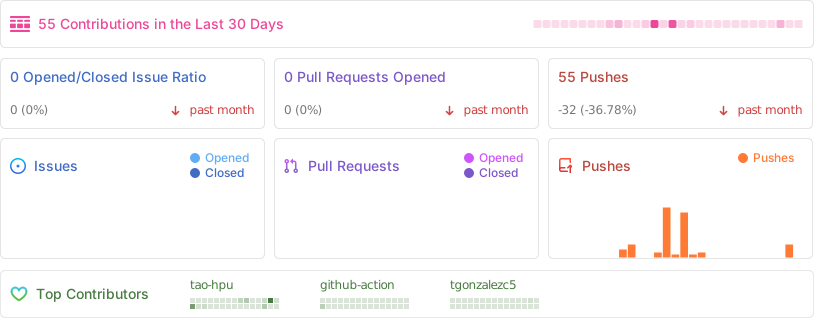
Activity
Contributors
Thanks to these wonderful people (emoji key):
This project follows the all-contributors specification. Contributions of any kind welcome!
License
FIM One Source Available License. This is not an OSI-approved open source license.
Permitted: internal use, modification, distribution with license intact, embedding in non-competing applications.
Restricted: multi-tenant SaaS, competing agent platforms, white-labeling, removing branding.
For commercial licensing inquiries, please open an issue on GitHub.
See LICENSE for full terms.
🌐 Website · 📖 Docs · 📋 Changelog · 🐛 Report Bug · 💬 Discord · 🐦 Twitter · 🏆 Product Hunt
README copy captured when this server was indexed; it may lag the repository. The original is authoritative.