About Flompt
Flompt is an MCP server in the Browser category: flow + prompt = flompt - Visual AI Prompt Builder. Decompose, edit as flowchart, recompile into optimized machine-readable prompts.
Install
git clone https://github.com/Nyrok/flomptThis server has no ConduID identity, so agent calls to it are not receipted. Pin the version you install and review the source before granting it credentials.
Ask AI
Ask AI about Flompt
Powered by Claude · Grounded in docs
Security checks
- ✓README presentThe repository ships documentation.
5 checks have not been run yet.
README
🎥 Demo
Try it live at flompt.dev, free, no account needed.
Paste any prompt. The AI breaks it into typed blocks. Drag, reorder, compile to Claude-optimized XML.
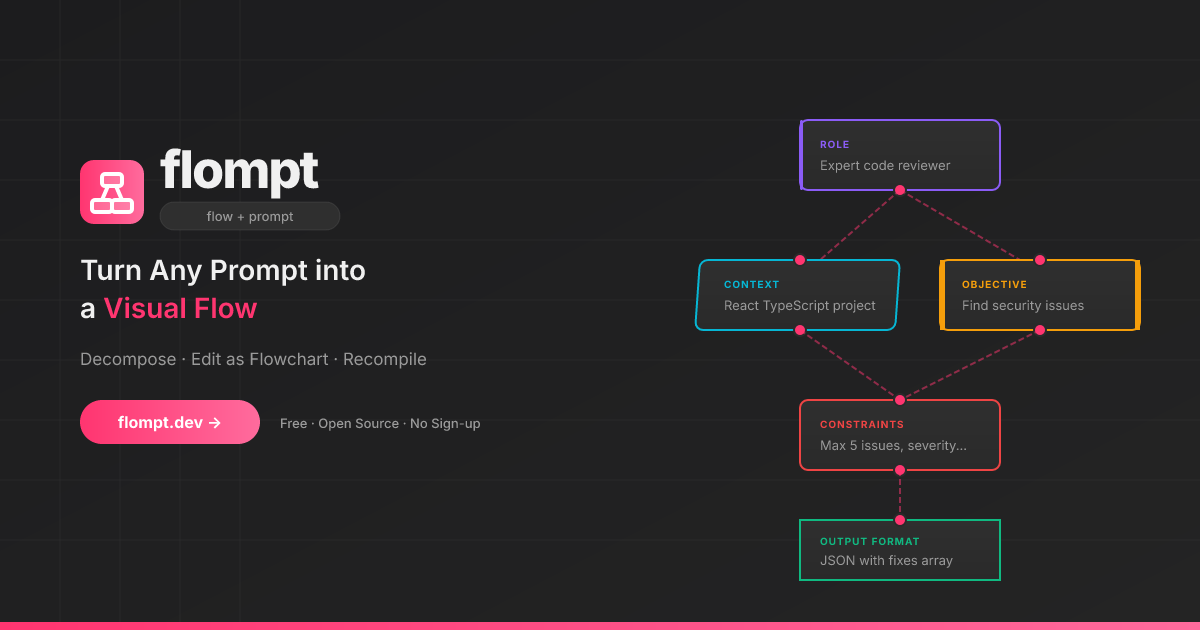
✨ What is flompt?
flompt is a visual prompt engineering tool.
Instead of writing one long block of text, flompt lets you:
- Paste any prompt and let the AI break it into structured blocks
- Drag, connect, and reorder blocks in a flowchart editor
- Compile to a Claude-optimized, machine-ready XML prompt
🧩 Block Types
16 specialized blocks that map directly to Claude's prompt engineering best practices:
| Block | Purpose | Claude XML |
|---|---|---|
| Document | External content grounding | <documents><document> |
| Role | AI persona & expertise | <role> |
| Tools | Callable functions the agent can use | <tools> |
| Audience | Who the output is written for | <audience> |
| Context | Background information | <context> |
| Environment | System context: OS, paths, date, runtime | <environment> |
| Objective | What to DO | <objective> |
| Goal | End goal & success criteria | <goal> |
| Input | Data you're providing | <input> |
| Constraints | Rules & limitations | <constraints> |
| Guardrails | Hard limits and safety refusals | <guardrails> |
| Examples | Few-shot demonstrations | <examples><example> |
| Chain of Thought | Step-by-step reasoning | <thinking> |
| Output Format | Expected output structure | <output_format> |
| Response Style | Verbosity, tone, prose, markdown (structured UI) | <format_instructions> |
| Language | Response language | <language> |
Blocks are automatically ordered following Anthropic's recommended prompt structure.
🚀 Try It Now
flompt.dev, free and open-source, no account needed.
🧩 Browser Extension
Use flompt directly inside ChatGPT, Claude, and Gemini without leaving your tab.
- Injects an Enhance button into the AI chat input
- Bidirectional sync between the sidebar and the chat
- Works on ChatGPT, Claude, and Gemini
🤖 Claude Code Integration (MCP)
flompt exposes its core capabilities as native tools inside Claude Code via the Model Context Protocol (MCP).
Once configured, you can call decompose_prompt, compile_prompt, and list_block_types directly from any Claude Code conversation, no browser, no copy-paste.
Installation
Option 1: CLI (recommended)
claude mcp add --transport http --scope user flompt https://flompt.dev/mcp/
The --scope user flag makes flompt available in all your Claude Code projects.
Option 2: ~/.claude.json
{
  "mcpServers": {
    "flompt": {
      "type": "http",
      "url": "https://flompt.dev/mcp/"
    }
  }
}
Available Tools
Once connected, 3 tools are available in Claude Code:
decompose_prompt(prompt: str)
Breaks down a raw prompt into structured blocks (role, objective, context, constraints, etc.).
- Uses Claude or GPT on the server if an API key is configured
- Falls back to keyword-based heuristic analysis otherwise
- Returns a list of typed blocks + full JSON to pass to
compile_prompt
Input:  "You are a Python expert. Write a function that parses JSON and handles errors."
Output: ✅ 3 blocks extracted:
          [ROLE] You are a Python expert.
          [OBJECTIVE] Write a function that parses JSON…
          [CONSTRAINTS] handles errors
        📋 Full blocks JSON: [{"id": "...", "type": "role", ...}, ...]
compile_prompt(blocks_json: str)
Compiles a list of blocks into a Claude-optimized XML prompt.
- Takes the JSON from
decompose_prompt(or manually crafted blocks) - Reorders blocks following Anthropic's recommended structure
- Returns the final XML prompt with an estimated token count
Input:  [{"type": "role", "content": "You are a Python expert", ...}, ...]
Output: ✅ Prompt compiled (142 estimated tokens):

        <role>You are a Python expert.</role>
        <objective>Write a function that parses JSON and handles errors.</objective>
list_block_types()
Lists all 16 available block types with descriptions and the recommended canonical ordering. Useful when manually crafting blocks.
Typical Workflow
1. decompose_prompt("your raw prompt here")
   → get structured blocks as JSON

2. (optionally edit the JSON to add/remove/modify blocks)

3. compile_prompt("<json from step 1>")
   → get Claude-optimized XML prompt, ready to use
Technical Details
| Property | Value |
|---|---|
| Transport | Streamable HTTP (POST) |
| Endpoint | https://flompt.dev/mcp/ |
| Session | Stateless (each call is independent) |
| Auth | None required |
| DNS rebinding protection | Enabled (flompt.dev explicitly allowed) |
🛠️ Self-Hosting (Local Dev)
Requirements
- Python 3.12+
- Node.js 18+
- An Anthropic or OpenAI API key (optional, heuristic fallback works without one)
Setup
Backend:
cd backend
python -m venv .venv && source .venv/bin/activate
pip install -r requirements.txt
cp .env.example .env   # add your API key
uvicorn app.main:app --reload --port 8000
App (Frontend):
cd app
cp .env.example .env   # optional: add PostHog key
npm install
npm run dev
Blog:
cd blog
npm install
npm run dev   # available at http://localhost:3000/blog
| Service | URL |
|---|---|
| App | http://localhost:5173 |
| Backend API | http://localhost:8000 |
| API Docs (Swagger) | http://localhost:8000/docs |
| MCP endpoint | http://localhost:8000/mcp/ |
⚙️ AI Configuration
flompt supports multiple AI providers. Copy backend/.env.example to backend/.env:
# Anthropic (recommended)
ANTHROPIC_API_KEY=sk-ant-...
AI_PROVIDER=anthropic
AI_MODEL=claude-3-5-haiku-20241022

# or OpenAI
OPENAI_API_KEY=sk-...
AI_PROVIDER=openai
AI_MODEL=gpt-4o-mini
Without an API key, flompt uses a keyword-based heuristic decomposer and still compiles structured XML.
🚢 Production Deployment
This section documents the exact production setup running at flompt.dev. Everything lives in /projects/flompt.
Architecture
Internet
   │
   ▼
Caddy (auto-TLS, reverse proxy)    ← port 443/80
   ├── /app*         → Vite SPA static files (app/dist/)
   ├── /blog*        → Next.js static export (blog/out/)
   ├── /api/*        → FastAPI backend (localhost:8000)
   ├── /mcp/*        → FastAPI MCP server (localhost:8000, no buffering)
   ├── /docs*        → Reverse proxy to GitBook
   └── /             → Static landing page (landing/)
         ↓
   FastAPI (uvicorn, port 8000)
         ↓
   Anthropic / OpenAI API
Both Caddy and the FastAPI backend are managed by supervisord, itself watched by a keepalive loop.
1. Prerequisites
# Python 3.12+ with pip
python --version

# Node.js 18+
node --version

# Caddy binary placed at /projects/flompt/caddy
# (not committed to git, download from https://caddyserver.com/download)
curl -o caddy "https://caddyserver.com/api/download?os=linux&arch=amd64"
chmod +x caddy

# supervisor installed in a Python virtualenv
pip install supervisor
2. Environment Variables
Backend (backend/.env):
ANTHROPIC_API_KEY=sk-ant-...       # or OPENAI_API_KEY
AI_PROVIDER=anthropic              # or: openai
AI_MODEL=claude-3-5-haiku-20241022 # model to use for decompose/compile
App frontend (app/.env):
VITE_POSTHOG_KEY=phc_...           # optional analytics
VITE_POSTHOG_HOST=https://eu.i.posthog.com
Blog (blog/.env.local):
NEXT_PUBLIC_POSTHOG_KEY=phc_...
NEXT_PUBLIC_POSTHOG_HOST=https://eu.i.posthog.com
3. Build
All assets must be built before starting services. Use the deploy script or manually:
Full deploy (build + restart + health check):
cd /projects/flompt
./deploy.sh
Build only (no service restart):
./deploy.sh --build-only
Restart only (no rebuild):
./deploy.sh --restart-only
Manual build steps:
# 1. Vite SPA → app/dist/
cd /projects/flompt/app
npm run build
# Output: app/dist/ (pre-compressed with gzip, served by Caddy)

# 2. Next.js blog → blog/out/
cd /projects/flompt/blog
rm -rf .next out   # clear cache to avoid stale builds
npm run build
# Output: blog/out/ (full static export, no Node server needed)
4. Process Management
Production processes are managed by supervisord (supervisord.conf):
| Program | Command | Port | Log |
|---|---|---|---|
flompt-backend |
uvicorn app.main:app --host 0.0.0.0 --port 8000 |
8000 | /tmp/flompt-backend.log |
flompt-caddy |
caddy run --config /projects/flompt/Caddyfile |
443/80 | /tmp/flompt-caddy.log |
Both programs have autorestart=true and startretries=5, they automatically restart on crash.
Start supervisord (first boot or after a full restart):
supervisord -c /projects/flompt/supervisord.conf
Common supervisorctl commands:
# Check status of all programs
supervisorctl -c /projects/flompt/supervisord.conf status

# Restart backend only (e.g. after a code change)
supervisorctl -c /projects/flompt/supervisord.conf restart flompt-backend

# Restart Caddy only (e.g. after a Caddyfile change)
supervisorctl -c /projects/flompt/supervisord.conf restart flompt-caddy

# Restart everything
supervisorctl -c /projects/flompt/supervisord.conf restart all

# Stop everything
supervisorctl -c /projects/flompt/supervisord.conf stop all

# Read real-time logs
tail -f /tmp/flompt-backend.log
tail -f /tmp/flompt-caddy.log
tail -f /tmp/flompt-supervisord.log
5. Keepalive Watchdog
keepalive.sh is an infinite bash loop (running as a background process) that:
- Checks every 30 seconds whether supervisord is alive
- If supervisord is down, kills any zombie process occupying port 8000 (via inode lookup in
/proc/net/tcp) - Restarts supervisord
- Logs all events to
/tmp/flompt-keepalive.log
Start keepalive (should be running at all times):
nohup /projects/flompt/keepalive.sh >> /tmp/flompt-keepalive.log 2>&1 &
echo $!   # note the PID
Check if keepalive is running:
ps aux | grep keepalive.sh
tail -f /tmp/flompt-keepalive.log
Note:
keepalive.shuses the same Python virtualenv path as supervisord. If you reinstall supervisor in a different venv, updateSUPERVISORDandSUPERVISORCTLpaths at the top ofkeepalive.sh.
6. Caddy Configuration
Caddyfile handles all routing for flompt.dev. Key rules (in priority order):
/blog*      → Static Next.js export at blog/out/
/api/*      → FastAPI backend at localhost:8000
/health     → FastAPI health check
/mcp/*      → FastAPI MCP server (flush_interval -1 for streaming)
/mcp        → 308 redirect to /mcp/ (avoids upstream 307 issues)
/docs*      → Reverse proxy to GitBook (external)
/app*       → Vite SPA at app/dist/ (gzip precompressed)
/           → Static landing page at landing/
Reload Caddy after a Caddyfile change:
supervisorctl -c /projects/flompt/supervisord.conf restart flompt-caddy
# or directly:
/projects/flompt/caddy reload --config /projects/flompt/Caddyfile
Caddy auto-manages TLS certificates via Let's Encrypt, no manual SSL setup needed.
7. Health Checks
The deploy script runs these checks automatically. You can run them manually:
# Backend API
curl -s https://flompt.dev/health
# → {"status":"ok","service":"flompt-api"}

# Landing page
curl -s -o /dev/null -w "%{http_code}" https://flompt.dev/
# → 200

# Vite SPA
curl -s -o /dev/null -w "%{http_code}" https://flompt.dev/app
# → 200

# Blog
curl -s -o /dev/null -w "%{http_code}" https://flompt.dev/blog/en
# → 200

# MCP endpoint (requires Accept header)
curl -s -o /dev/null -w "%{http_code}" \
  -X POST https://flompt.dev/mcp/ \
  -H "Content-Type: application/json" \
  -H "Accept: application/json, text/event-stream" \
  -d '{"jsonrpc":"2.0","method":"tools/list","id":1}'
# → 200
8. Updating the App
After a backend code change:
cd /projects/flompt
git pull
supervisorctl -c supervisord.conf restart flompt-backend
After a frontend change:
cd /projects/flompt
git pull
cd app && npm run build
# No service restart needed, Caddy serves static files directly
After a blog change:
cd /projects/flompt
git pull
cd blog && rm -rf .next out && npm run build
# No service restart needed
After a Caddyfile change:
supervisorctl -c /projects/flompt/supervisord.conf restart flompt-caddy
Full redeploy from scratch:
cd /projects/flompt && ./deploy.sh
9. Log Files Reference
| File | Content |
|---|---|
/tmp/flompt-backend.log |
FastAPI/uvicorn stdout + stderr |
/tmp/flompt-caddy.log |
Caddy access + error logs |
/tmp/flompt-supervisord.log |
supervisord daemon logs |
/tmp/flompt-keepalive.log |
keepalive watchdog events |
🏗️ Tech Stack
| Layer | Technology |
|---|---|
| Frontend | React 18, TypeScript, React Flow v11, Zustand, Vite |
| Backend | FastAPI, Python 3.12, Uvicorn |
| MCP Server | FastMCP (streamable HTTP transport) |
| AI | Anthropic Claude / OpenAI GPT (pluggable) |
| Reverse Proxy | Caddy (auto-TLS via Let's Encrypt) |
| Process Manager | Supervisord + keepalive watchdog |
| Blog | Next.js 15 (static export), Tailwind CSS |
| Extension | Chrome & Firefox MV3 (content script + sidebar) |
| i18n | 10 languages: EN FR ES DE PT JA TR ZH AR RU |
🌍 Features
- 🎨 Visual flowchart editor with drag-and-drop blocks (React Flow)
- 📋 Dual-view editor: toggle between canvas and card list at any time
- 👁️ Hide/show any block; hidden blocks are excluded from the assembled prompt
- 📑 Duplicate any block in one click from the List View
- 🤖 AI-powered decomposition: paste a prompt, get structured blocks
- 🔄 Async job queue for non-blocking decomposition with live progress
- 🦾 XML output structured following Anthropic best practices
- 🧩 Browser extension for ChatGPT, Claude, and Gemini (Chrome + Firefox)
- 🔌 Claude Code MCP: native tool integration via Model Context Protocol
- 📱 Responsive with full touch support
- 🌙 Dark theme
- 🌐 10 languages: EN, FR, ES, DE, PT, JA, TR, ZH, AR, RU, each with a dedicated indexed page for SEO
- 💾 Auto-save via local Zustand persistence
- ⌨️ Keyboard shortcuts
- 📋 Export as TXT or JSON
- 🔓 MIT licensed, self-hostable
🤝 Contributing
Contributions are welcome: bug reports, features, translations, and docs!
Read CONTRIBUTING.md to get started. The full changelog is in CHANGELOG.md.
📄 License
README copy captured when this server was indexed; it may lag the repository. The original is authoritative.