About Friday Tony Stark Demo
Friday Tony Stark Demo is an MCP server in the Files category: a Tony Stark-inspired AI voice assistant built with LiveKit and Python.
Install
git clone https://github.com/SAGAR-TAMANG/friday-tony-stark-demoThis server has no ConduID identity, so agent calls to it are not receipted. Pin the version you install and review the source before granting it credentials.
Ask AI
Ask AI about Friday Tony Stark Demo
Powered by Claude · Grounded in docs
Security checks
- ✓README presentThe repository ships documentation.
5 checks have not been run yet.
README
F.R.I.D.A.Y. — Tony Stark Demo
"Fully Responsive Intelligent Digital Assistant for You"
A Tony Stark-inspired AI assistant split into two cooperating pieces:
| Component | What it is |
|---|---|
MCP Server (uv run friday) |
A FastMCP server that exposes tools (news, web search, system info, …) over SSE. Think of it as the Stark Industries backend — it does the actual work. |
Voice Agent (uv run friday_voice) |
A LiveKit Agents voice pipeline that listens to your microphone, reasons with an LLM (Gemini 2.5 Flash by default), and speaks back with OpenAI TTS — all while pulling tools from the MCP server in real time. |
Demo: Instagram reel
How it works
Microphone ──► STT (Sarvam Saaras v3)
                    │
                    ▼
             LLM (Gemini 2.5 Flash)  ◄──────► MCP Server (FastMCP / SSE)
                    │                              ├─ get_world_news
                    ▼                              ├─ open_world_monitor
             TTS (OpenAI nova)                     ├─ search_web
                    │                              └─ …more tools
                    ▼
             Speaker / LiveKit room
The voice agent connects to the MCP server via SSE at http://127.0.0.1:8000/sse (auto-resolved to the Windows host IP when running inside WSL).
Project structure
friday-tony-stark-demo/
├── server.py           # uv run friday  → starts the MCP server (SSE on :8000)
├── agent_friday.py     # uv run friday_voice → starts the LiveKit voice agent
├── pyproject.toml
├── .env.example        # copy → .env and fill in your keys
│
└── friday/             # MCP server package
    ├── config.py       # env-var loading & app-wide settings
    ├── tools/          # MCP tools (callable by the LLM)
    │   ├── web.py      # search_web, fetch_url, get_world_news, open_world_monitor
    │   ├── system.py   # get_current_time, get_system_info
    │   └── utils.py    # format_json, word_count
    ├── prompts/        # MCP prompt templates (summarize, explain_code, …)
    └── resources/      # MCP resources exposed to clients (friday://info)
Quick start
1. Prerequisites
- Python ≥ 3.11
uv—pip install uvorcurl -Lsf https://astral.sh/uv/install.sh | sh- A LiveKit Cloud project (free tier works)
2. Clone & install
git clone https://github.com/SAGAR-TAMANG/friday-tony-stark-demo.git
cd friday-tony-stark-demo
uv sync          # creates .venv and installs all dependencies
3. Set up environment
cp .env.example .env
# Open .env and fill in your API keys (see the section below)
4. Run — two terminals
Terminal 1 — MCP server (must start first)
uv run friday
Starts the FastMCP server on http://127.0.0.1:8000/sse. The voice agent connects here to fetch its tools.
Terminal 2 — Voice agent
uv run friday_voice
Starts the LiveKit voice agent in dev mode — it joins a LiveKit room and begins listening. Open the LiveKit Agents Playground and connect to your room to talk to FRIDAY.
uv run friday vs uv run friday_voice
| Command | Entry point | What it does |
|---|---|---|
uv run friday |
server.py → main() |
Launches the FastMCP server over SSE transport on port 8000. This is the "brain backend" — it registers all tools, prompts, and resources that the LLM can call. |
uv run friday_voice |
agent_friday.py → dev() |
Launches the LiveKit voice agent. It builds the STT / LLM / TTS pipeline, connects to your LiveKit room, and wires up the MCP server as a tool source. The dev() wrapper auto-injects the dev CLI flag so you don't have to type it manually. |
Both processes must run simultaneously. The voice agent calls the MCP server in real time whenever it needs a tool (e.g. fetching news).
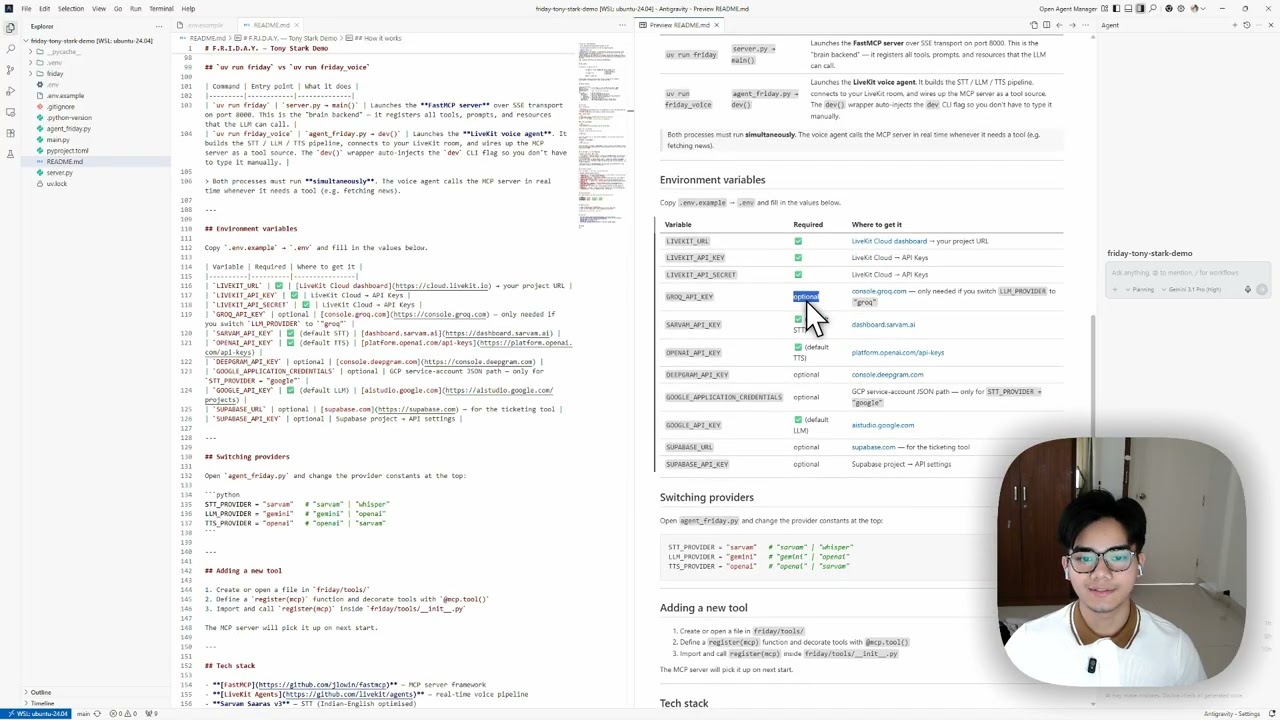
Environment variables
Copy .env.example → .env and fill in the values below.
| Variable | Required | Where to get it |
|---|---|---|
LIVEKIT_URL |
✅ | LiveKit Cloud dashboard → your project URL |
LIVEKIT_API_KEY |
✅ | LiveKit Cloud → API Keys |
LIVEKIT_API_SECRET |
✅ | LiveKit Cloud → API Keys |
GROQ_API_KEY |
optional | console.groq.com — only needed if you switch LLM_PROVIDER to "groq" |
SARVAM_API_KEY |
✅ (default STT) | dashboard.sarvam.ai |
OPENAI_API_KEY |
✅ (default TTS) | platform.openai.com/api-keys |
DEEPGRAM_API_KEY |
optional | console.deepgram.com |
GOOGLE_APPLICATION_CREDENTIALS |
optional | GCP service-account JSON path — only for STT_PROVIDER = "google" |
GOOGLE_API_KEY |
✅ (default LLM) | aistudio.google.com |
SUPABASE_URL |
optional | supabase.com — for the ticketing tool |
SUPABASE_API_KEY |
optional | Supabase project → API settings |
Switching providers
Open agent_friday.py and change the provider constants at the top:
STT_PROVIDER = "sarvam"   # "sarvam" | "whisper"
LLM_PROVIDER = "gemini"   # "gemini" | "openai"
TTS_PROVIDER = "openai"   # "openai" | "sarvam"
Adding a new tool
- Create or open a file in
friday/tools/ - Define a
register(mcp)function and decorate tools with@mcp.tool() - Import and call
register(mcp)insidefriday/tools/__init__.py
The MCP server will pick it up on next start.
Tech stack
- FastMCP — MCP server framework
- LiveKit Agents — real-time voice pipeline
- Sarvam Saaras v3 — STT (Indian-English optimised)
- Google Gemini 2.5 Flash — LLM
- OpenAI TTS (
novavoice) — TTS - uv — fast Python package manager
License
MIT
README copy captured when this server was indexed; it may lag the repository. The original is authoritative.