About Gptme
Gptme is an MCP server in the RAG category: your agent in your terminal, equipped with local tools: writes code, uses the terminal, browses the web. Make your own persistent autonomous agent on top!.
Install
git clone https://github.com/gptme/gptmeThis server has no ConduID identity, so agent calls to it are not receipted. Pin the version you install and review the source before granting it credentials.
Tools (12)
browserSearch and navigate the web via Playwright
Parameters not published.
chatsReference and search past conversations
Parameters not published.
computerFull desktop access for GUI interactions
Parameters not published.
ghInteract with GitHub via the GitHub CLI
Parameters not published.
ipythonRun Python code with access to your installed libraries
Parameters not published.
ragRetrieve context from local files (Retrieval Augmented Generation)
Parameters not published.
readRead files and directories
Parameters not published.
screenshotCapture screenshots of your desktop
Parameters not published.
shellExecute shell commands directly in your terminal
Parameters not published.
subagentSpawn sub-agents for parallel or isolated tasks
Parameters not published.
tmuxRun long-lived commands in persistent terminal sessions
Parameters not published.
visionProcess and analyze images
Parameters not published.
Ask AI
Ask AI about Gptme
Powered by Claude · Grounded in docs
Security checks
- ✓README presentThe repository ships documentation.
5 checks have not been run yet.
README
📚 Table of Contents
📢 News
- Coming soon - gptme.ai service for running agents in the cloud; gptme desktop app for easy local use.
- 2026-01 - gptme-agent-template v0.4: Bob reaches 1700+ autonomous sessions, autonomous run loops, enhanced context generation
- 2025-12 - v0.31.0: Background jobs, form tool, cost tracking, content-addressable storage
- 2025-11 - v0.30.0: Plugin system, context compression, subagent planner mode
- 2025-10 - v0.29.0: Lessons system for contextual guidance, MCP discovery & dynamic loading, token awareness; Bob begins autonomous runs with GitHub monitoring
- 2025-08 - v0.28.0: MCP support, morph tool for fast edits, auto-commit, redesigned server API
- 2025-03 - v0.27.0: Pre-commit integration, macOS computer use, Claude 3.7 Sonnet, DeepSeek R1, local TTS with Kokoro
- 2025-01 - gptme-contrib created: community plugins including Twitter/X, Discord bot, email tools, consortium (multi-agent)
- 2024-12 - gptme-agent-template v0.3: Template for persistent agents
- 2024-11 - Ecosystem expansion: gptme-webui, gptme-rag, gptme.vim, Bob created (first autonomous agent)
- 2024-10 - First viral tweet bringing widespread attention
- 2024-08 - Show HN, Anthropic Claude support, tmux tool
- 2023-09 - Initial public release on HN, Reddit, Twitter
- 2023-03 - Initial commit - one of the first agent CLIs
For more history, see the Timeline and Changelog.
🎥 Demos
[!NOTE] The screencasts below are from 2023. gptme has evolved a lot since then! For up-to-date examples and screenshots, see the Documentation. We're working on automated demo generation: #1554.
You can find more Demos and Examples in the documentation.
🌟 Features
- 💻 Code execution
- 🧩 Read, write, and change files
- Makes incremental changes with the patch tool.
- 🌐 Search and browse the web
- Can use a browser via Playwright with the browser tool.
- 👀 Vision
- Can see images referenced in prompts, screenshots of your desktop, and web pages.
- 🔄 Self-correcting
- Output is fed back to the assistant, allowing it to respond and self-correct.
- 📚 Lessons system
- Contextual guidance and best practices automatically included when relevant.
- Keyword, tool, and pattern-based matching.
- Adapts to interactive vs autonomous modes.
- Extend with your own lessons and skills.
- 🤖 Support for many LLM providers
- Anthropic (Claude), OpenAI (GPT), Google (Gemini), xAI (Grok), DeepSeek, and more.
- Use OpenRouter for access to 100+ models, or serve locally with
llama.cpp.
- 🌐 Web UI and REST API
- Modern web interface at chat.gptme.org (gptme-webui)
- Simple built-in web UI included in the Python package.
- Server with REST API.
- Standalone executable builds available with PyInstaller.
- 💻 Computer use (see #216)
- Give the assistant access to a full desktop, allowing it to interact with GUI applications.
- 🔊 Tool sounds — pleasant notification sounds for different tool operations.
- Enable with
GPTME_TOOL_SOUNDS=true.
- Enable with
🛠 Tools
gptme equips the AI with a rich set of built-in tools:
| Tool | Description |
|---|---|
shell |
Execute shell commands directly in your terminal |
ipython |
Run Python code with access to your installed libraries |
read |
Read files and directories |
save / append |
Create or update files |
patch / morph |
Make incremental edits to existing files |
browser |
Search and navigate the web via Playwright |
vision |
Process and analyze images |
screenshot |
Capture screenshots of your desktop |
rag |
Retrieve context from local files (Retrieval Augmented Generation) |
gh |
Interact with GitHub via the GitHub CLI |
tmux |
Run long-lived commands in persistent terminal sessions |
computer |
Full desktop access for GUI interactions |
subagent |
Spawn sub-agents for parallel or isolated tasks |
chats |
Reference and search past conversations |
Use /tools during a conversation to see all available tools and their status.
🔌 Extensibility: Plugins, Skills & Lessons
gptme has a layered extensibility system that lets you tailor it to your workflow:
Plugins — extend gptme with custom tools, hooks, and commands via Python packages:
# gptme.toml
[plugins]
paths = ["~/.config/gptme/plugins", "./plugins"]
enabled = ["my_plugin"]
Skills — lightweight workflow bundles (Anthropic format) that auto-load when mentioned by name. Great for packaging reusable instructions and helper scripts without writing Python.
Lessons — contextual guidance that auto-injects into conversations based on keywords, tools, and patterns. Write your own to capture team best-practices or domain knowledge.
Hooks — run custom code at key lifecycle events (before/after tool calls, on conversation start, etc.) without a full plugin.
gptme-contrib — community-contributed plugins, packages, scripts, and lessons:
| Plugin | Description |
|---|---|
| gptme-consortium | Multi-model consensus decision-making |
| gptme-imagen | Multi-provider image generation |
| gptme-lsp | Language Server Protocol integration |
| gptme-ace | ACE-inspired context optimization |
| gptme-gupp | Work state persistence across sessions |
🔗 Integrations: MCP & ACP
MCP (Model Context Protocol) — use any MCP server as a tool source:
pipx install gptme # MCP support included by default
gptme can discover and dynamically load MCP servers, giving the agent access to databases, APIs, file systems, and any other MCP-compatible tool. See the MCP docs for server configuration.
ACP (Agent Client Protocol) — use gptme as a coding agent directly from your editor:
pipx install 'gptme[acp]'
This makes gptme available as a drop-in coding agent in Zed and JetBrains IDEs. Your editor sends requests, gptme executes with its full toolset (shell, browser, files, etc.) and streams results back.
🤖 Autonomous Agents
gptme is designed to run not just interactively but as a persistent autonomous agent — an AI that runs continuously, remembers everything, and gets better over time. The gptme-agent-template provides a complete scaffold:
- Persistent workspace — git-tracked "brain" with journal, tasks, knowledge base, and lessons
- Run loops — scheduled (systemd/launchd) or event-driven autonomous operation
- Task management — structured task queue with YAML metadata and GTD-style workflows
- Meta-learning — lessons system captures behavioral patterns and improves over time
- Multi-agent coordination — file leases, message bus, and work claiming for concurrent agents
- External integrations — GitHub, email, Discord, Twitter, RSS, and more
# Create and run your own agent
gptme-agent create ~/my-agent --name MyAgent
gptme-agent install   # runs on a schedule
gptme-agent status    # check on it
Bob is the reference implementation — a production autonomous agent that's been running continuously since late 2024. Bob opens PRs, reviews code, fixes CI, manages his own task queue, maintains a growing set of behavioral lessons, posts on Twitter, responds on Discord, and writes blog posts.
Multiple specialized agents can run in parallel — e.g. Bob (engineering) and Alice (personal assistant & orchestration) — coordinating through shared infrastructure.
See the Autonomous Agents docs for the full guide.
🛡 Guardrails
Persistent agents need guardrails around the full loop, not just tool permissions:
- Input guardrails — structured task selectors in the agent workspace keep work focused and reduce thrashing on notifications or ambiguous work. Bob uses a CASCADE-style selector for this layer.
- Pre-action guardrails — lessons inject situational guidance before the agent acts.
- Output guardrails — hooks and pre-commit checks validate file changes before control returns to the user.
This stack is simple and composable: selectors improve work choice, lessons steer behavior, and checks verify the result. You can add evals on top later, but the baseline guardrail loop already exists.
🛠 Use Cases
- 🖥 Development: Write and run code faster with AI assistance.
- 🎯 Shell Expert: Get the right command using natural language (no more memorizing flags!).
- 📊 Data Analysis: Process and analyze data directly in your terminal.
- 🎓 Interactive Learning: Experiment with new technologies or codebases hands-on.
- 🤖 Agents & Tools: Build long-running autonomous agents for real work.
- 🔬 Research: Automate literature review, data collection, and analysis pipelines.
🛠 Developer Perks
- ⭐ One of the first agent CLIs created (Spring 2023) that is still in active development.
- 🧰 Easy to extend
- 🧪 Extensive testing, high coverage.
- 🧹 Clean codebase, checked and formatted with
mypy,ruff, andpyupgrade. - 🤖 GitHub Bot to request changes from comments! (see #16)
- Operates in this repo! (see #18 for example)
- Runs entirely in GitHub Actions.
- 📊 Evaluation suite for testing capabilities of different models.
- 📝 gptme.vim for easy integration with vim.
🚧 In Progress
- 🖥 gptme-tauri — desktop app wrapping gptme for easy local use (WIP)
- ☁️ gptme.ai — managed cloud service for running gptme agents (WIP; still self-hostable by running
gptme-server+gptme-webuiyourself) - 🌳 Tree-based conversation structure (see #17)
- 📜 RAG to automatically include context from local files (see #59)
- 🏆 Advanced evals for testing frontier capabilities
🚀 Getting Started
Prerequisites
- Python 3.10 or newer
- An API key for at least one LLM provider:
- Anthropic (set
ANTHROPIC_API_KEY) - OpenAI (set
OPENAI_API_KEY) - OpenRouter (set
OPENROUTER_API_KEY) - Local models via
llama.cpp(no key required — see providers docs)
- Anthropic (set
Installation
For full setup instructions, see the Getting Started guide.
# With pipx (recommended, requires Python 3.10+)
pipx install gptme

# With uv
uv tool install gptme

# With optional extras
pipx install 'gptme[browser]'  # Playwright for web browsing
pipx install 'gptme[all]'      # Everything

# Latest from git with all extras
uv tool install 'git+https://github.com/gptme/gptme.git[all]'
Quick Start
gptme
You'll be greeted with a prompt. Type your request and gptme will respond, using tools as needed.
Example Commands
# Create a particle effect visualization
gptme 'write an impressive and colorful particle effect using three.js to particles.html'

# Generate visual art
gptme 'render mandelbrot set to mandelbrot.png'

# Get configuration suggestions
gptme 'suggest improvements to my vimrc'

# Process media files
gptme 'convert to h265 and adjust the volume' video.mp4

# Code assistance from git diffs
git diff | gptme 'complete the TODOs in this diff'

# Fix failing tests
make test | gptme 'fix the failing tests'

# Auto-approve tool confirmations (user can still watch and interrupt)
gptme -y 'run the test suite and fix any failing tests'

# Fully non-interactive/autonomous mode (no user interaction possible, safe for scripts/CI)
gptme -n 'run the test suite and fix any failing tests'
For more, see the Getting Started guide and the Examples in the documentation.
⚙️ Configuration
Create ~/.config/gptme/config.toml:
[user]
name = "User"
about = "I am a curious human programmer."
response_preference = "Don't explain basic concepts"

[prompt]
# Additional files to always include as context
# files = ["~/notes/llm-tips.md"]

[env]
# Set your default model
# MODEL = "anthropic/claude-sonnet-4-20250514"
# MODEL = "openai/gpt-4o"
For all options, see the configuration docs.
🛠 Usage
$ gptme --help
Usage: gptme [OPTIONS] [PROMPTS]...

  gptme is a chat-CLI for LLMs, empowering them with tools to run shell
  commands, execute code, read and manipulate files, and more.

  If PROMPTS are provided, a new conversation will be started with it. PROMPTS
  can be chained with the '-' separator.

  The interface provides user commands that can be used to interact with the
  system.

  Available commands:
    /undo         Undo the last action
    /log          Show the conversation log
    /edit         Edit the conversation in your editor
    /rename       Rename the conversation
    /fork         Create a copy of the conversation
    /summarize    Summarize the conversation
    /replay       Replay tool operations
    /export       Export conversation as HTML
    /model        Show or switch the current model
    /models       List available models
    /tokens       Show token usage and costs
    /context      Show context token breakdown
    /tools        Show available tools
    /commit       Ask assistant to git commit
    /compact      Compact the conversation
    /impersonate  Impersonate the assistant
    /restart      Restart gptme process
    /setup        Setup gptme
    /help         Show this help message
    /exit         Exit the program

  See docs for all commands: https://gptme.org/docs/commands.html

  Keyboard shortcuts:
    Ctrl+X Ctrl+E  Edit prompt in your editor
    Ctrl+J         Insert a new line without executing the prompt

Options:
  --name TEXT            Name of conversation. Defaults to generating a random
                         name.
  -m, --model TEXT       Model to use, e.g. openai/gpt-5, anthropic/claude-
                         sonnet-4-20250514. If only provider given then a
                         default is used.
  -w, --workspace TEXT   Path to workspace directory. Pass '@log' to create a
                         workspace in the log directory.
  --agent-path TEXT      Path to agent workspace directory.
  -r, --resume           Load most recent conversation.
  -y, --no-confirm       Skip all confirmation prompts.
  -n, --non-interactive  Non-interactive mode. Implies --no-confirm.
  --system TEXT          System prompt. Options: 'full', 'short', or something
                         custom.
  -t, --tools TEXT       Tools to allow as comma-separated list. Available:
                         append, browser, chats, choice, computer, gh,
                         ipython, morph, patch, rag, read, save, screenshot,
                         shell, subagent, tmux, vision.
  --tool-format TEXT     Tool format to use. Options: markdown, xml, tool
  --no-stream            Don't stream responses
  --show-hidden          Show hidden system messages.
  -v, --verbose          Show verbose output.
  --version              Show version and configuration information
  --help                 Show this message and exit.
🌍 Ecosystem
gptme is more than a CLI — it's a platform with a growing ecosystem:
| Project | Description |
|---|---|
| gptme-webui | Modern React web interface, available at chat.gptme.org |
| gptme-contrib | Community plugins, packages, scripts, and lessons |
| gptme-agent-template | Template for building persistent autonomous agents |
| gptme-rag | RAG integration for semantic search over local files |
| gptme.vim | Vim plugin for in-editor gptme integration |
| gptme-tauri | Desktop app (WIP) |
| gptme.ai | Managed cloud service (WIP) |
Community agents powered by gptme:
- Bob — autonomous AI agent, running continuously since late 2024, contributes to open source and manages his own tasks
- Alice — personal assistant & agent orchestrator, forked from the same architecture
💬 Community
- Discord — ask questions, share what you've built, discuss features
- GitHub Discussions — longer-form conversation and ideas
- X/Twitter — updates and announcements
Contributions welcome! See the contributing guide.
📊 Stats
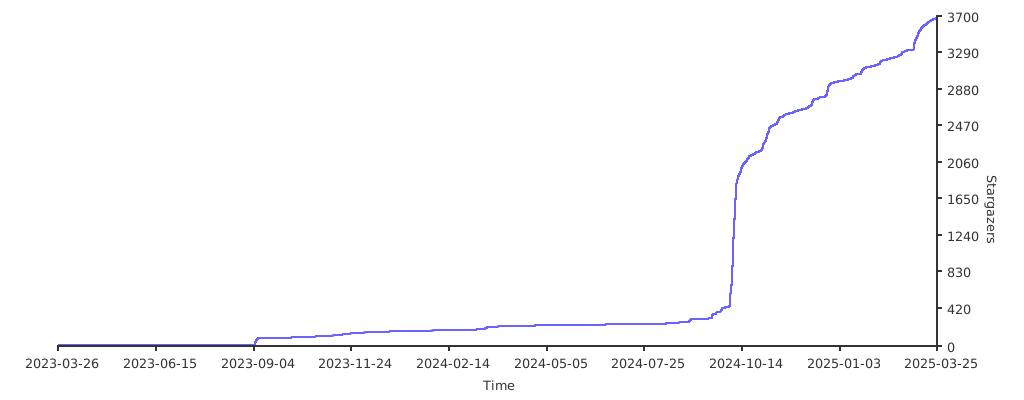
⭐ Stargazers over time
📈 Download Stats
🔗 Links
README copy captured when this server was indexed; it may lag the repository. The original is authoritative.