About Libresprite MCP
Libresprite MCP is an MCP server in the AI category: prompt your way into LibreSprite.
Install
git clone https://github.com/Snehil-Shah/libresprite-mcpThis server has no ConduID identity, so agent calls to it are not receipted. Pin the version you install and review the source before granting it credentials.
Ask AI
Ask AI about Libresprite MCP
Powered by Claude · Grounded in docs
Security checks
- ✓README presentThe repository ships documentation.
5 checks have not been run yet.
README
LibreSprite-MCP


Prompt your way into LibreSprite
Model Context Protocol (MCP) server for prompt-assisted editing, designing, and scripting inside LibreSprite.
https://github.com/user-attachments/assets/71440bba-16a5-4ee2-af10-2c346978a290
Prerequisites
uv is the recommended way to install and use this server. Here are quick one-liners to install it if you haven't:
-
Windows: (run as administrator)
powershell -ExecutionPolicy ByPass -c "irm https://astral.sh/uv/install.ps1 | iex" -
Unix:
curl -LsSf https://astral.sh/uv/install.sh | sh
More on installing uv.
The package is published on PyPI, so feel free to consume it any other way you prefer (pipx, etc)
Usage
Step 1: Setting up the client
Add the MCP server with the following entrypoint command (or something else if you are not using uv) to your MCP client:
uvx libresprite-mcp
Examples:
-
Claude Desktop & Cursor
Edit Claude > Settings > Developer > Edit Config > claude_desktop_config.json or .cursor > mcp.json to include the server:
{
    "mcpServers": {
        // ...existing servers...
        "libresprite": {
            "type": "stdio",
            "command": "uvx",
            "args": [
                "libresprite-mcp"
            ]
        }
        // ...existing servers...
    }
}
You can also use this fancy badge to make it quick:

[!NOTE] You will have to restart Claude Desktop to load the MCP Server.
Step 2: Setting up LibreSprite
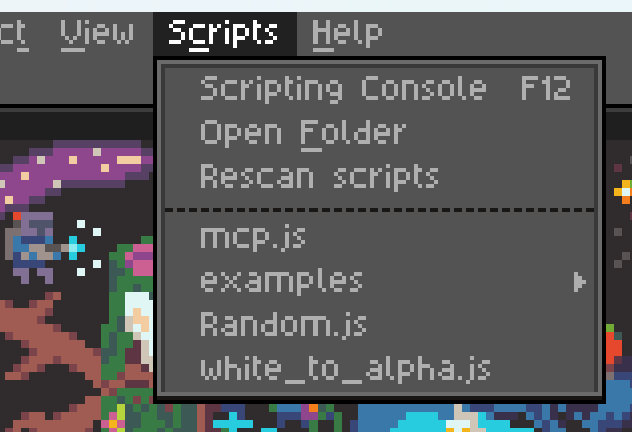
Download the latest stable remote script mcp.js from releases and add it to LibreSprite's scripts folder:
Step 3: Connect and use
Run the mcp.js script (that you see in the screenshot above), and make sure your MCP server is running (Claude Desktop/Cursor is loaded and running). If all went well, you should see the following screen:

Click the "Connect" button and you can now start talking to Claude about your next big pixel-art project!
Some pointers
- You can only run one instance of the MCP server at a time.
- The server expects port
64823to be free. - The server has a hacky and brittle implementation (see ARCHITECTURE), and is not extensively tested.
- The MCP resources are kinda low quality with unclear API reference and limited examples, leaving the LLM confused at times. If you're a LibreSprite expert, we need your help.
README copy captured when this server was indexed; it may lag the repository. The original is authoritative.