About Md MCP
Md MCP is an MCP server published by ly2xxx in the AI category: mCP server exposing a single Markdown+YAML vault to AI agents with structure-aware tools: outline reads, section-level edits, frontmatter properties, atomic multi-file transactions, and git sync.
Six months or more without a commit doesn't mean the server is broken, but check the open issues before depending on it in production.
Install
git clone https://github.com/ly2xxx/md-mcpThis server has no ConduID identity, so agent calls to it are not receipted. Pin the version you install and review the source before granting it credentials.
Ask AI
Ask AI about Md MCP
Powered by Claude · Grounded in docs
Security checks
- ✓README presentThe repository ships documentation.
- ✓License declaredUsable under a stated license.
- !Scoped permissionsDoesn't declare a permission scope. Assume it can do anything its process can.
3 checks have not been run yet.
Releases
README
md-mcp
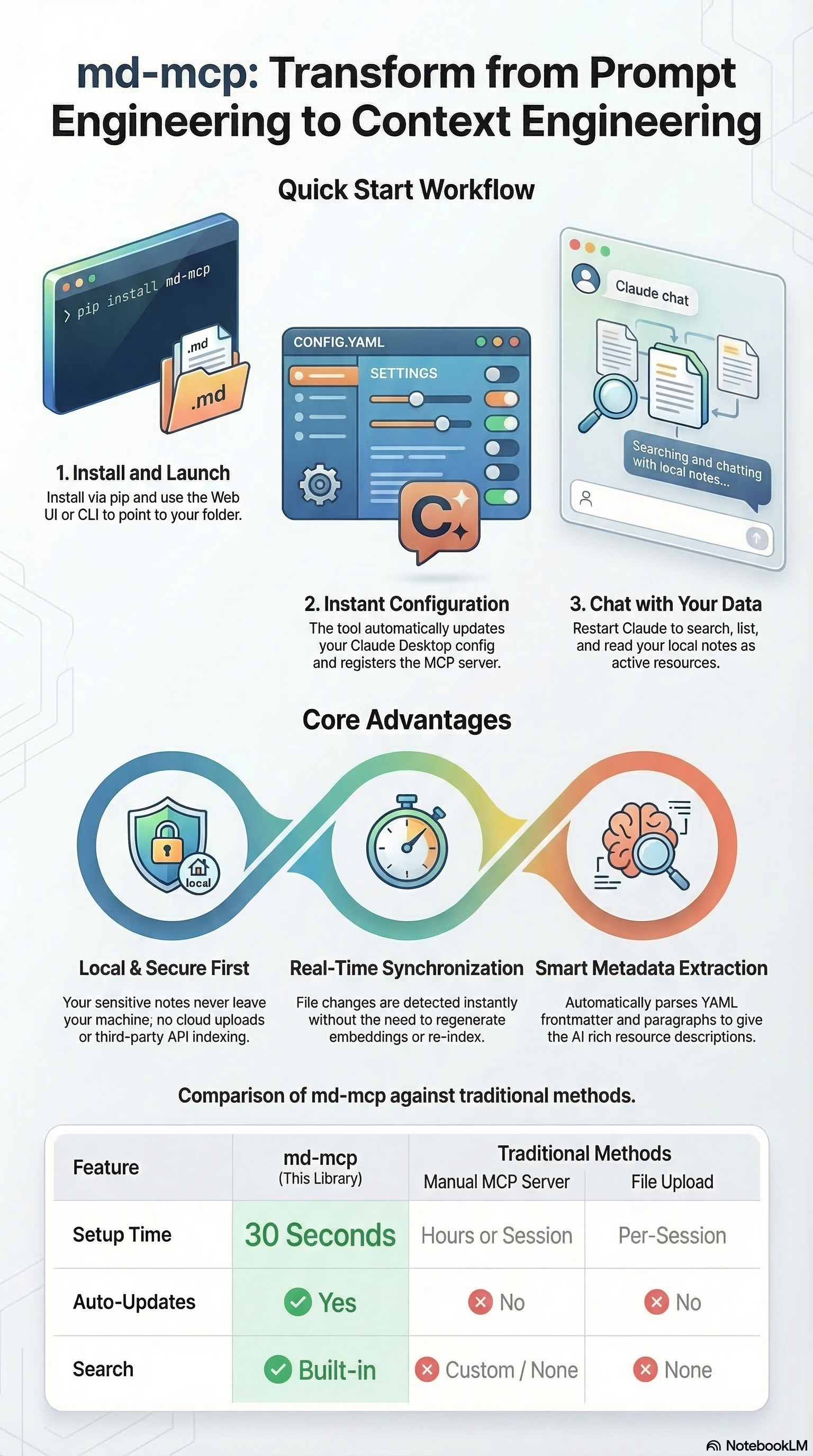
Transform from Prompt Engineering to Context Engineering.
A lightweight Python library that instantly exposes your local markdown documentation, notes, and knowledge bases to any AI tool that supports the Model Context Protocol (MCP) – including Claude Desktop.
No embeddings, no preprocessing, and no uploading. Your files stay safely on your local machine, and any real-time updates are instantly reflected in your AI's context.
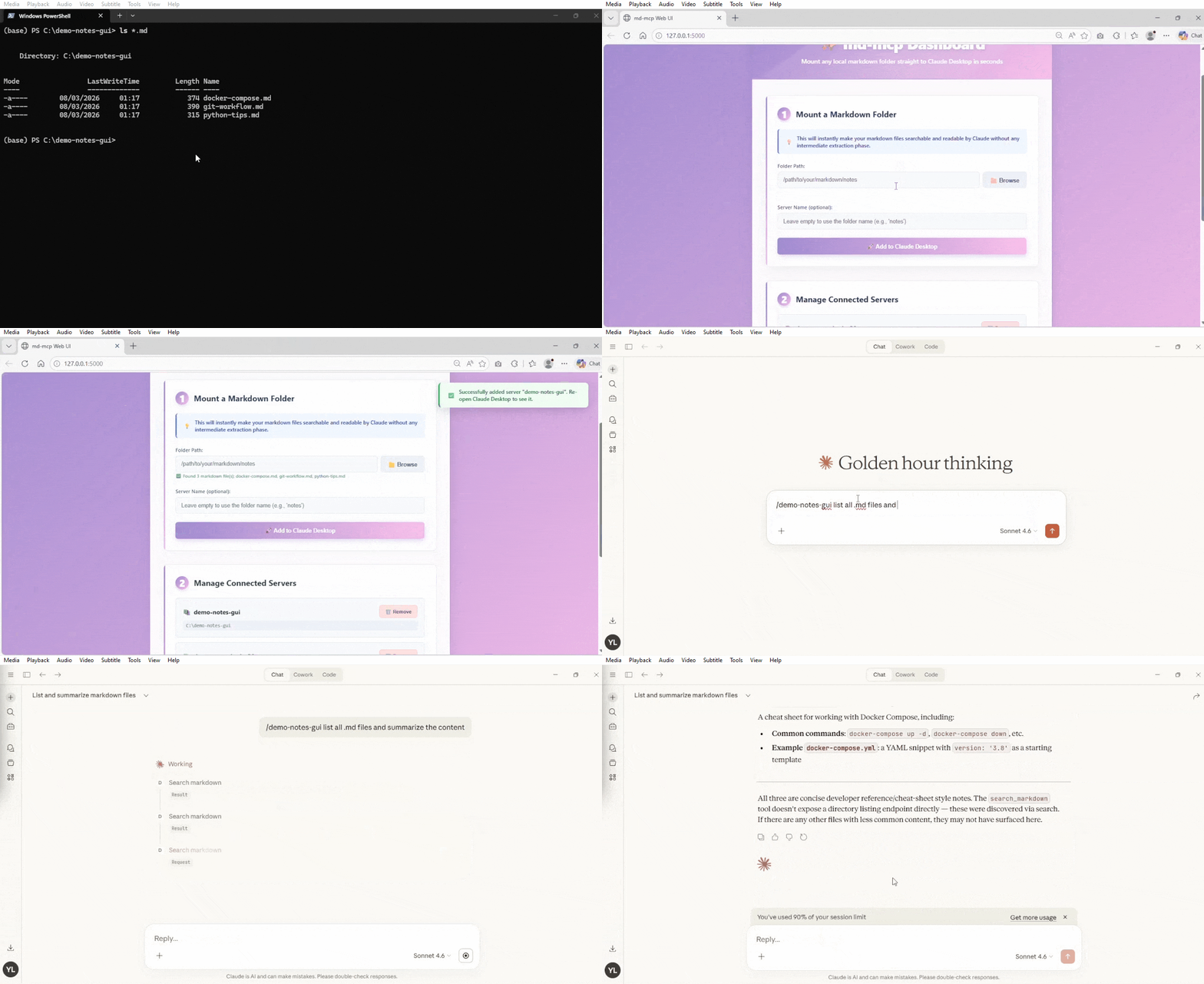
🚀 Quick Start
1. Install
Option A: Install from pypi
pip install md-mcp
Option B: Install from source code
pip install -e .
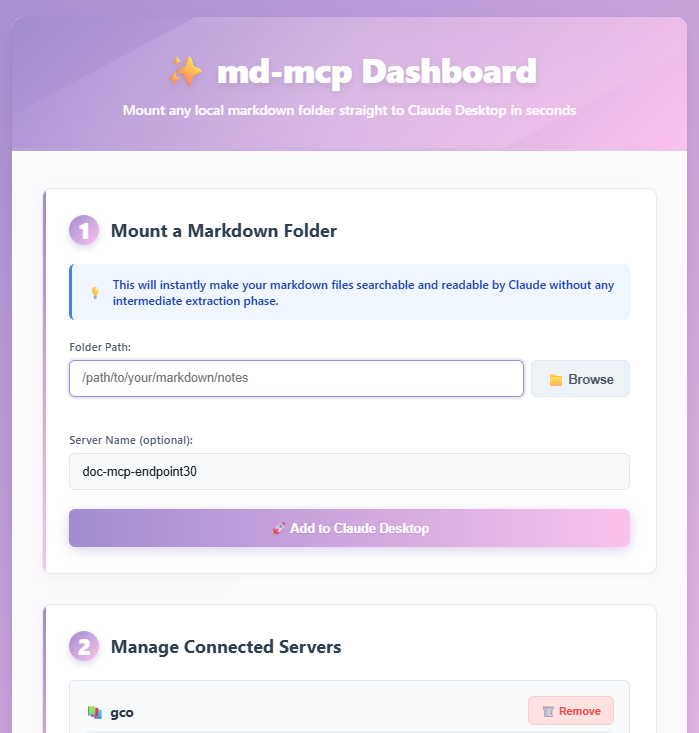
2. Launch the Web UI (Recommended)
The easiest way to manage your markdown servers is through the visual dashboard:
md-mcp --web
Just point at a folder and go!
3. Or use the CLI
If you prefer the command line:
# Expose a folder of markdown files
md-mcp --folder ~/Documents/notes --name "My Notes"

# That's it! Restart Claude Desktop and it's available.
📋 Features
- Context Engineering: Feed your AI assistant exactly the right local context to get better answers, eliminating the need to endlessly prompt.
- Universal MCP Support: Works natively with Claude Desktop and any other AI tool or agent that supports the Model Context Protocol.
- Local & Secure First: Your files never leave your machine. No cloud uploads, no third-party APIs parsing your sensitive notes.
- Real-time Sync: Edit your markdown files and the MCP server picks up the changes instantly. No need to regenerate embeddings or re-index.
- Auto File Watching: Automatically detects when files are added, modified, or deleted (powered by watchdog). Use the
rescan_folder()tool in Claude Desktop for manual refresh if needed. - Zero Configuration: Just point at a folder and go.
- Auto-Discovery: Recursively finds all
.mdfiles. - Metadata Extraction: Parses YAML frontmatter and first paragraphs for rich resource descriptions.
- Search Support: Built-in search across all files to quickly find the needle in the haystack.
- Web Interface: Easy-to-use visual dashboard for non-technical users to manage multiple knowledge bases.
🎯 Use Cases
1. Personal Knowledge Base
md-mcp --folder ~/obsidian-vault --name "Obsidian"
→ Claude can now read your entire Obsidian vault
2. Project Documentation
md-mcp --folder ~/code/myproject/docs --name "Project Docs"
→ Claude has full context on your project
3. Research Papers
md-mcp --folder ~/research/papers-md --name "Research"
→ Claude can reference your research notes
📖 Advanced Usage commands
Web Interface (easiest way to use)
md-mcp --web
# Launches a dashboard to manage all your markdown servers

# You can optionally specify a custom port (default is 5000)
md-mcp --web --port 8080
Add a Markdown Folder
# With explicit name
md-mcp --folder /path/to/docs --name "My Docs"

# Auto-name from folder
md-mcp --folder ~/notes
# Creates server named "notes"

# Alias: --add
md-mcp --add ~/work-docs --name "Work"
Scan Before Adding (Dry Run)
md-mcp --folder ~/notes --scan
# Shows what files would be exposed
List Configured Servers
md-mcp --list
# Shows all md-mcp servers
Show Configuration Status
md-mcp --status
# Shows Claude config path and all servers
Remove a Server
md-mcp --remove "My Docs"
Interactive Mode
md-mcp
# Prompts for folder path
🔧 How It Works
-
You run the CLI:
md-mcp --folder ~/notes --name "Notes" -
md-mcp:
- Scans folder for
.mdfiles - Extracts metadata (frontmatter, descriptions)
- Updates Claude Desktop config
- Registers MCP server entry
- Scans folder for
-
In Claude Desktop:
- Restart Claude
- Server appears in MCP dropdown
- All markdown files available as resources
- Use search tools to find content
📂 What Gets Exposed
Each markdown file becomes an MCP Resource:
{
  "uri": "md://notes/project-plan.md",
  "name": "Project Plan",
  "description": "Auto-extracted from frontmatter or first paragraph",
  "mimeType": "text/markdown"
}
🛠️ MCP Tools
md-mcp provides three tools to Claude:
1. search_markdown
Search across all markdown files by content or filename.
Usage in Claude:
- Standard (keyword): > "Search my notes for 'docker compose'"
⚠️ Experimental features below: (may not work)
- Semantic: > "Search my docs for 'user authentication' using semantic search" (Finds related concepts like login, OAuth, etc.)
- Hybrid: > "Search for 'docker setup' using hybrid search" (Combines exact matching and conceptual matching)
(Note: Semantic and hybrid search require pip install md-mcp[semantic])
2. list_files
List all available markdown files.
Usage in Claude:
"What markdown files do I have about Python?"
3. rescan_folder
Manually rescan the folder for new, modified, or deleted markdown files. Use this if the automatic file watcher is not available or if files are missing.
Usage in Claude:
"Rescan the markdown folder to find my new notes"
📋 Requirements
- Python 3.10+
- mcp library
- Claude Desktop
🔧 Configuration
Claude Desktop Config Location (Automatic)
Windows: %APPDATA%\Claude\claude_desktop_config.json
macOS: ~/Library/Application Support/Claude/claude_desktop_config.json
Linux: ~/.config/Claude/claude_desktop_config.json
Antigravity Config Location (Manual)
Windows: %USERPROFILE%\.gemini\antigravity\mcp_config.json
Add your config and run Developer: Reload Window from the Command Palette (Ctrl+Shift+P).
Config Entry Format
{
  "mcpServers": {
    "my-notes": {
      "command": "C:\\Python\\python.exe",
      "args": [
        "-m", "md_mcp.server_runner",
        "--folder", "C:\\Users\\Yang\\notes",
        "--name", "my-notes"
      ]
    }
  }
}
VS Code MCP Config (Manual)
For workspace-level tools, use a file at .vscode/mcp.json. See official VS Code MCP documentation.
[!IMPORTANT] For workspace configs, the top-level key is
"servers", not"mcpServers".
Example .vscode/mcp.json:
{
  "servers": {
    "my-notes": {
      "command": "C:\\Python\\python.exe",
      "args": [
        "-m", "md_mcp.server_runner",
        "--folder", "C:\\Users\\Yang\\notes",
        "--name", "my-notes"
      ]
    }
  }
}
Sample Prompts to Test
Once configured, try these prompts with your AI assistant:
- "Search my-notes for 'Docker'"
- "List markdown files in my-notes"
- "What do my notes say about the system architecture?"
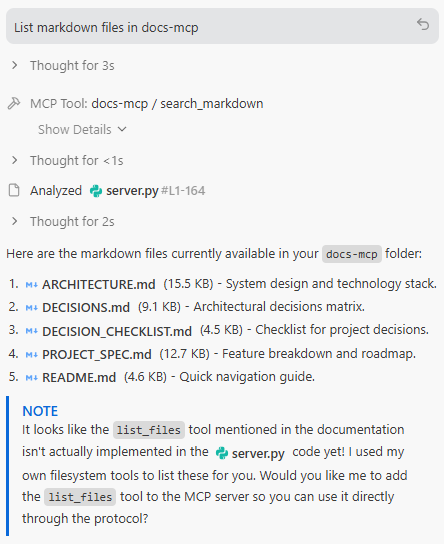
🧪 Testing
Test the Scanner
from md_mcp.scanner import MarkdownScanner

scanner = MarkdownScanner("~/notes")
files = scanner.scan()

for f in files:
    print(f"{f.name}: {f.description}")
Test the Server Locally
# Run server directly (stdio mode)
python -m md_mcp.server_runner --folder ~/notes --name test

# Server listens on stdin/stdout for MCP protocol
📝 Markdown Frontmatter Support
md-mcp extracts metadata from YAML frontmatter:
---
title: My Document
description: A brief overview of the document
tags: [project, planning]
---

# Content starts here
Extracted fields:
description→ Used as resource description- Other fields stored in
frontmatterdict
If no frontmatter, first paragraph is used as description.
🚧 Roadmap
- v0.3: Smart chunking for large files
- v0.4: Semantic search with embeddings
- v1.0: Use web UI for all operations
🐛 Troubleshooting
"Server not showing in Claude Desktop"
-
Check config was updated:
md-mcp --status -
Verify file exists:
# Windows type %APPDATA%\Claude\claude_desktop_config.json # Mac/Linux cat ~/.config/Claude/claude_desktop_config.json -
Restart Claude Desktop completely
"No files found"
# Check what scanner finds
md-mcp --folder ~/notes --scan
"Permission denied"
Make sure the folder is readable:
# Check permissions
ls -la ~/notes
🏗️ Architecture
┌─────────────────┐
│  Claude Desktop │
│   (MCP Client)  │
└────────┬────────┘
         │ stdio (JSON-RPC)
         │
┌────────▼────────┐
│  md-mcp Server  │
│  (MCP Protocol) │
└────────┬────────┘
         │
┌────────▼────────┐
│ MarkdownScanner │
│  (File Reader)  │
└────────┬────────┘
         │
   ┌─────▼──────┐
   │ Filesystem │
   │  (*.md)    │
   └────────────┘
🤝 Comparison to Alternatives
| Feature | md-mcp | Manual MCP Server | File Upload |
|---|---|---|---|
| Setup Time | 30 seconds | Hours | Per-session |
| Auto-Updates | ✅ | ❌ | ❌ |
| Full Folder | ✅ | ✅ | ❌ |
| Search | ✅ | Custom | ❌ |
| One Command | ✅ | ❌ | ❌ |
📚 Development
Setup Dev Environment
git clone https://github.com/ly2xxx/md-mcp.git
cd md-mcp
pip install -e ".[dev]"
Run Tests
pytest
Format Code
black md_mcp/
📄 License
This project is licensed under the MIT License - see the LICENSE file for details.
🙏 Credits
Inspired by:
- Model Context Protocol by Anthropic
- netshare - File sharing tool by Yang Li
📮 Contact
Issues: https://github.com/ly2xxx/md-mcp/issues
Built by: Yang Li
Date: 2026-02-16
🚀 Just point at a folder and go!
README copy captured when this server was indexed; it may lag the repository. The original is authoritative.