About OpenAgentd
OpenAgentd is an MCP server published by lthoangg in the Agents category: open-source desktop app for a local coding agent. Watch every tool call, diff, and terminal command. Bring your own models; sessions stay on your machine.
The repository has 212 stars and 38 forks, with the last commit 2 days ago. Recent commit activity is the strongest signal that reported issues will get attention.
Install
git clone https://github.com/lthoangg/OpenAgentdThis server has no ConduID identity, so agent calls to it are not receipted. Pin the version you install and review the source before granting it credentials.
Ask AI
Ask AI about OpenAgentd
Powered by Claude · Grounded in docs
Security checks
Static checks derived from the repository 15 hours ago. Heuristics on the source, not an audit.
- ✓README presentThe repository ships documentation.
- ✓License declaredUsable under a stated license.
- ✓Tests presentA test suite exists in the repository.
- ✓Dependencies pinnedA lockfile pins dependency versions.
- !No dynamic code executionSource scan found eval or shell execution. Review how tool inputs reach it before granting credentials.
1 check has not been run yet.
Releases
README
OpenAgentd
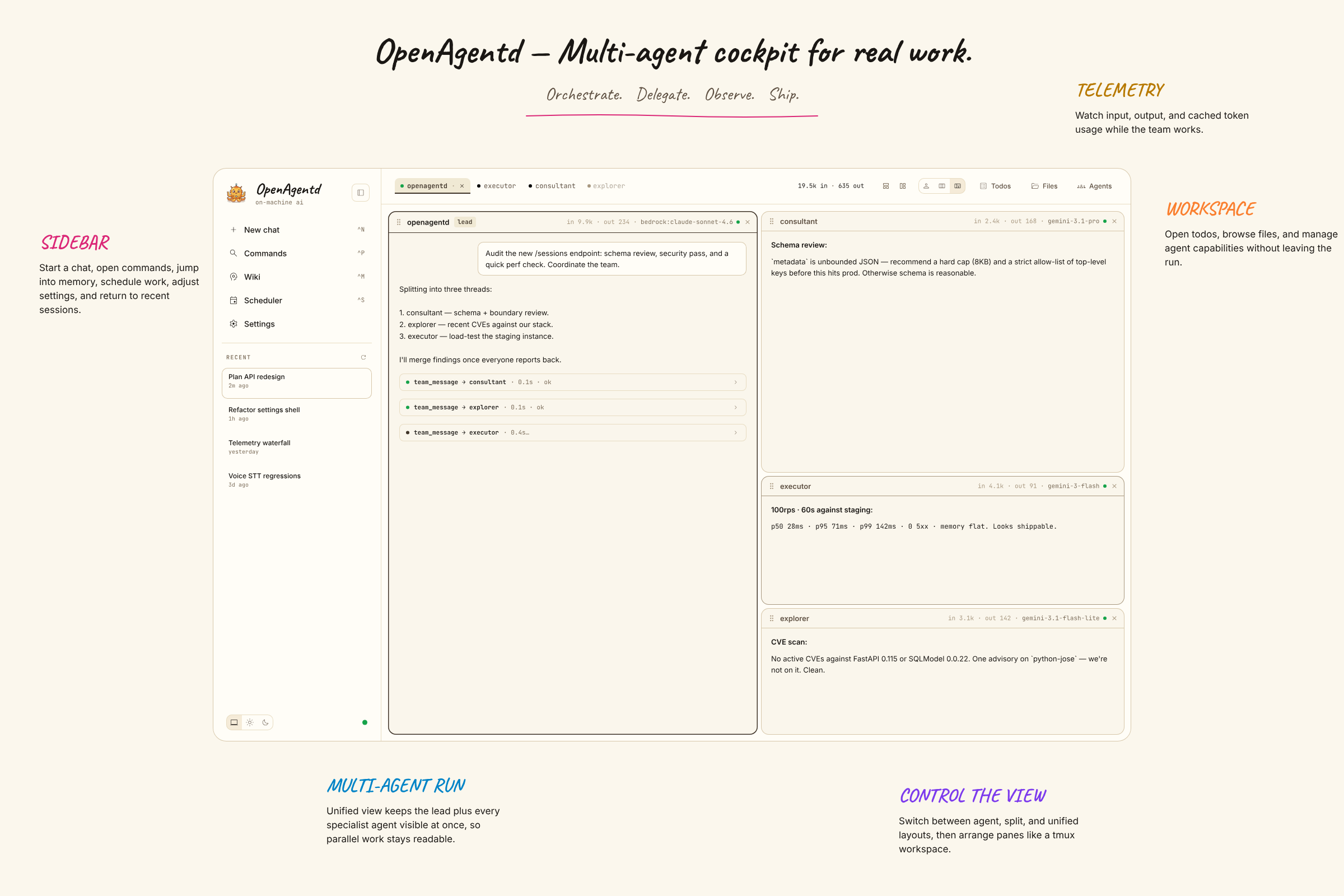
Why OpenAgentd
Most coding agents live in a terminal or an editor. OpenAgentd is a coding-first native desktop app and mobile companion where you can run an agent, follow work in real time, inspect what changed, and keep moving without losing context.
- See the work. Streamed replies, tool calls, arguments, results, timings, files, diffs, terminal output, and agent status are visible in one interface.
- Track tasks. A clean, user-readable taskboard checklist keeps current work and progress visible at a glance.
- Work in real repositories. Coding sessions open local folders, support isolated git worktrees, show changes and history, and return language-server diagnostics after edits.
- Choose your models. Use your own keys with major cloud and local providers, including Anthropic, OpenAI, Gemini, OpenRouter, Bedrock, Copilot, Codex, Ollama, and more.
- Stay local-first. Sessions, telemetry, configuration, and the API server run on your machine. Connect a mobile client or another desktop securely when you need to.
The versioned feature catalogue is the canonical record of shipped capabilities.
Get started
Desktop app
Install the current desktop release:
# macOS / Linux
curl -fsSL https://openagentd.dev/install.sh | sh
# Windows PowerShell
irm https://openagentd.dev/install.ps1 | iex
On macOS you can also install it with Homebrew:
brew install --cask lthoangg/tap/openagentd
Open OpenAgentd from your applications folder or Start menu. The desktop app runs its bundled backend automatically. Add a provider key in Settings, or run local models with Ollama, to start your first conversation.
Release artifacts are available for macOS, Windows, and Linux on the latest release page. Unsigned desktop builds may require an explicit operating-system confirmation before first launch.
iOS app
The iOS app connects to an OpenAgentd server running on your computer (see
CLI server). It is not on the App Store; each release includes an
.ipa to sideload. With SideStore, add this source to
get the app and its updates:
https://github.com/lthoangg/openagentd/releases/download/latest-ios/source.json
See Install the iOS app for SideStore setup, other sideloading tools, free Apple Account limits, connecting to your server, and troubleshooting.
CLI server
Install the backend when you want to run it from a terminal, use a browser client, or connect another device:
# macOS / Linux
curl -fsSL https://openagentd.dev/install.sh | sh -s -- --cli
openagentd server start
# Windows PowerShell
& ([scriptblock]::Create((irm https://openagentd.dev/install.ps1))) -Cli
The server creates its default agents and configuration on first start. It
serves the API only: connect to the printed Server: address from the desktop
app's server connection dialog or the mobile app, then add a provider in
Settings. For a phone or another computer on your network:
openagentd server start --host 0.0.0.0 --key
openagentd server status
--key sets the access key every client must send; the server refuses to
listen beyond loopback without one. It has no built-in TLS, so put an HTTPS
reverse proxy in front of it before exposing it outside a trusted network.
Use openagentd --help and <command> --help for the current command
reference.
Run one agent turn directly against the current project directory when you need a pipe-friendly terminal response:
openagentd run --model openai:gpt-5.5 --thinking high --prompt "Summarize this project"
openagentd run --continue --prompt "Now add tests for it"
The command validates the current directory as a coding workspace, persists a
new session for the turn, and streams the agent's response text to standard
output. Tool-permission events follow the runtime's existing auto-allow policy;
interactive agent questions stop the non-interactive command. Use -C DIR for
another workspace, --continue or --session ID to continue a session, and
--json for one JSON line per stream event.
From source
Requires a Rust toolchain (cargo) and Bun:
git clone https://github.com/lthoangg/openagentd.git
cd openagentd
bun install --cwd web
make dev       # backend on :8000 + web UI on http://localhost:5173
make run starts only the backend.
What it feels like
| A conversation that can act | A workspace that stays in view |
|---|---|
 |
 |
| Inspect changes | Keep an eye on local usage |
|---|---|
 |
 |
| Command and scheduling | Todos and terminal |
|---|---|
  |
  |
| Provider and security settings | MCP settings |
|---|---|
  |
 |
Built for the whole loop
Plan and code. Toggle between Plan mode for read-only exploration and decision-complete plans, and Code mode for surgical implementation—switch mid-session right from the composer or with Tab.
Build and inspect. Attach files, browse a coding workspace, use @ mentions, review real-time diffs, and inspect structured tool output without leaving the conversation. Delegate independent sub-tasks across specialists with a unified timeline.
Operate with confidence. Manage providers, MCP servers, skills, path denylist permissions, scheduled tasks, todos, and local telemetry from the coding workspace. OpenAgentd supports desktop, browser, and touch-first mobile clients against the same API.
For users and contributors
- Features — shipped, version-cited capabilities.
- Releases — download builds and read release notes.
- Discord — join the community server to chat and ask questions.
- Facebook Group — join the community group to connect and share.
- Issues — feature requests, bugs, roadmap discussion, and known issues.
- Security policy — report vulnerabilities privately.
- Contributing — set up a development checkout and submit changes.
OpenAgentd is licensed under Apache 2.0.
README fetched from the repository 15 hours ago. The original is authoritative.