About Openapi
Openapi is an MCP server published by samchon in the AI category: openAPI definitions, converters and LLM function calling schema composer.
The repository has 126 stars and 12 forks, with the last commit 7 months ago. Six months or more without a commit doesn't mean the server is broken, but check the open issues before depending on it in production.
Install
git clone https://github.com/samchon/openapiThis server has no ConduID identity, so agent calls to it are not receipted. Pin the version you install and review the source before granting it credentials.
Ask AI
Ask AI about Openapi
Powered by Claude · Grounded in docs
Security checks
Static checks derived from the repository 8 hours ago. Heuristics on the source, not an audit.
- ✓README presentThe repository ships documentation.
- ✓License declaredUsable under a stated license.
- ✓Tests presentA test suite exists in the repository.
- ✓Dependencies pinnedA lockfile pins dependency versions.
- ✓No dynamic code executionSource scan found no eval, dynamic Function, or shell execution.
- !Scoped permissionsDoesn't declare a permission scope. Assume it can do anything its process can.
Releases
README
@samchon/openapi
This repository has been archived and is no longer maintained.
All functionality has been merged into
typiaas built-in namespace modules.
- OpenAPI → LLM function calling:
@typia/utilsHTTP LLM- TypeScript class → LLM function calling:
typia.llm.application()- LLM JSON utilities:
@typia/utilsLLM JSON- MCP integration:
@typia/mcp- Vercel AI SDK:
@typia/vercel- LangChain:
@typia/langchain
flowchart TB
subgraph "OpenAPI Specification"
  v20("Swagger v2.0") --upgrades--> emended[["OpenAPI v3.1 (emended)"]]
  v30("OpenAPI v3.0") --upgrades--> emended
  v31("OpenAPI v3.1") --emends--> emended
end
subgraph "LLM Function Calling"
  emended --normalizes--> migration[["Migration Schema"]]
  migration --"AI-Ready"--> schema{{"LLM Function Schema"}}
end






Transform OpenAPI documents into LLM function calling applications.
@samchon/openapi converts OpenAPI/Swagger documents into LLM function calling schemas. With full TypeScript type safety, automatic validation, and support for every OpenAPI version, it's the simplest way to make your HTTP backend AI-callable.
Key Features
- 🌐 Multi-Provider Support: Works with OpenAI, Claude, Qwen, Llama, and other LLM providers
- 📝 Complete OpenAPI Coverage: Swagger 2.0, OpenAPI 3.0, and OpenAPI 3.1 fully supported
- 🔒 Type-Safe Validation: Built-in validation with detailed error feedback for LLM responses
- 🔄 MCP Integration: Compose function calling schemas from Model Context Protocol servers
- 📊 Emended Specification: Standardized OpenAPI v3.1 format that removes ambiguities
- ✅ Production Ready: Battle-tested with 98%+ success rates in real-world LLM applications
Live Demo:
https://github.com/user-attachments/assets/e1faf30b-c703-4451-b68b-2e7a8170bce5
Watch how
@samchon/openapipowers an AI shopping chatbot with@agentica
Quick Start
npm install @samchon/openapi
Transform your OpenAPI document into an LLM function calling application:
import { HttpLlm, OpenApi } from "@samchon/openapi";

// 1. Load and convert your OpenAPI document
const document: OpenApi.IDocument = OpenApi.convert(swagger);

// 2. Generate LLM function calling schemas
const application: IHttpLlmApplication = HttpLlm.application({
  document,
});

// 3. Find a function to call
const func: IHttpLlmFunction | undefined = application.functions.find(
  (f) => f.path === "/bbs/articles" && f.method === "post"
);

// 4. Use with any LLM provider (OpenAI, Claude, Qwen, etc.)
const completion = await llm.chat.completions.create({
  model: "gpt-4o", // or claude-3-5-sonnet, qwen-plus, etc.
  messages: [...],
  tools: [{
    type: "function",
    function: {
      name: func.name,
      description: func.description,
      parameters: func.parameters,
    }
  }],
});

// 5. Execute with validation
const result = await HttpLlm.execute({
  connection: { host: "http://localhost:3000" },
  application,
  function: func,
  input: llmGeneratedArgs,
});
That's it! Your HTTP backend is now AI-callable across all major LLM providers.
OpenAPI Definitions
@samchon/openapi provides complete TypeScript definitions for all OpenAPI versions and introduces an "emended" OpenAPI v3.1 specification that serves as an intermediate format.
flowchart TB
v20(Swagger v2.0) --upgrades--> emended[["<b><u>OpenAPI v3.1 (emended)</u></b>"]]
v30(OpenAPI v3.0) --upgrades--> emended
v31(OpenAPI v3.1) --emends--> emended
emended --downgrades--> v20d(Swagger v2.0)
emended --downgrades--> v30d(OpenAPI v3.0)
Supported Specifications:
- Swagger v2.0
- OpenAPI v3.0
- OpenAPI v3.1
- OpenAPI v3.1 (emended) - Standardized format
What is "Emended" OpenAPI?
The emended specification removes ambiguities and duplications from OpenAPI v3.1, creating a cleaner, more consistent format. All conversions flow through this intermediate format.
Key Improvements:
- Operations: Merges parameters from path and operation levels, resolves all references
- JSON Schema: Eliminates mixed types, unifies nullable handling, standardizes array/tuple representations
- Schema Composition: Consolidates
anyOf,oneOf,allOfpatterns into simpler structures
Converting Between Versions
import { OpenApi } from "@samchon/openapi";

// Convert any version to emended format
const emended: OpenApi.IDocument = OpenApi.convert(swagger); // Swagger 2.0/3.0/3.1

// Downgrade to older versions if needed
const v30: OpenApiV3.IDocument = OpenApi.downgrade(emended, "3.0");
const v20: SwaggerV2.IDocument = OpenApi.downgrade(emended, "2.0");
Validating OpenAPI Documents
Use typia for runtime validation with detailed type checking:
import { OpenApi, OpenApiV3, OpenApiV3_1, SwaggerV2 } from "@samchon/openapi";
import typia from "typia";

const document: any = await fetch("swagger.json").then(r => r.json());

// Validate with detailed error messages
const result = typia.validate<
  SwaggerV2.IDocument | OpenApiV3.IDocument | OpenApiV3_1.IDocument
>(document);

if (result.success) {
  const emended: OpenApi.IDocument = OpenApi.convert(result.data);
} else {
  console.error(result.errors); // Detailed validation errors
}
Try it: Type assertion | Detailed validation
LLM Function Calling
Turn your HTTP backend into an AI-callable service. @samchon/openapi converts your OpenAPI document into function calling schemas that work with OpenAI GPT, Claude, Qwen, Llama, and other LLM providers.
Type Definitions:
Complete Example
Here's a full example showing LLM function calling with OpenAI (works identically with Claude, Qwen, etc.):
import { HttpLlm, OpenApi, IHttpLlmApplication, IHttpLlmFunction } from "@samchon/openapi";
import OpenAI from "openai";

// 1. Convert OpenAPI to LLM function calling application
const document: OpenApi.IDocument = OpenApi.convert(swagger);
const application: IHttpLlmApplication = HttpLlm.application({
  document,
});

// 2. Find the function by path and method
const func: IHttpLlmFunction | undefined = application.functions.find(
  (f) => f.path === "/shoppings/sellers/sale" && f.method === "post"
);
if (!func) throw new Error("Function not found");

// 3. Let OpenAI GPT call the function
const client: OpenAI = new OpenAI({ apiKey: process.env.OPENAI_API_KEY });
const completion: OpenAI.ChatCompletion = await client.chat.completions.create({
  model: "gpt-4o",
  messages: [
    { role: "system", content: "You are a helpful shopping assistant." },
    { role: "user", content: "I want to sell Microsoft Surface Pro 9..." }
  ],
  tools: [{
    type: "function",
    function: {
      name: func.name,
      description: func.description,
      parameters: func.parameters,
    }
  }],
});

// 4. Execute the function call on your actual server
const toolCall = completion.choices[0].message.tool_calls![0];
const result = await HttpLlm.execute({
  connection: { host: "http://localhost:37001" },
  application,
  function: func,
  input: JSON.parse(toolCall.function.arguments),
});
Works with Any LLM Provider:
// OpenAI
const openai = new OpenAI({ apiKey: "..." });

// Anthropic Claude
const anthropic = new Anthropic({ apiKey: "..." });

// Alibaba Qwen via DashScope
const qwen = new OpenAI({
  apiKey: "...",
  baseURL: "https://dashscope.aliyuncs.com/compatible-mode/v1",
});

// All use the same func.parameters schema
Validation Feedback - Fixing LLM Mistakes
The Problem: LLMs make type errors. A lot.
Even when your schema says Array<string>, GPT might return just "string". In real-world testing with OpenAI GPT-4o-mini on a shopping service:
- 1st attempt: 70% success rate ❌
- 2nd attempt (with validation feedback): 98% success rate ✅
- 3rd attempt: Never failed ✅
The Solution: Validate LLM output and send errors back for correction.
import { HttpLlm, IHttpLlmFunction, IValidation } from "@samchon/openapi";

const func: IHttpLlmFunction = application.functions[0];

// Validate LLM-generated arguments
const result: IValidation<unknown> = func.validate(llmArguments);

if (result.success === false) {
  // Send detailed error feedback to LLM
  return await retryWithFeedback({
    message: "Type errors detected. Please correct the arguments.",
    errors: result.errors, // Detailed error information
  });
} else {
  // Execute the validated function
  const output = await HttpLlm.execute({
    connection: { host: "http://localhost:3000" },
    application,
    function: func,
    input: result.data,
  });
  return output;
}
The validation uses typia.validate<T>(), which provides the most accurate validation and extremely detailed error messages compared to other validators:
| Components | typia |
TypeBox |
ajv |
io-ts |
zod |
C.V. |
|---|---|---|---|---|---|---|
| Easy to use | ✅ | ❌ | ❌ | ❌ | ❌ | ❌ |
| Object (simple) | ✔ | ✔ | ✔ | ✔ | ✔ | ✔ |
| Object (hierarchical) | ✔ | ✔ | ✔ | ✔ | ✔ | ✔ |
| Object (recursive) | ✔ | ❌ | ✔ | ✔ | ✔ | ✔ |
| Object (union, implicit) | ✅ | ❌ | ❌ | ❌ | ❌ | ❌ |
| Object (union, explicit) | ✔ | ✔ | ✔ | ✔ | ✔ | ❌ |
| Object (additional tags) | ✔ | ✔ | ✔ | ✔ | ✔ | ✔ |
| Object (template literal) | ✔ | ✔ | ✔ | ❌ | ❌ | ❌ |
| Object (dynamic properties) | ✔ | ✔ | ✔ | ❌ | ❌ | ❌ |
| Array (rest tuple) | ✅ | ❌ | ❌ | ❌ | ❌ | ❌ |
| Array (hierarchical) | ✔ | ✔ | ✔ | ✔ | ✔ | ✔ |
| Array (recursive) | ✔ | ✔ | ✔ | ✔ | ✔ | ❌ |
| Array (R+U, explicit) | ✔ | ✔ | ❌ | ✔ | ✔ | ❌ |
| Array (R+U, implicit) | ✅ | ❌ | ❌ | ❌ | ❌ | ❌ |
| Array (repeated) | ✅ | ❌ | ❌ | ❌ | ❌ | ❌ |
| Array (repeated, union) | ✅ | ❌ | ❌ | ❌ | ❌ | ❌ |
| Ultimate Union Type | ✅ | ❌ | ❌ | ❌ | ❌ | ❌ |
C.V.meansclass-validator
Human-AI Collaboration (Separating Parameters)
Sometimes you need both human input and AI-generated parameters. Use the separate option to split parameters between LLM and human:
import { HttpLlm, LlmTypeChecker } from "@samchon/openapi";

const application = HttpLlm.application({
  document,
  options: {
    separate: (schema) =>
      LlmTypeChecker.isString(schema) &&
      !!schema.contentMediaType?.startsWith("image"),
  },
});

const func = application.functions.find(
  (f) => f.path === "/shoppings/sellers/sale" && f.method === "post"
)!;

// func.separated.llm - for AI to fill (text, numbers, etc.)
// func.separated.human - for human to provide (file uploads, images)

const result = await HttpLlm.execute({
  connection: { host: "http://localhost:37001" },
  application,
  function: func,
  input: HttpLlm.mergeParameters({
    function: func,
    llm: llmGeneratedArgs,
    human: {
      content: {
        files: [...], // Human provides files
        thumbnails: [...], // Human provides images
      },
    },
  }),
});
Model Context Protocol
flowchart TB
subgraph "JSON Schema Specification"
  schemav4("JSON Schema v4 ~ v7") --upgrades--> emended[["OpenAPI v3.1 (emended)"]]
  schema2910("JSON Schema 2019-03") --upgrades--> emended
  schema2020("JSON Schema 2020-12") --emends--> emended
end
subgraph "AI Ecosystem"
  emended --normalizes--> migration[["Migration Schema"]]
  migration --AI-Ready--> schema{{"LLM Function Schema"}}
  schema --supports--> all("All LLM Providers")
end
@samchon/openapi provides better MCP function calling than using the mcp_servers property directly.
While MCP can execute server functions directly through the mcp_servers property, @samchon/openapi offers significant advantages through validation feedback and selector agent filtering for context optimization.
For example, the GitHub MCP server has 30 functions. Loading all of them via mcp_servers creates huge context that often causes AI agents to crash with hallucinations. Function calling with proper filtering avoids this problem.
https://github.com/user-attachments/assets/72390cb4-d9b1-4d31-a6dd-d866da5a433b
GitHub MCP server via
mcp_serversoften crashes.However, function calling to GitHub MCP with
@agenticaworks properly.
- Function calling demo: https://www.youtube.com/watch?v=rLlHkc24cJs
Creating MCP applications:
Use McpLlm.application() to create function calling schemas from MCP tools. The returned IMcpLlmApplication works across all LLM providers and includes validation feedback.
MCP supports all JSON schema specifications:
- JSON Schema v4, v5, v6, v7
- JSON Schema 2019-03
- JSON Schema 2020-12
import { IMcpLlmApplication, IMcpLlmFunction, IValidation, McpLlm } from "@samchon/openapi";

const application: IMcpLlmApplication = McpLlm.application({
  tools: [...], // MCP tools
});

const func: IMcpLlmFunction = application.functions.find(
  (f) => f.name === "create",
)!;

// Validate with detailed feedback
const result: IValidation<unknown> = func.validate({
  title: "Hello World",
  body: "Nice to meet you AI developers",
  thumbnail: "https://wrtnlabs.io/agentica/thumbnail.jpg",
});

if (result.success) {
  // Execute validated function
  console.log("Valid arguments:", result.data);
} else {
  // Send errors back to LLM for correction
  console.error("Validation errors:", result.errors);
}
[!NOTE]
You can also compose
ILlmApplicationfrom a TypeScript class usingtypia.https://typia.io/docs/llm/application
import { ILlmApplication } from "@samchon/openapi";
import typia from "typia";

const app: ILlmApplication = typia.llm.application<YourClassType>();
Utilization Cases
Agentica

https://github.com/wrtnlabs/agentica
Agentic AI framework that converts OpenAPI documents into LLM function calling schemas. Uses @samchon/openapi to transform backend REST APIs into callable functions with automatic parameter validation and type-safe remote execution.
import { Agentica, assertHttpController } from "@agentica/core";
import OpenAI from "openai";
import typia from "typia";

import { MobileFileSystem } from "./services/MobileFileSystem";

const agent = new Agentica({
  vendor: {
    api: new OpenAI({ apiKey: "********" }),
    model: "gpt-4o-mini",
  },
  controllers: [
    // Functions from TypeScript class
    typia.llm.controller(
      "filesystem",
      MobileFileSystem(),
    ),
    // Functions from Swagger/OpenAPI
    // Uses @samchon/openapi under the hood
    assertHttpController({
      name: "shopping",
      document: await fetch(
        "https://shopping-be.wrtn.ai/editor/swagger.json",
      ).then(r => r.json()),
      connection: {
        host: "https://shopping-be.wrtn.ai",
        headers: { Authorization: "Bearer ********" },
      },
    }),
  ],
});
await agent.conversate("I wanna buy MacBook Pro");
AutoBE
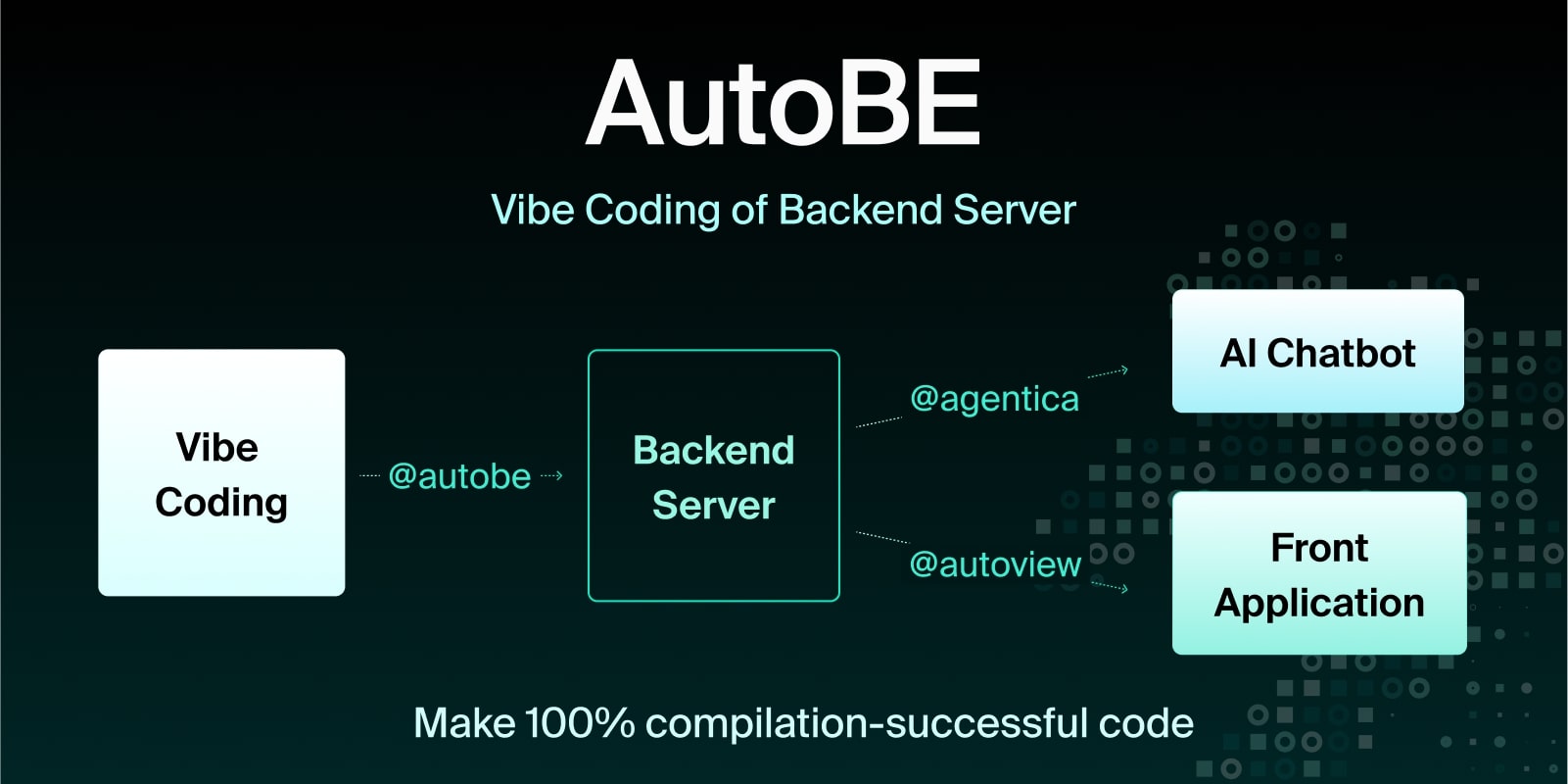
AI backend code generator achieving 100% compilation success by using function calling to construct compiler AST instead of generating code text. For API specification design, uses @samchon/openapi types - AI calls compiler functions to build OpenAPI document structures that define REST endpoints and request/response schemas.
import { MicroAgentica } from "@agentica/core";
import { OpenApi } from "@samchon/openapi";

const agent = new MicroAgentica({
  vendor: {
    api: new OpenAI({ apiKey: "********" }),
    model: "gpt-4o-mini",
  },
  controllers: [
    // Compiler functions that receive/produce OpenApi.IDocument
    typia.llm.controller(
      "api",
      new OpenApiWriteApplication(),
    ),
  ],
});
await agent.conversate("Design API specification and generate backend app.");

class OpenApiWriteApplication {
  // LLM calls this function with OpenApi.IDocument structure
  public async write(document: OpenApi.IDocument): Promise<void> {
    // Compiler validates schema structure before code generation
    ...
  }
}
License
MIT License
Copyright (c) 2024 Jeongho Nam
For detailed API documentation, visit: https://samchon.github.io/openapi/api/
README fetched from the repository 8 hours ago. The original is authoritative.