About Sample Drawio MCP
Sample Drawio MCP is an MCP server in the Cloud category.
Install
git clone https://github.com/aws-samples/sample-drawio-mcpThis server has no ConduID identity, so agent calls to it are not receipted. Pin the version you install and review the source before granting it credentials.
Ask AI
Ask AI about Sample Drawio MCP
Powered by Claude · Grounded in docs
Security checks
- ✓README presentThe repository ships documentation.
5 checks have not been run yet.
README
🎨 Draw.io MCP Server
[!WARNING] Pre-Release Alpha Software: This software is in an early stage of development and may contain defects. Please open issues at github.com/aws-samples/sample-drawio-mcp/issues — we welcome bug reports and accept PRs.
Create, read, and update draw.io diagrams programmatically using AI assistants.
🚀 What is This?
The draw.io MCP server enables AI assistants to build technical diagrams on your local computer through natural language. Ask for an AWS architecture diagram, a flowchart, or a network topology—and watch it appear in draw.io format.
🏗️ Architecture
The project consists of two main components:
- DrawIO JSAPI - A JavaScript/TypeScript library that manipulates mxGraph XML structures
- MCP Server - A Model Context Protocol server that exposes diagram operations to AI assistants
The JSAPI operates independently of draw.io or mxGraph runtime dependencies, working in both Node.js and browser environments.
🔒 Privacy First
All operations run entirely on your local machine. No diagram data, telemetry, or information is transmitted over the network.
✨ Key Features
- 📊 Create architecture diagrams with AWS, Kubernetes, and more icons!
- 🔄 Programmatically modify existing diagrams
- 🎯 Natural language diagram creation through AI assistants
- 🌐 Works in Node.js and browser environments
- 🔐 100% local operation with no network dependencies
🎯 Quick Example
You: "Create an AWS serverless architecture diagram with CloudFront, API Gateway,
container-based Lambda (pulling from ECR), connecting to Aurora PostgreSQL,
OpenSearch, S3, and Bedrock. Include Cognito for authentication, IAM roles,
and CodePipeline for deployment. Show the VPC and private subnet structure."

AI: [Generates a properly formatted draw.io diagram with official AWS icons]
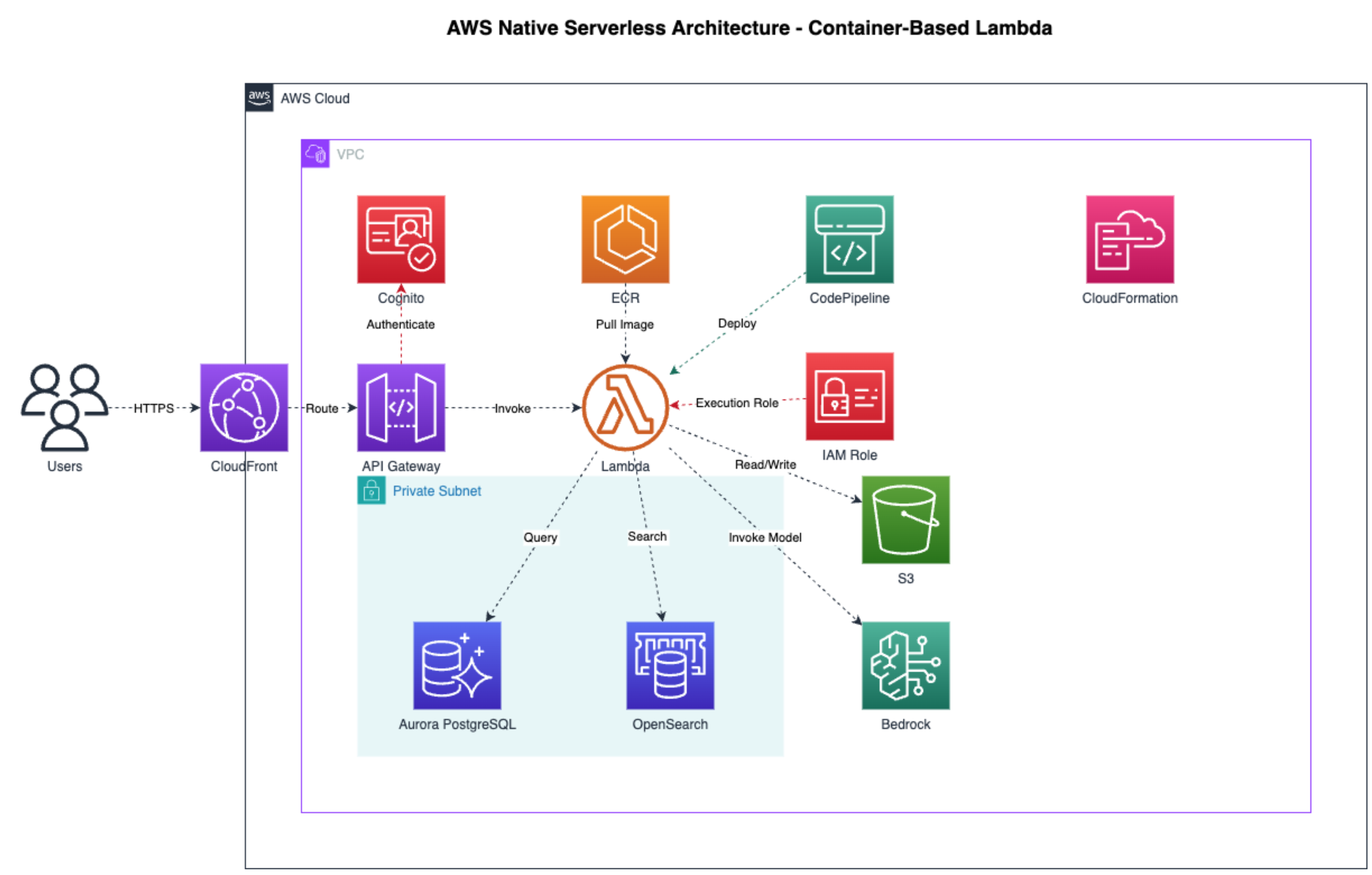
Example AWS architecture diagram generated by the MCP server. The resulting .drawio file can be edited manually in draw.io or programmatically by AI assistants like Kiro.
Getting Started
MCP Client Configuration
Add to your MCP client config (Claude Desktop, Claude Code, Kiro):
{
  "mcpServers": {
    "drawio": {
      "command": "npx",
      "args": [
        "-y",
        "https://github.com/aws-samples/sample-drawio-mcp/releases/latest/download/drawio-mcp-server-latest.tgz",
        "--no-cache"
      ],
      "type": "stdio"
    }
  }
}
See the full Installation Guide for version pinning, platform-specific config paths, and building from source.
📚 Documentation
- JSAPI - JavaScript API documentation for programmatic diagram creation
- Examples - Working code examples and tutorials
- Contributing - Guidelines for contributing to the project
README copy captured when this server was indexed; it may lag the repository. The original is authoritative.