About Swagger MCP
Swagger MCP is an MCP server published by danishjsheikh in the Finance category: mcp server which will dynamically define tools based on swagger.
The repository has 83 stars and 25 forks, with the last commit 3 months ago. Recent commit activity is the strongest signal that reported issues will get attention.
Install
git clone https://github.com/danishjsheikh/swagger-mcpThis server has no ConduID identity, so agent calls to it are not receipted. Pin the version you install and review the source before granting it credentials.
Ask AI
Ask AI about Swagger MCP
Powered by Claude · Grounded in docs
Security checks
Static checks derived from the repository yesterday. Heuristics on the source, not an audit.
- ✓README presentThe repository ships documentation.
- ✓License declaredUsable under a stated license.
- ✓Tests presentA test suite exists in the repository.
- ✓Dependencies pinnedA lockfile pins dependency versions.
- ✓No dynamic code executionSource scan found no eval, dynamic Function, or shell execution.
- !Scoped permissionsDoesn't declare a permission scope. Assume it can do anything its process can.
README
swagger-mcp

Overview
swagger-mcp is a tool that reads a Swagger 2.0 or OpenAPI 3.0 specification and dynamically generates MCP tools at runtime — one tool per API endpoint. These tools can be used by any MCP client for LLM-driven API interaction.
Supported spec formats:
- Swagger 2.0 (
swagger: "2.0") — path/query/header parameters andin: bodyrequest bodies - OpenAPI 3.0 (
openapi: "3.0.x") — path/query/header parameters andrequestBodywith inline or$refschemas
Required and optional fields are read from the schema's required array and honoured in the generated tool definitions.
📽️ Demo Video
Check out demo video showcasing the project in action:

🙌 Support
If you find this project valuable, please support me on LinkedIn by:
- 👍 Liking and sharing our demo post
- 💬 Leaving your thoughts and feedback in the comments
- 🔗 Connecting with me for future updates
Your support on LinkedIn will help me reach more people and improve the project!
Prerequisites
To use swagger-mcp, ensure you have the following dependencies:
- LLM Model API Key / Local LLM: Requires access to OpenAI, Claude, or Ollama models.
- Any MCP Client: (Used mark3labs - mcphost)
Installation and Setup
go install github.com/danishjsheikh/swagger-mcp@latest
Run Configuration
Stdio mode (default)
swagger-mcp --specUrl=https://your_swagger_api_docs.json
SSE mode
swagger-mcp --specUrl=https://your_swagger_api_docs.json --sse --sseAddr=:8080
StreamableHTTP mode
swagger-mcp --specUrl=https://your_swagger_api_docs.json --http --httpAddr=:8080
All flags
| Flag | Description |
|---|---|
--specUrl |
URL or file:// path of the Swagger/OpenAPI JSON spec (required) |
--baseUrl |
Override the base URL for API requests |
--sse |
Run in SSE mode instead of stdio |
--sseAddr |
SSE listen address, :Port or IP:Port |
--sseUrl |
SSE base URL (auto-derived from --sseAddr if omitted) |
--sseHeaders |
Comma-separated request headers to forward from SSE to API (e.g. Authorization,X-Tenant) |
--http |
Run in StreamableHTTP mode instead of stdio |
--httpAddr |
StreamableHTTP listen address, :Port or IP:Port |
--httpPath |
StreamableHTTP endpoint path (default /mcp) |
--httpHeaders |
Comma-separated request headers to forward from HTTP to API |
--includePaths |
Comma-separated paths or regex patterns to include |
--excludePaths |
Comma-separated paths or regex patterns to exclude |
--includeMethods |
Comma-separated HTTP methods to include (e.g. GET,POST) |
--excludeMethods |
Comma-separated HTTP methods to exclude |
--security |
Auth type: basic, bearer, or apiKey |
--basicAuth |
Basic auth credentials in user:password format |
--bearerAuth |
Bearer token for the Authorization header |
--apiKeyAuth |
API key(s): passAs:name=value — passAs is header, query, or cookie; multiple entries comma-separated (e.g. header:token=abc,query:user=foo) |
--headers |
Additional static headers for every request, name1=value1,name2=value2 |
Xquik OpenAPI Example
Xquik publishes a remote OpenAPI document for its X/Twitter automation API.
Because it uses an API key header, pass the key with --security=apiKey and
--apiKeyAuth:
export XQUIK_API_KEY="your-xquik-api-key"

swagger-mcp \
  --specUrl=https://xquik.com/openapi.json \
  --baseUrl=https://xquik.com \
  --security=apiKey \
  --apiKeyAuth=header:x-api-key=$XQUIK_API_KEY
The same arguments can be used in an MCP client config:
{
  "mcpServers": {
    "xquik": {
      "command": "swagger-mcp",
      "args": [
        "--specUrl=https://xquik.com/openapi.json",
        "--baseUrl=https://xquik.com",
        "--security=apiKey",
        "--apiKeyAuth=header:x-api-key=<XQUIK_API_KEY>"
      ]
    }
  }
}
MCP Configuration
To integrate with mcphost, include the following configuration in .mcp.json:
{
    "mcpServers": {
        "swagger_loader": {
            "command": "swagger-mcp",
            "args": ["--specUrl=<swagger/doc.json_url>"]
        }
    }
}
With bearer auth and path filtering:
{
    "mcpServers": {
        "swagger_loader": {
            "command": "swagger-mcp",
            "args": [
                "--specUrl=https://api.example.com/openapi.json",
                "--security=bearer",
                "--bearerAuth=your-token-here",
                "--includeMethods=GET,POST"
            ]
        }
    }
}
Request Body Support
Both Swagger 2.0 and OpenAPI 3.0 request bodies are supported:
- Swagger 2.0:
parameterswithin: bodyand a$refor inline schema underdefinitions - OpenAPI 3.0:
requestBody.content.<media-type>.schema— resolved fromcomponents/schemasif a$ref, or used inline if an object schema
Fields listed in the schema's required array are marked as required in the MCP tool. All other fields are optional and are omitted from the request if not provided.
Demo Flow
-
Some Backend:
go install github.com/danishjsheikh/go-backend-demo@latest go-backend-demo -
Ollama
ollama run llama3.2 -
MCP Client
go install github.com/mark3labs/mcphost@latest
mcphost -m ollama:llama3.2 --config <.mcp.json_file_path>
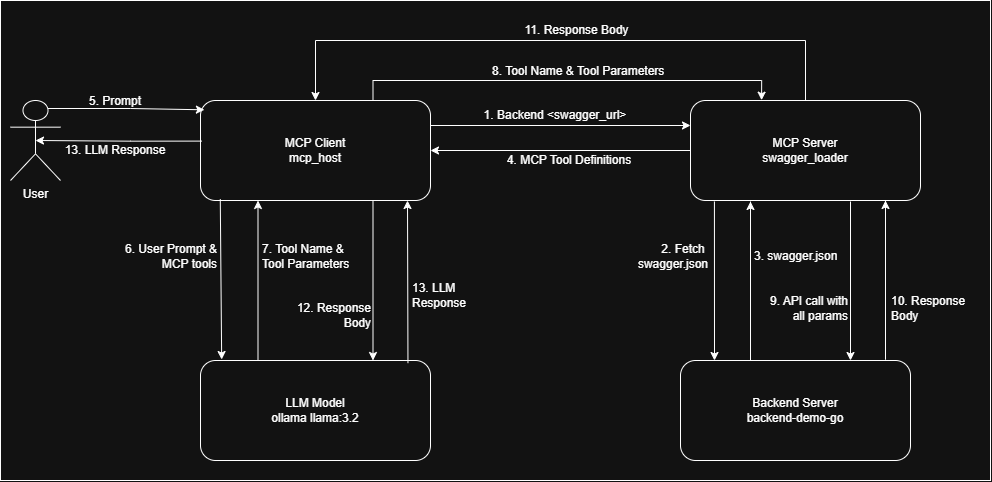
Flow Diagram
🛠️ Need Help
I am working on improving tool definitions to enhance:
✅ Better error handling for more accurate responses
✅ LLM behavior control to ensure it relies only on API responses and does not use its own memory
✅ Preventing hallucinations and random data generation by enforcing strict data retrieval from APIs
If you have insights or suggestions on improving these aspects, please contribute by:
- Sharing your experience with similar implementations
- Suggesting modifications to tool definitions
- Providing feedback on current limitations
Your input will be invaluable in making this tool more reliable and effective! 🚀
README fetched from the repository yesterday. The original is authoritative.