About Ableton Live
Ableton Live is an MCP server published by Simon-Kansara in the Developer Tools category: mCP Server implementation for Ableton Live OSC control.
The repository has 394 stars and 70 forks, with the last commit a year ago. Six months or more without a commit doesn't mean the server is broken, but check the open issues before depending on it in production.
Install
uvx ableton-live-mcp-serverpip install ableton-live-mcp-serverThis server has no ConduID identity, so agent calls to it are not receipted. Pin the version you install and review the source before granting it credentials.
Ask AI
Ask AI about Ableton Live
Powered by Claude · Grounded in docs
Security checks
Static checks derived from the repository 4 days ago. Heuristics on the source, not an audit.
- ✓README presentThe repository ships documentation.
- ✓License declaredUsable under a stated license.
- !Tests presentNo tests found. Behaviour changes may go unnoticed between versions.
- ✓Dependencies pinnedA lockfile pins dependency versions.
- ✓No dynamic code executionSource scan found no eval, dynamic Function, or shell execution.
- !Scoped permissionsDoesn't declare a permission scope. Assume it can do anything its process can.
README
Ableton Live MCP Server
📌 Overview
The Ableton Live MCP Server is a server implementing the Model Context Protocol (MCP) to facilitate communication between LLMs and Ableton Live. It uses OSC (Open Sound Control) to send and receive messages to/from Ableton Live. It is based on AbletonOSC implementation and exhaustively maps available OSC adresses to tools accessible to MCP clients.
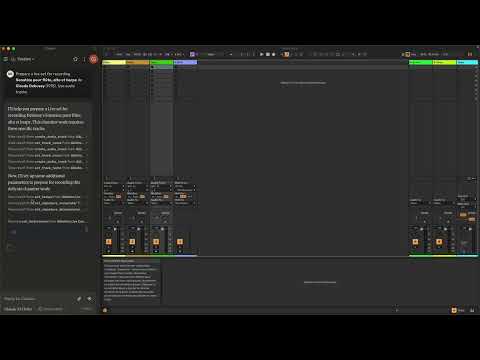
This project consists of two main components:
mcp_ableton_server.py: The MCP server handling the communication between clients and the OSC daemon.osc_daemon.py: The OSC daemon responsible for relaying commands to Ableton Live and processing responses.
✨ Features
- Provides an MCP-compatible API for controlling Ableton Live from MCP clients.
- Uses python-osc for sending and receiving OSC messages.
- Based on the OSC implementation from AbletonOSC.
- Implements request-response handling for Ableton Live commands.
⚡ Installation
Requirements
- Python 3.8+
python-osc(for OSC communication)fastmcp(for MCP support)uv(recommended Python package installer)- AbletonOSC as a control surface
Installation Steps
-
Install
uv(https://docs.astral.sh/uv/getting-started/installation):curl -LsSf https://astral.sh/uv/install.sh | sh -
Clone the repository:
git clone https://github.com/your-username/mcp_ableton_server.git cd mcp_ableton_server -
Install the project and its dependencies:
uv sync -
Install AbletonOSC Follow the instructions at AbletonOSC
🚀 Usage
Running the OSC Daemon
The OSC daemon will handle OSC communication between the MCP server and Ableton Live:
uv run osc_daemon.py
This will:
- Listen for MCP client connections on port 65432.
- Forward messages to Ableton Live via OSC on port 11000.
- Receive OSC responses from Ableton on port 11001.
Example Usage
In Claude desktop, ask Claude:
- Prepare a set to record a rock band
- Set the input routing channel of all tracks that have "voice" in their name to Ext. In 2
⚙️ Configuration
By default, the server and daemon run on localhost (127.0.0.1) with the following ports:
- MCP Server Socket: 65432
- Ableton Live OSC Port (Send): 11000
- Ableton Live OSC Port (Receive): 11001
To modify these, edit the AbletonOSCDaemon class in osc_daemon.py:
self.socket_host = '127.0.0.1'
self.socket_port = 65432
self.ableton_host = '127.0.0.1'
self.ableton_port = 11000
self.receive_port = 11001
Claude Desktop Configuration
To use this server with Claude Desktop, you need to configure it in your Claude Desktop settings. The configuration file location varies by operating system:
- macOS:
~/Library/Application Support/Claude/claude_desktop_config.json - Windows:
%APPDATA%/Claude/claude_desktop_config.json
Add the following configuration to your mcpServers section:
{
  "mcpServers": {
    "Ableton Live Controller": {
      "command": "/path/to/your/project/.venv/bin/python",
      "args": ["/path/to/your/project/mcp_ableton_server.py"]
    }
  }
This configuration ensures that:
- The server runs with all dependencies properly managed
- The project remains portable and reproducible
Contributing
Feel free to submit issues, feature requests, or pull requests to improve this project.
License
This project is licensed under the MIT License. See the LICENSE file for
details.
Acknowledgments
- Model Context Protocol (MCP)
- python-osc for OSC handling
- Daniel John Jones for OSC implementation with AbletonOSC
- Ableton Third Party Remote Scripts
- Julien Bayle @Structure Void for endless inspirations and resources.
TODO
- Explore resources and prompts primitives opportunities.
- Build a standalone Ableton Live MCP client.
README fetched from the repository 4 days ago. The original is authoritative.