About runekaagaard/mcp-alchemy
runekaagaard/mcp-alchemy is an MCP server published by runekaagaard in the Data category: a MCP (model context protocol) server that gives the LLM access to and knowledge about relational databases like SQLite, Postgresql, MySQL & MariaDB, Oracle, and MS-SQL.
The repository has 420 stars and 62 forks, with the last commit 3 days ago. Recent commit activity is the strongest signal that reported issues will get attention.
Install
claude mcp add alchemy -- npx -y @fernforge/alchemy-mcpnpx -y @fernforge/alchemy-mcpThis server has no ConduID identity, so agent calls to it are not receipted. Pin the version you install and review the source before granting it credentials.
Ask AI
Ask AI about runekaagaard/mcp-alchemy
Powered by Claude · Grounded in docs
Security checks
Static checks derived from the repository yesterday. Heuristics on the source, not an audit.
- ✓README presentThe repository ships documentation.
- ✓License declaredUsable under a stated license.
- ✓Tests presentA test suite exists in the repository.
- ✓Dependencies pinnedA lockfile pins dependency versions.
- ✓No dynamic code executionSource scan found no eval, dynamic Function, or shell execution.
- !Scoped permissionsDoesn't declare a permission scope. Assume it can do anything its process can.
Releases
README
MCP Alchemy
Status: Actively maintained and in daily use. Tested releases are published to PyPI with git tags, and issues and pull requests are triaged regularly.
Let Claude be your database expert! MCP Alchemy connects Claude Desktop directly to your databases, allowing it to:
- Help you explore and understand your database structure
- Assist in writing and validating SQL queries
- Displays relationships between tables
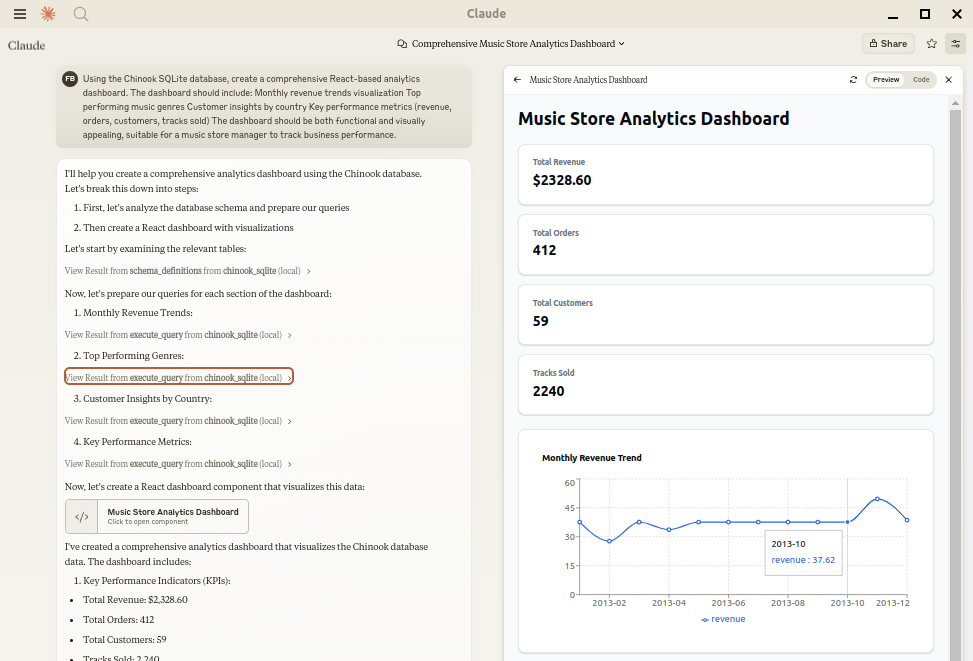
- Analyze large datasets and create reports
- Claude Desktop Can analyse and create artifacts for very large datasets using claude-local-files.
Works with PostgreSQL, MySQL, MariaDB, SQLite, Oracle, MS SQL Server, CrateDB, Vertica, and a host of other SQLAlchemy-compatible databases.
Installation
Ensure you have uv installed:
# Install uv if you haven't already
curl -LsSf https://astral.sh/uv/install.sh | sh
Usage with Claude Desktop
Add to your claude_desktop_config.json. You need to add the appropriate database driver in the --with parameter.
Note: After a new version release there might be a period of up to 600 seconds while the cache clears locally cached causing uv to raise a versioning error. Restarting the MCP client once again solves the error.
SQLite (built into Python)
{
  "mcpServers": {
    "my_sqlite_db": {
      "command": "uvx",
      "args": ["--from", "mcp-alchemy==2026.10.15.202659",
               "--refresh-package", "mcp-alchemy", "mcp-alchemy"],
      "env": {
        "DB_URL": "sqlite:////absolute/path/to/database.db"
      }
    }
  }
}
PostgreSQL
{
  "mcpServers": {
    "my_postgres_db": {
      "command": "uvx",
      "args": ["--from", "mcp-alchemy==2026.10.15.202659", "--with", "psycopg2-binary",
               "--refresh-package", "mcp-alchemy", "mcp-alchemy"],
      "env": {
        "DB_URL": "postgresql://user:password@localhost/dbname"
      }
    }
  }
}
MySQL/MariaDB
{
  "mcpServers": {
    "my_mysql_db": {
      "command": "uvx",
      "args": ["--from", "mcp-alchemy==2026.10.15.202659", "--with", "pymysql",
               "--refresh-package", "mcp-alchemy", "mcp-alchemy"],
      "env": {
        "DB_URL": "mysql+pymysql://user:password@localhost/dbname"
      }
    }
  }
}
Microsoft SQL Server
{
  "mcpServers": {
    "my_mssql_db": {
      "command": "uvx",
      "args": ["--from", "mcp-alchemy==2026.10.15.202659", "--with", "pymssql",
               "--refresh-package", "mcp-alchemy", "mcp-alchemy"],
      "env": {
        "DB_URL": "mssql+pymssql://user:password@localhost/dbname"
      }
    }
  }
}
Oracle
{
  "mcpServers": {
    "my_oracle_db": {
      "command": "uvx",
      "args": ["--from", "mcp-alchemy==2026.10.15.202659", "--with", "oracledb",
               "--refresh-package", "mcp-alchemy", "mcp-alchemy"],
      "env": {
        "DB_URL": "oracle+oracledb://user:password@localhost/dbname"
      }
    }
  }
}
CrateDB
{
  "mcpServers": {
    "my_cratedb": {
      "command": "uvx",
      "args": ["--from", "mcp-alchemy==2026.10.15.202659", "--with", "sqlalchemy-cratedb>=0.42.0.dev1",
               "--refresh-package", "mcp-alchemy", "mcp-alchemy"],
      "env": {
        "DB_URL": "crate://user:password@localhost:4200/?schema=testdrive"
      }
    }
  }
}
For connecting to CrateDB Cloud, use a URL like
crate://user:password@example.aks1.westeurope.azure.cratedb.net:4200?ssl=true.
Vertica
{
  "mcpServers": {
    "my_vertica_db": {
      "command": "uvx",
      "args": ["--from", "mcp-alchemy==2026.10.15.202659", "--with", "vertica-python",
               "--refresh-package", "mcp-alchemy", "mcp-alchemy"],
      "env": {
        "DB_URL": "vertica+vertica_python://user:password@localhost:5433/dbname",
        "DB_ENGINE_OPTIONS": "{\"connect_args\": {\"ssl\": false}}"
      }
    }
  }
}
Docker
A container image is published to GitHub Container Registry with common database drivers (PostgreSQL, MySQL/MariaDB, MS SQL Server, Oracle) preinstalled:
{
  "mcpServers": {
    "my_db": {
      "command": "docker",
      "args": ["run", "-i", "--rm", "-e", "DB_URL",
               "ghcr.io/runekaagaard/mcp-alchemy:latest"],
      "env": {
        "DB_URL": "postgresql://user:password@host.docker.internal/dbname"
      }
    }
  }
}
Or build it yourself with docker build -t ghcr.io/runekaagaard/mcp-alchemy .
Transports
By default the server speaks stdio. It can also serve over HTTP for clients that connect that way:
# Recommended HTTP transport (serves on http://HOST:PORT/mcp)
mcp-alchemy --transport streamable-http --host 127.0.0.1 --port 7000

# Legacy SSE transport, for older clients (serves on http://HOST:PORT/sse)
mcp-alchemy --transport sse --host 127.0.0.1 --port 7000
Environment Variables
DB_URL: SQLAlchemy database URL (required)CLAUDE_LOCAL_FILES_PATH: Directory for full result sets (optional)EXECUTE_QUERY_MAX_CHARS: Maximum output length (optional, default 4000)DB_ENGINE_OPTIONS: JSON string containing additional SQLAlchemy engine options (optional)
Connection Pooling
MCP Alchemy uses connection pooling optimized for long-running MCP servers. The default settings are:
pool_pre_ping=True: Tests connections before use to handle database timeouts and network issuespool_size=1: Maintains 1 persistent connection (MCP servers typically handle one request at a time)max_overflow=2: Allows up to 2 additional connections for burst capacitypool_recycle=3600: Refreshes connections older than 1 hour (prevents timeout issues)isolation_level='AUTOCOMMIT': Ensures each query commits automatically
These defaults work well for most databases, but you can override them via DB_ENGINE_OPTIONS:
{
  "DB_ENGINE_OPTIONS": "{\"pool_size\": 5, \"max_overflow\": 10, \"pool_recycle\": 1800}"
}
For databases with aggressive timeout settings (like MySQL's 8-hour default), the combination of pool_pre_ping and pool_recycle ensures reliable connections.
API
Tools
-
all_table_names
- Return all table names in the database
- No input required
- Returns comma-separated list of tables
users, orders, products, categories -
filter_table_names
- Find tables matching a substring
- Input:
q(string) - Returns matching table names
Input: "user" Returns: "users, user_roles, user_permissions" -
schema_definitions
- Get detailed schema for specified tables
- Input:
table_names(string[]) - Returns table definitions including:
- Column names and types
- Primary keys
- Foreign key relationships
- Nullable flags
users: id: INTEGER, primary key, autoincrement email: VARCHAR(255), nullable created_at: DATETIME Relationships: id -> orders.user_id -
execute_query
- Execute SQL query with vertical output format
- Inputs:
query(string): SQL queryparams(object, optional): Query parameters
- Returns results in clean vertical format:
1. row id: 123 name: John Doe created_at: 2024-03-15T14:30:00 email: NULL Result: 1 rows- Features:
- Smart truncation of large results
- Full result set access via claude-local-files integration
- Clean NULL value display
- ISO formatted dates
- Clear row separation
Claude Local Files
When claude-local-files is configured:
- Access complete result sets beyond Claude's context window
- Generate detailed reports and visualizations
- Perform deep analysis on large datasets
- Export results for further processing
The integration automatically activates when CLAUDE_LOCAL_FILES_PATH is set.
Developing
First clone the github repository, install the dependencies and your database driver(s) of choice:
git clone git@github.com:runekaagaard/mcp-alchemy.git
cd mcp-alchemy
uv sync
uv pip install psycopg2-binary
Then set this in claude_desktop_config.json:
...
"command": "uv",
"args": ["run", "--directory", "/path/to/mcp-alchemy", "-m", "mcp_alchemy.server", "main"],
...
My Other LLM Projects
- MCP Redmine - Let Claude Desktop manage your Redmine projects and issues.
- MCP Notmuch Sendmail - Email assistant for Claude Desktop using notmuch.
- MCP Show-on-Kindle - Copy a file to a Kindle running KOReader and open it on screen.
- Diffpilot - Multi-column git diff viewer with file grouping and tagging.
- Claude Local Files - Access local files in Claude Desktop artifacts.
MCP Directory Listings
MCP Alchemy is listed in the following MCP directory sites and repositories:
Contributing
Contributions are warmly welcomed! Whether it's bug reports, feature requests, documentation improvements, or code contributions - all input is valuable. Feel free to:
- Open an issue to report bugs or suggest features
- Submit pull requests with improvements
- Enhance documentation or share your usage examples
- Ask questions and share your experiences
The goal is to make database interaction with Claude even better, and your insights and contributions help achieve that.
License
Mozilla Public License Version 2.0
README fetched from the repository yesterday. The original is authoritative.