About Archi MCP
Archi MCP is an MCP server published by entira in the Developer Tools category: entprise architect assistant.
The repository has 32 stars and 7 forks, with the last commit 10 months ago. Six months or more without a commit doesn't mean the server is broken, but check the open issues before depending on it in production.
Install
git clone https://github.com/entira/archi-mcpThis server has no ConduID identity, so agent calls to it are not receipted. Pin the version you install and review the source before granting it credentials.
Ask AI
Ask AI about Archi MCP
Powered by Claude · Grounded in docs
Security checks
Static checks derived from the repository 5 days ago. Heuristics on the source, not an audit.
- ✓README presentThe repository ships documentation.
- ✓License declaredUsable under a stated license.
- ✓Tests presentA test suite exists in the repository.
- ✓Dependencies pinnedA lockfile pins dependency versions.
- ✓No dynamic code executionSource scan found no eval, dynamic Function, or shell execution.
- !Scoped permissionsDoesn't declare a permission scope. Assume it can do anything its process can.
Releases
README
ArchiMate MCP Server









A specialized MCP (Model Context Protocol) server for generating PlantUML ArchiMate diagrams with comprehensive enterprise architecture modeling support.
✨ Claude Code & Claude Desktop Compatible: Fully tested with both Claude Code CLI and Claude Desktop. Automatic parameter handling ensures seamless operation across both platforms (v1.0.2+).
🎯 Live Architecture Demo: This repository includes a complete architectural blueprint of the ArchiMate MCP Server itself, spanning all 7 ArchiMate layers with 8 coordinated views. See the generated diagrams below for a real-world demonstration of the tool's capabilities.
🏗️ Overview
ArchiMate MCP Server fills a crucial gap in the MCP ecosystem by providing dedicated support for ArchiMate enterprise architecture modeling. While existing MCP servers offer general UML diagram generation, this server focuses specifically on ArchiMate 3.2 specification compliance with full support for all layers, elements, and relationships.
Key Features
- Complete ArchiMate 3.2 Support: All 55+ elements across 100% of 7 layers (Motivation, Strategy, Business, Application, Technology, Physical, Implementation)
- Universal PlantUML Generation: All layers now supported with official PlantUML ArchiMate sprites and syntax
- Intelligent Input Normalization: Case-insensitive inputs with automatic correction and helpful error messages
- Built-in Validation: Comprehensive 4-step validation pipeline with real-time error detection
- macOS-Optimized PNG/SVG Generation: Headless mode prevents cursor interference + live HTTP server for instant viewing (uses up-to-date PlantUML 1.2025.4)
- 2 Core MCP Tools: Focused diagram creation and element normalization testing
- Real-time Error Analysis: Actionable troubleshooting guidance with pattern recognition and fix suggestions
- FastMCP 2.8+ Integration: Modern MCP protocol implementation with comprehensive schema discovery
- Production-Ready Testing: 182 passing tests with 70% coverage and comprehensive test suites across all layers
- Multi-Language Support: Automatic language detection (Slovak/English) with customizable relationship labels
- Advanced Layout Control: Configurable direction, spacing, grouping with environment variable defaults
🚀 Quick Start
Installation
# Clone the repository
git clone https://github.com/entira/archi-mcp.git
cd archi-mcp

# Install dependencies with uv
uv sync

# Download PlantUML JAR (required for diagram generation)
curl -L https://github.com/plantuml/plantuml/releases/latest/download/plantuml.jar -o plantuml.jar
Upgrading to Latest Version
# Navigate to your archi-mcp directory
cd archi-mcp

# Fetch latest changes
git fetch origin

# Upgrade to specific version (e.g., v1.0.2)
git checkout v1.0.2

# Or upgrade to latest main branch
git checkout main
git pull origin main

# Update dependencies
uv sync

# Download latest PlantUML JAR if needed
curl -L https://github.com/plantuml/plantuml/releases/latest/download/plantuml.jar -o plantuml.jar
Claude Desktop Configuration
Add to your Claude Desktop configuration file:
macOS: ~/Library/Application Support/Claude/claude_desktop_config.json
Windows: %APPDATA%\Claude\claude_desktop_config.json
Configuration for local installation:
{
  "mcpServers": {
    "archi-mcp": {
      "command": "uv",
      "args": ["run", "--directory", "/path/to/your/archi-mcp", "python", "-m", "archi_mcp.server"],
      "cwd": "/path/to/your/archi-mcp",
      "env": {
        "ARCHI_MCP_LOG_LEVEL": "INFO",
        "ARCHI_MCP_STRICT_VALIDATION": "true",
        "ARCHI_MCP_LANGUAGE": "auto",
        "ARCHI_MCP_DEFAULT_DIRECTION": "top-bottom",
        "ARCHI_MCP_DEFAULT_SPACING": "comfortable",
        "ARCHI_MCP_DEFAULT_TITLE": "true",
        "ARCHI_MCP_DEFAULT_LEGEND": "false",
        "ARCHI_MCP_DEFAULT_GROUP_BY_LAYER": "false",
        "ARCHI_MCP_DEFAULT_SHOW_RELATIONSHIP_LABELS": "true",
        "ARCHI_MCP_LOCK_DIRECTION": "false",
        "ARCHI_MCP_LOCK_SPACING": "false",
        "ARCHI_MCP_LOCK_TITLE": "false",
        "ARCHI_MCP_LOCK_LEGEND": "false",
        "ARCHI_MCP_LOCK_GROUP_BY_LAYER": "false",
        "ARCHI_MCP_LOCK_SHOW_RELATIONSHIP_LABELS": "false"
      }
    }
  }
}
Environment Variables
Core Configuration:
- ARCHI_MCP_LOG_LEVEL: Logging level (
DEBUG,INFO,WARNING,ERROR). Default:INFO - ARCHI_MCP_STRICT_VALIDATION: Enable strict ArchiMate validation (
true/false). Default:true
Language Settings:
- ARCHI_MCP_LANGUAGE: Language for relationship labels:
auto: Auto-detect from content (Slovak/English)en: Force English labelssk: Force Slovak labels- Default:
auto
Layout Defaults:
-
ARCHI_MCP_DEFAULT_DIRECTION: Default layout direction:
top-bottom: Vertical top-to-bottom flowleft-right: Horizontal left-to-right flowvertical: Same as top-bottomhorizontal: Same as left-right- Default:
top-bottom
-
ARCHI_MCP_DEFAULT_SPACING: Default element spacing:
compact: Minimal spacing between elementsbalanced: Moderate spacing for readabilitycomfortable: Maximum spacing for clarity- Default:
comfortable
-
ARCHI_MCP_DEFAULT_TITLE: Show diagram title (
true/false). Default:true -
ARCHI_MCP_DEFAULT_LEGEND: Show legend with element types (
true/false). Default:false -
ARCHI_MCP_DEFAULT_GROUP_BY_LAYER: Group elements by ArchiMate layer (
true/false). Default:false -
ARCHI_MCP_DEFAULT_SHOW_RELATIONSHIP_LABELS: Show enhanced relationship labels (
true/false). Default:true
Parameter Locking (Prevent Client Override):
- ARCHI_MCP_LOCK_DIRECTION: Lock direction parameter (
true/false). Default:false - ARCHI_MCP_LOCK_SPACING: Lock spacing parameter (
true/false). Default:false - ARCHI_MCP_LOCK_TITLE: Lock title parameter (
true/false). Default:false - ARCHI_MCP_LOCK_LEGEND: Lock legend parameter (
true/false). Default:false - ARCHI_MCP_LOCK_GROUP_BY_LAYER: Lock grouping parameter (
true/false). Default:false - ARCHI_MCP_LOCK_SHOW_RELATIONSHIP_LABELS: Lock relationship labels parameter (
true/false). Default:false
XML Export (Experimental):
- ARCHI_MCP_ENABLE_UNIVERSAL_FIX: Enable universal relationship fixing for Archi compatibility (
true/false). Default:true - ARCHI_MCP_ENABLE_VALIDATION: Enable XML validation logging (
true/false). Default:false - ARCHI_MCP_ENABLE_AUTO_FIX: Enable automatic relationship correction (
true/false). Default:false
HTTP Server:
- ARCHI_MCP_HTTP_PORT: Port for diagram viewing server (number). Default:
8080 - ARCHI_MCP_HTTP_HOST: Host for diagram server (
localhost,0.0.0.0). Default:localhost
Basic Usage
Once configured, you can use ArchiMate MCP Server through Claude Desktop:
Diagram Generation:
Create a simple service-oriented diagram with:
- A customer facing business service
- An application service implementing it
- A supporting technology node
Show how the layers interact.
The server automatically:
- Generates all diagram formats (PlantUML, PNG, SVG, XML)
- Starts an HTTP server for instant viewing
- Returns direct URLs for immediate access (e.g., http://localhost:8080/diagram.png)
- Saves all outputs to timestamped directories in
exports/
🏛️ Complete Architecture Demonstration
This repository showcases comprehensive architectural documentation of the ArchiMate MCP Server itself, spanning all 7 ArchiMate layers with production-ready diagrams. Each layer is fully supported with complete PlantUML generation:
🎯 Complete Layered Architecture Overview
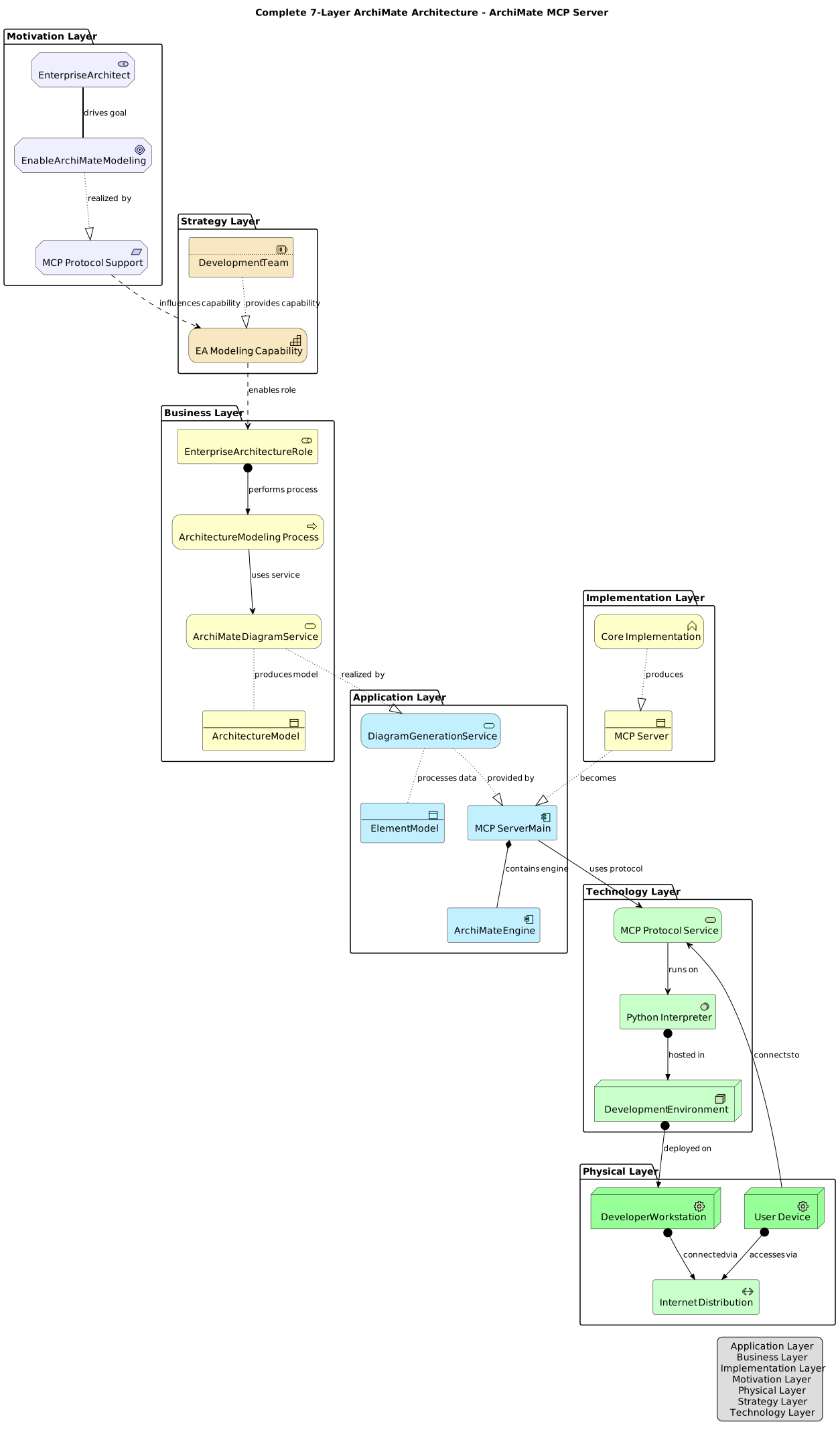 Comprehensive view showing key elements from all 7 ArchiMate layers with cross-layer relationships
🎯 Motivation Layer
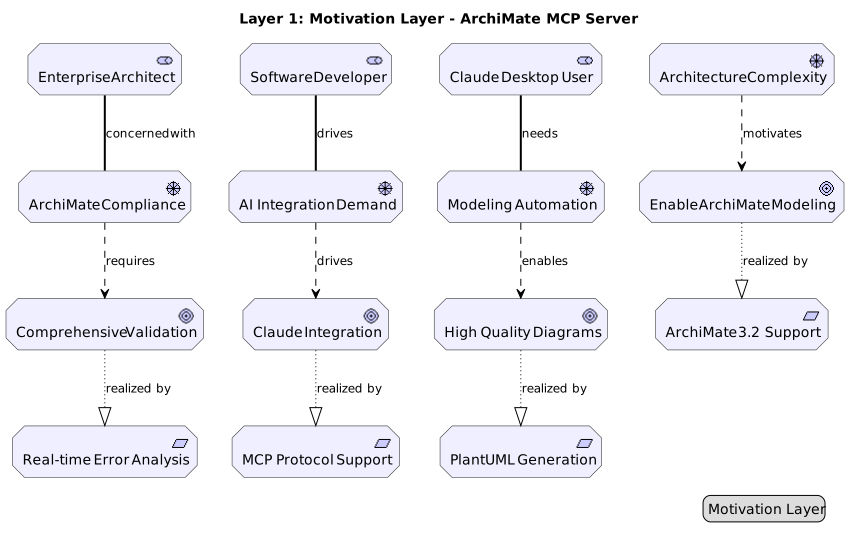 Stakeholders, drivers, goals, and requirements driving the ArchiMate MCP Server implementation
- Stakeholders: Enterprise Architect, Software Developer, Claude Desktop User
- Drivers: Architecture Complexity, ArchiMate Compliance, Modeling Automation, AI Integration Demand
- Goals: Enable ArchiMate Modeling, Claude Integration, High Quality Diagrams, Comprehensive Validation
- Requirements: MCP Protocol Support, ArchiMate 3.2 Support, PlantUML Generation, Real-time Error Analysis
📋 Strategy Layer
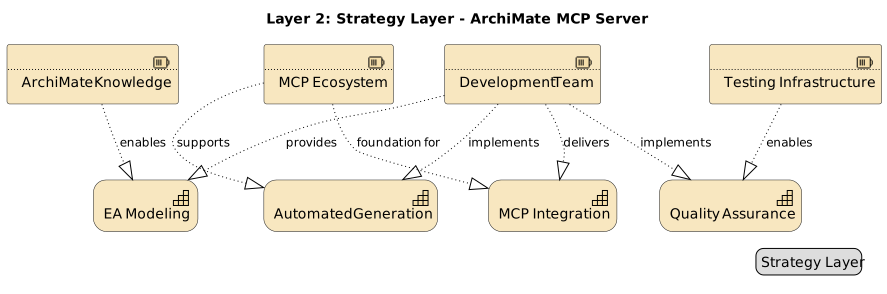 Strategic resources, capabilities, and courses of action for the ArchiMate MCP Server
- Resources: ArchiMate IP Knowledge, Development Team, MCP Ecosystem, Testing Infrastructure
- Capabilities: Enterprise Architecture Modeling, Automated Diagram Generation, MCP Protocol Integration, Quality Assurance
- Courses of Action: Open Source Strategy, MCP-First Strategy, Standards Compliance Strategy, Continuous Testing Strategy
🏢 Business Layer
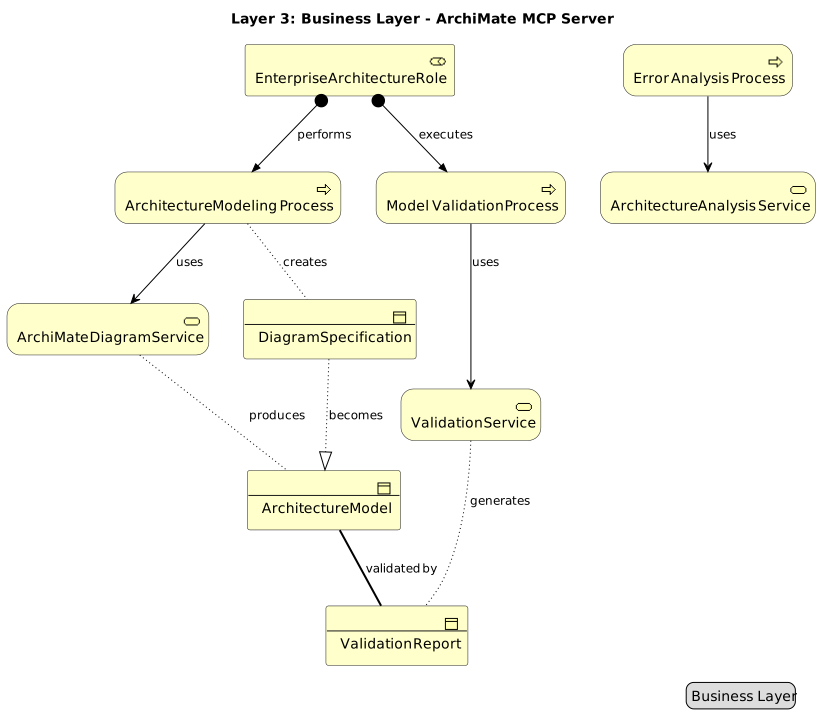 Business actors, processes, services, and objects for architecture modeling
- Business Actor: Enterprise Architecture Role (responsible for creating and maintaining enterprise architecture models)
- Business Processes: Architecture Modeling Process, Model Validation Process, Error Analysis Process
- Business Services: ArchiMate Diagram Service, Architecture Analysis Service, Validation Service
- Business Objects: Architecture Model, Diagram Specification, Validation Report
💻 Application Layer
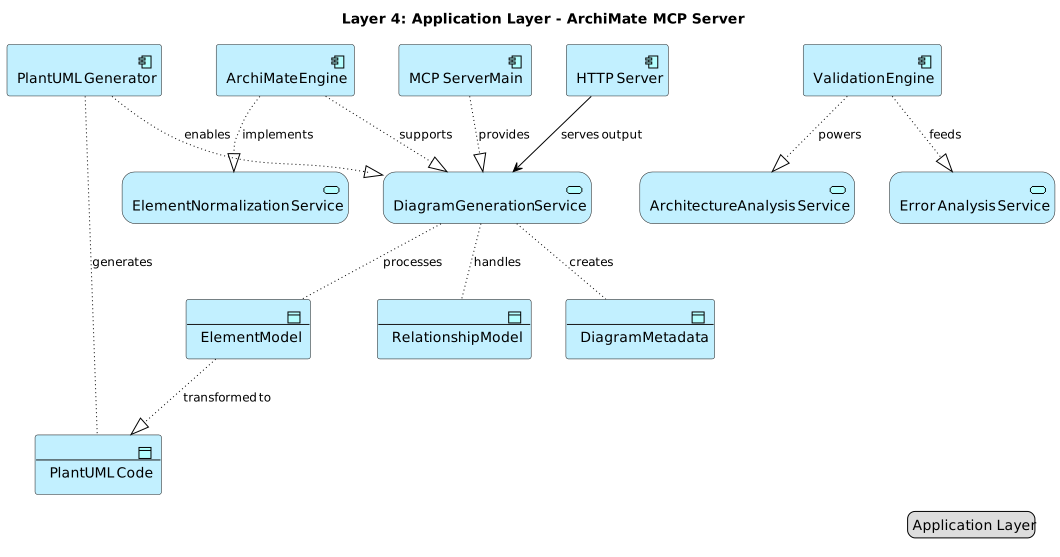 Application components, services, and data objects implementing the MCP server
- Components: MCP Server Main, ArchiMate Engine, PlantUML Generator, Validation Engine, HTTP Server
- Services: Diagram Generation Service, Architecture Analysis Service, Element Normalization Service, Error Analysis Service
- Data Objects: Element Model, Relationship Model, PlantUML Code, Diagram Metadata
⚙️ Technology Layer
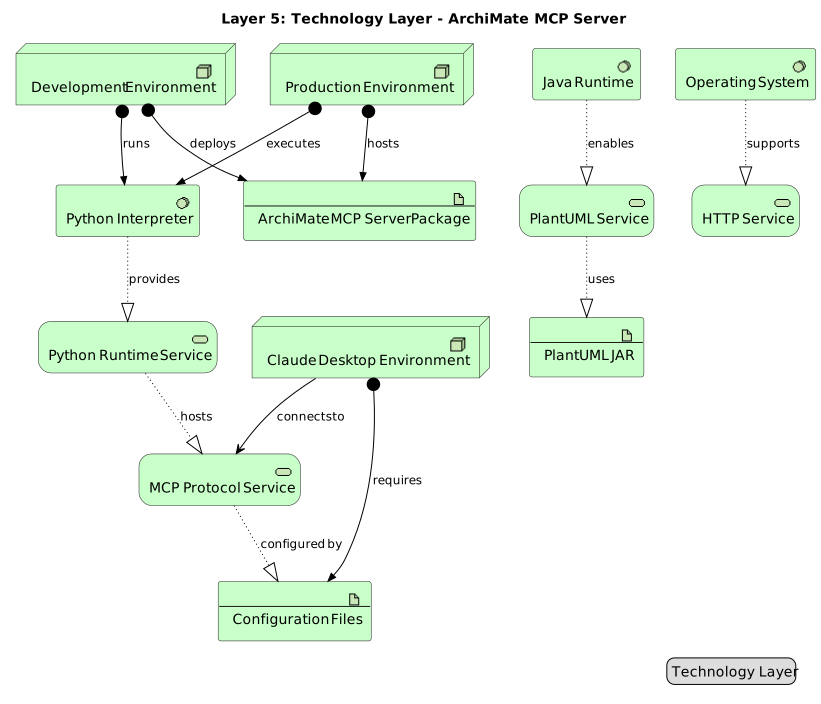 Technology services, system software, nodes, and artifacts supporting the MCP server
- Technology Services: MCP Protocol Service, PlantUML Service, Python Runtime Service, HTTP Service
- System Software: Python Interpreter (3.11+), Java Runtime, Operating System
- Nodes: Development Environment, Production Environment, Claude Desktop Environment
- Artifacts: ArchiMate MCP Server Package, PlantUML JAR (v1.2025.4), Configuration Files
🏗️ Physical Layer
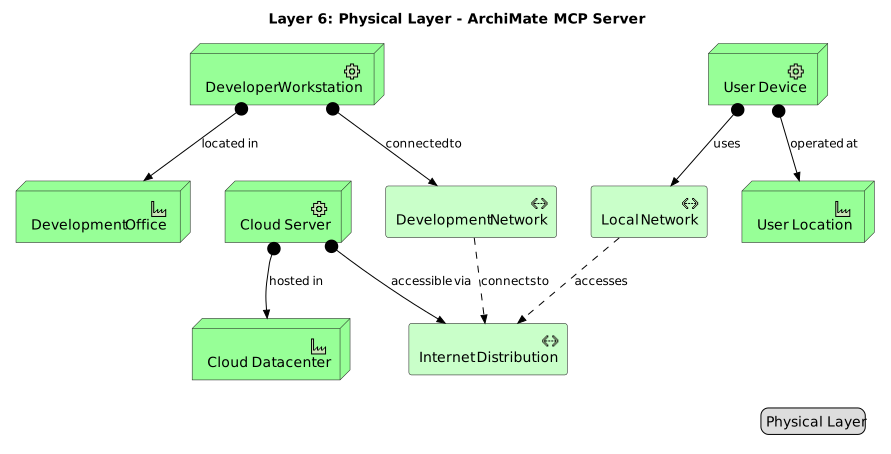 Physical equipment, facilities, and distribution networks supporting the ArchiMate MCP Server
- Equipment: Developer Workstation, Cloud Server, User Device
- Facilities: Development Office, Cloud Datacenter, User Location
- Distribution Networks: Development Network, Internet Distribution, Local Network
🚀 Implementation & Migration Layer
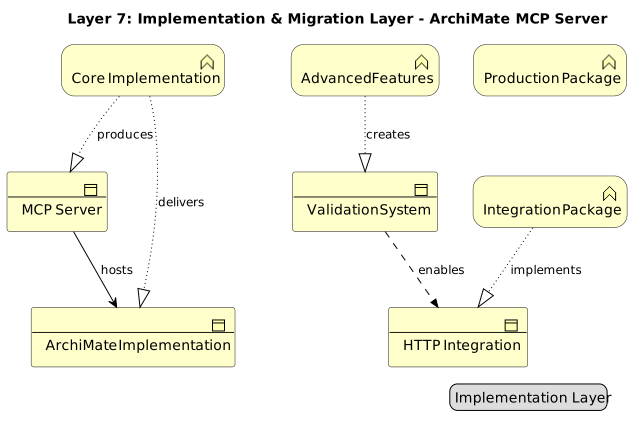 Work packages, deliverables, plateaus, and implementation events for the ArchiMate MCP Server rollout
- Work Packages: Core MCP Implementation, Advanced Features Package, Integration Package, Production Release Package
- Deliverables: MCP Protocol Implementation, ArchiMate Engine, Validation Framework, HTTP Server Integration, Test Suite
- Plateaus: Development Plateau, Feature Complete Plateau, Integration Plateau, Production Plateau
- Events: Project Start, Core Milestone, Feature Milestone, Release Event
💡 Complete ArchiMate 3.2 Coverage: All 7 layers successfully generated using the ArchiMate MCP Server itself, demonstrating 100% layer support and production readiness.
🏛️ ArchiMate Support
Supported Layers
- Business Layer: Actors, roles, processes, services, objects
- Application Layer: Components, services, interfaces, data objects
- Technology Layer: Nodes, devices, software, networks, artifacts
- Physical Layer: Equipment, facilities, distribution networks, materials
- Motivation Layer: Stakeholders, drivers, goals, requirements, principles
- Strategy Layer: Resources, capabilities, courses of action, value streams
- Implementation Layer: Work packages, deliverables, events, plateaus, gaps
Supported Relationships
All 12 ArchiMate relationship types with directional variants:
- Access, Aggregation, Assignment, Association
- Composition, Flow, Influence, Realization
- Serving, Specialization, Triggering
Junction Support
- And/Or junctions for complex relationship modeling
- Grouping and nesting capabilities
🛠️ MCP Tools
The server exposes 2 core tools via FastMCP:
1. create_archimate_diagram
Generate complete ArchiMate diagrams from structured input with:
- Support for all 55+ element types across 7 layers
- All 12 ArchiMate relationship types with directional support
- Intelligent input normalization and validation
- Multi-format export: PlantUML (.puml), PNG, SVG, ArchiMate XML (.archimate)
- Built-in HTTP server with direct viewing URLs
- Comprehensive layout configuration options
- Multi-language support (auto-detects Slovak/English)
2. test_element_normalization
Test element type normalization across all ArchiMate layers:
- Validates case-insensitive input handling
- Tests common element type mappings
- Verifies layer and relationship normalization
- Essential for troubleshooting input issues
ArchiMate Viewpoints
- Layered: Cross-layer relationships and dependencies
- Service Realization: How services are realized by components
- Application Cooperation: Application component interactions
- Technology Usage: Infrastructure and technology stack
- Motivation: Stakeholders, drivers, goals, and requirements
Architecture Patterns
- Three-Tier Architecture: Presentation, business logic, data layers
- Microservices: Service-oriented architecture with API gateway
- Event-Driven: Event producers, consumers, and message flows
- Layered Service: Service-oriented layered architecture
- CQRS: Command Query Responsibility Segregation pattern
🧪 Development
🔧 For complete development setup, testing, and contribution guidelines, see CLAUDE.md
Quick Start for Developers:
git clone https://github.com/entira/archi-mcp.git
cd archi-mcp
uv sync --dev
uv run pytest
Project Structure
archi-mcp/
├── src/archi_mcp/           # Library and server code
│   ├── archimate/           # Modeling components
│   ├── i18n/                # Internationalization
│   ├── xml_export/          # XML export functionality
│   ├── utils/               # Logging and exceptions
│   └── server.py            # FastMCP server entry point
├── tests/                   # Test suites (194 tests, 66% coverage)
├── docs/                    # Documentation and diagrams
💡 Production Validation: All architecture diagrams were generated using the ArchiMate MCP Server itself, proving 100% ArchiMate 3.2 layer support and production readiness.
🤝 Contributing
🔧 For complete development guidelines, code style, and contribution workflow, see CLAUDE.md
Contributions are welcome! The project follows standard open source practices with comprehensive testing and documentation requirements.
📄 License
This project is licensed under the MIT License - see the LICENSE file for details.
🙏 Acknowledgments
- ArchiMate® 3.2 Specification by The Open Group
- PlantUML for diagram generation capabilities
- Model Context Protocol (MCP) for enabling AI assistant integration
- Anthropic for Claude and MCP development
🗺️ Roadmap
- Export to ArchiMate Open Exchange Format (Experimental)
- PlantUML is the primary output - fully tested and production-ready
- XML export is experimental - may not be 100% ArchiMate compliant
- Use for exploration - XML export is bonus functionality for those who need it
- Enhanced XML validation and auto-fix capabilities
- Additional language support (beyond Slovak/English)
- Custom ArchiMate viewpoint templates
README fetched from the repository 5 days ago. The original is authoritative.