About Cellpose MCP
Cellpose MCP is an MCP server published by surajinacademia in the Content category: mCP tools for Cellpose and napari integration.
Recent commit activity is the strongest signal that reported issues will get attention.
Install
git clone https://github.com/surajinacademia/cellpose_mcpThis server has no ConduID identity, so agent calls to it are not receipted. Pin the version you install and review the source before granting it credentials.
Ask AI
Ask AI about Cellpose MCP
Powered by Claude · Grounded in docs
Security checks
- ✓README presentThe repository ships documentation.
- ✓License declaredUsable under a stated license.
- !Scoped permissionsDoesn't declare a permission scope. Assume it can do anything its process can.
3 checks have not been run yet.
Releases
README
Cellpose MCP Server



Cellpose-mcp is a Model Context Protocol (MCP) server that enables AI assistants like Claude, Cursor IDE, etc. to perform cell segmentation through natural language commands. This tool exposes comprehensive Cellpose functionality through 13+ MCP tools, including 2D/3D segmentation, batch processing, image restoration (denoising, deblurring, upsampling), and custom model training. The system integrates seamlessly with Napari, enabling complete workflows from segmentation to interactive visualization.
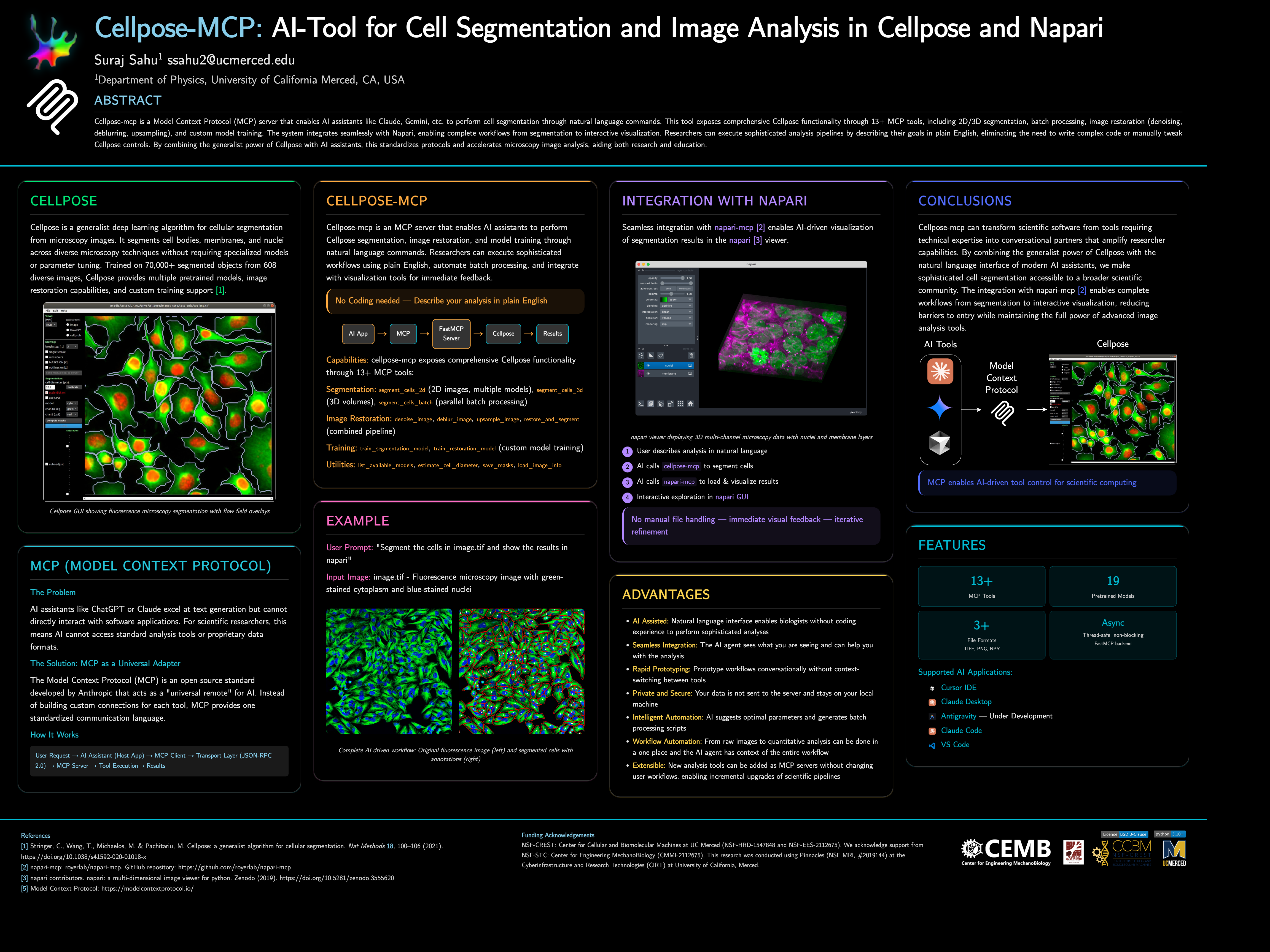
📌 Note: This project started as a fun project inspired by napari-mcp and adapted for Cellpose segmentation workflows. If you would like to contribute then please get in touch with me at ssahu2@ucmerced.edu.
🚀 Quick Start
Requirements: Python 3.10 or later (use a virtual environment or conda).
Install from PyPI:
pip install cellpose-mcp
Install and configure for Cursor in one go:
pip install cellpose-mcp && cellpose-mcp-install cursor
The installer uses the Python that runs the command (or a conda env named Cellpose_mcp if present). Restart Cursor after configuring.
Development install (from source):
git clone https://github.com/surajinacademia/cellpose_mcp.git
cd cellpose_mcp
pip install -e .
Auto-Configure Your AI Application
After pip install cellpose-mcp, run the installer for your app. It writes to the correct MCP config file using your current Python.
| Application | Command | Notes |
|---|---|---|
| Cursor IDE | cellpose-mcp-install cursor |
Writes to ~/.cursor/mcp.json |
| Claude Desktop | cellpose-mcp-install claude-desktop |
Adds to Claude Desktop config |
| Antigravity | cellpose-mcp-install antigravity |
Configures Antigravity MCP |
| VS Code (Cline/Roo Cline) | cellpose-mcp-install vscode |
Configures Cline/Roo Cline extension |
| Claude Code | Manual only | See Manual Configuration below |
Options: --python-path /path/to/python to use a specific Python; --env-name NAME to use a conda env (default: Cellpose_mcp).
If you prefer manual setup (or use Claude Code), create a .mcp.json file in your project root. Use the full path to your Python executable if python is not the one that has cellpose-mcp installed (e.g. a venv or conda):
{
  "mcpServers": {
    "cellpose": {
      "command": "python",
      "args": ["-m", "cellpose_mcp"],
      "env": {
        "KMP_DUPLICATE_LIB_OK": "TRUE",
        "OMP_NUM_THREADS": "1"
      }
    }
  }
}
For Cursor, use the same structure in ~/.cursor/mcp.json (global) or .cursor/mcp.json in your project.
After installation, restart your AI app and try asking:
"Can you list available Cellpose models?"
"Segment the cells in ./data/sample.tif using the cyto2 model"
🎯 What Can You Do?
Example: Cell Segmentation in Action
Basic Cell Segmentation
"Segment the cells in ./data/sample.tif using the cyto2 model"
"List available Cellpose models"
"Estimate cell diameter from ./data/image.tif"
Advanced Workflows
"Segment all TIFF files in ./data/images/ and save masks to ./output/"
"Train a custom segmentation model using images in ./train/images/ and masks in ./train/masks/"
"Restore and segment the noisy image in ./data/noisy.tif using oneclick_cyto3"
Batch Processing
"Process all images in ./data/ with the cyto2 model and save results to ./output/"
🛠 Available MCP Tools
The server exposes 13+ tools for complete Cellpose functionality:
Segmentation Tools
segment_cells_2d- Segment cells in 2D imagessegment_cells_3d- Segment cells in 3D volumessegment_cells_batch- Batch process multiple images
Image Restoration Tools
denoise_image- Denoise microscopy imagesdeblur_image- Deblur microscopy imagesupsample_image- Upsample low-resolution imagesrestore_and_segment- Combined restoration + segmentation
Training Tools
train_segmentation_model- Train custom segmentation modeltrain_restoration_model- Train custom restoration model
Utility Tools
list_available_models- List all pretrained modelsestimate_cell_diameter- Estimate cell diameter from imagesave_masks- Save masks in various formatsload_image_info- Get image metadata
📖 Documentation
- Quick Start Guide - Get running in 3 steps
- Available Tools - Complete tool list
- Release Notes - Detailed v0.1.0 release information
- Changelog - Version history and changes
📋 Architecture
- FastMCP Server: Handles MCP protocol communication
- Cellpose Integration: Manages model loading and segmentation operations
- Tool Layer: Exposes Cellpose functionality as MCP tools
- File I/O: Handles image reading, writing, and mask generation
Key features:
- Thread-safe: All operations are properly serialized
- Non-blocking: Async operations for better performance
- Napari Integration: Integration with Napari for visualization and analysis
Author: Suraj Sahu
Affiliation: Department of Physics, University of California Merced, CA, USA
Email: ssahu2@ucmerced.edu
📄 License
BSD-3-Clause License - see LICENSE file for details.
🙏 Acknowledgments
- Napari MCP by royerlab
- Cellpose team for the excellent segmentation library
- FastMCP for the MCP framework
- Anthropic for Claude and MCP development
- Model Context Protocol - Open standard for AI-tool integration
README copy captured when this server was indexed; it may lag the repository. The original is authoritative.