About Codamcpserver
Codamcpserver is an MCP server published by elberrd in the Developer Tools category: mCP server: Codamcpserver.
The repository has 5 stars and 3 forks, with the last commit a year ago. Six months or more without a commit doesn't mean the server is broken, but check the open issues before depending on it in production.
Install
git clone https://github.com/elberrd/CodaMcpServerThis server has no ConduID identity, so agent calls to it are not receipted. Pin the version you install and review the source before granting it credentials.
Ask AI
Ask AI about Codamcpserver
Powered by Claude · Grounded in docs
Security checks
Static checks derived from the repository 8 days ago. Heuristics on the source, not an audit.
- ✓README presentThe repository ships documentation.
- !License declaredNo license file. Legally you have no right to use it in a product.
- !Tests presentNo tests found. Behaviour changes may go unnoticed between versions.
- ✓Dependencies pinnedA lockfile pins dependency versions.
- ✓No dynamic code executionSource scan found no eval, dynamic Function, or shell execution.
- !Scoped permissionsDoesn't declare a permission scope. Assume it can do anything its process can.
README
MCP Server - Coda.io
A Model Context Protocol (MCP) server implementation for seamless integration with Coda's API, providing various tools for document, table, and data management.
Features
- Table Operations
- Fetch all tables from a document
- Retrieve specific table data
- Get table columns information
- Row Management
- Fetch rows from tables
- Upsert (insert/update) rows
- Delete rows
- Column Operations
- Fetch specific column details
- Get column metadata
Prerequisites
- Node.js (v20 or higher)
- A Coda API key
- TypeScript knowledge (for development)
Environment Setup
- Clone or fork this repository in Replit
- Create a
.envfile in the root directory:PORT=8000 CODA_API_KEY=your_coda_api_key_here - Replace
your_coda_api_key_herewith your actual Coda API key
Installation
The project uses npm for dependency management. To install dependencies:
npm install
Building the Project
Compile TypeScript files to JavaScript:
npx tsc
Running the Server
After building, start the server:
node dist/index.js
Or use the combined command:
npm install && npx tsc && node dist/index.js
The server will start on port 8000 by default, with the following endpoints available:
- GET
/sse- SSE connection endpoint - POST
/messages- Message handling endpoint
Available Tools
-
fetch-coda-docs- Fetches all available Coda documents
- Optional parameters: isOwner, limit
-
fetch-coda-tables- Fetches all tables from a specified document
- Required parameter: docId
-
fetch-coda-table- Fetches a specific table from a document
- Required parameters: docId, tableId
-
fetch-coda-table-columns- Retrieves columns information for a specific table
- Required parameters: docId, tableId
-
fetch-coda-rows- Fetches rows from a specified table
- Required parameters: docId, tableId
-
upsert-coda-rows- Inserts or updates rows in a table
- Required parameters: docId, tableId, rows
-
delete-coda-rows- Deletes specified rows from a table
- Required parameters: docId, tableId, rowIds
Error Handling
The server implements comprehensive error handling:
- Environment variable validation
- API response validation
- Request parameter validation
- Proper error messages and logging
Development
The project is structured as follows:
src/
├── tools/           # Individual tool implementations
│   ├── fetch-coda-docs.tool.ts
│   ├── fetch-coda-tables.tool.ts
│   └── ...
└── index.ts        # Main server implementation
Built With
- Express.js - Web framework
- @modelcontextprotocol/sdk - MCP implementation
- Zod - Runtime type checking
- dotenv - Environment configuration
Known Limitations and Future Improvements
The current implementation of tools requires several improvements:
- Enhanced JSON response handling and formatting
- Implementation of pagination for large datasets
- Better error handling and retry mechanisms
- Rate limiting implementation
- Batch processing for large operations
- Caching mechanisms for frequently accessed data
- There is more API tools to implement based on the documentation
MCP Client Implementation Example
Here are examples of how to implement this MCP server in Cursor:
-
Configure the MCP server in Cursor's
mcp.json: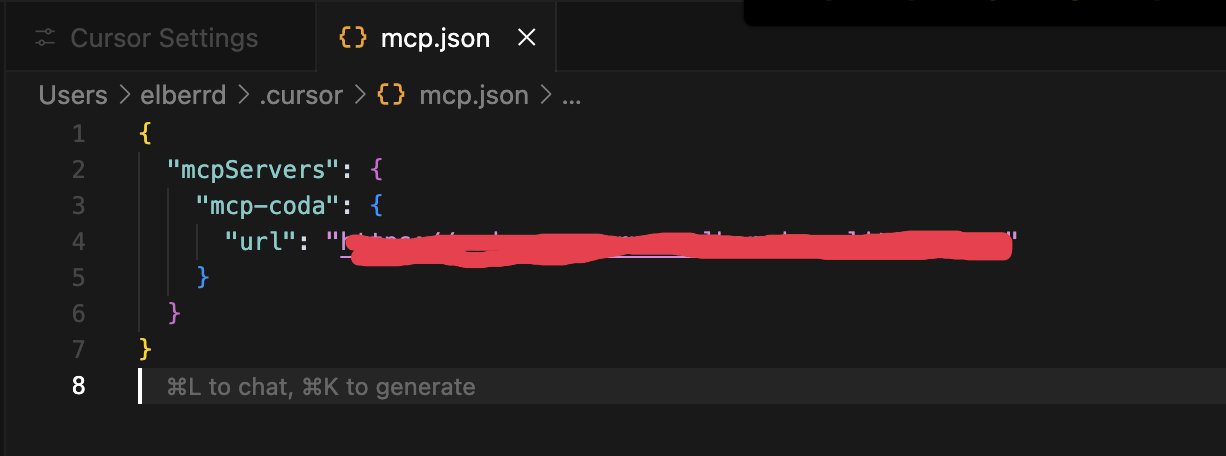
-
Enable and use the available tools in Cursor's settings:
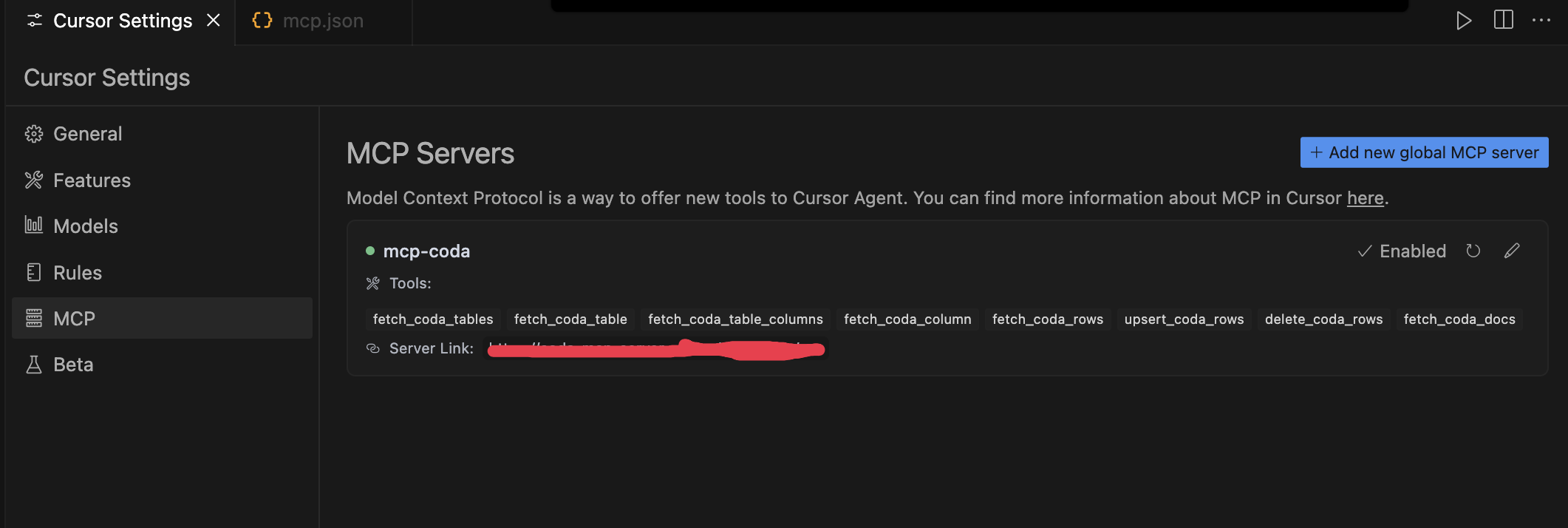
License
This project is licensed under the ISC License.
README fetched from the repository 8 days ago. The original is authoritative.