About Codex MCP Rs
Codex MCP Rs is an MCP server published by missdeer in the Blockchain category: codex-mcp-rs is a Rust-based MCP (Model Context Protocol) server that serves as a bridge for Codex CLI, enabling various AI coding assistants (such as Claude Code, Roo Code, KiloCode, etc.) to seamlessly collaborate with Codex.
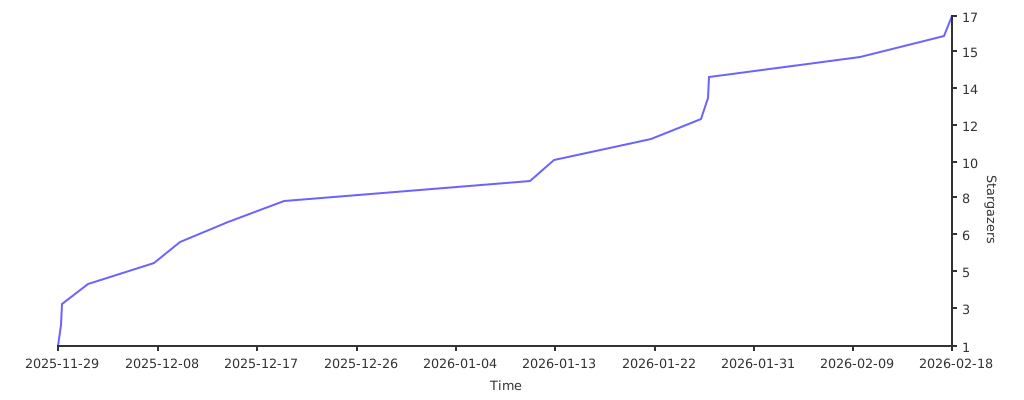
The repository has 16 stars and 2 forks, with the last commit 8 months ago. Six months or more without a commit doesn't mean the server is broken, but check the open issues before depending on it in production.
Install
git clone https://github.com/missdeer/codex-mcp-rsThis server has no ConduID identity, so agent calls to it are not receipted. Pin the version you install and review the source before granting it credentials.
Ask AI
Ask AI about Codex MCP Rs
Powered by Claude · Grounded in docs
Security checks
- ✓README presentThe repository ships documentation.
5 checks have not been run yet.
README
codex-mcp-rs



A high-performance Rust implementation of MCP (Model Context Protocol) server that wraps the Codex CLI for AI-assisted coding tasks.
Features
- MCP Protocol Support: Implements the official Model Context Protocol using the Rust SDK
- Codex Integration: Wraps the Codex CLI to enable AI-assisted coding through MCP
- Session Management: Supports multi-turn conversations via session IDs
- Sandbox Safety: Configurable sandbox policies (read-only, workspace-write, danger-full-access)
- Smart Stdin Mode: Automatically pipes prompts via stdin when they contain special characters or exceed length limits, with
force_stdinoverride - Image Support: Attach images to prompts for visual context
- Async Runtime: Built on Tokio for efficient async I/O
- Cross-Platform: Pre-built binaries for Linux, macOS, and Windows (x64 and arm64)
Supported Platforms
| Platform | Architecture | Binary |
|---|---|---|
| Linux | x86_64 | codex-mcp-rs_Linux_x86_64.tar.gz |
| Linux | arm64 | codex-mcp-rs_Linux_arm64.tar.gz |
| macOS | Universal (x64 + arm64) | codex-mcp-rs_Darwin_universal.tar.gz |
| Windows | x86_64 | codex-mcp-rs_Windows_x86_64.zip |
| Windows | arm64 | codex-mcp-rs_Windows_arm64.zip |
Prerequisites
- Rust 1.77.2+ (required for Windows command-line argument escaping fixes)
- Codex CLI installed and configured
- Claude Code or another MCP client
Building
# Debug build
cargo build

# Release build
cargo build --release
Running
The server communicates via stdio transport:
cargo run
Or after building:
./target/release/codex-mcp-rs
Quick Start
The fastest way to get started is using npx:
npx @missdeer/codex-mcp-rs
This command automatically installs the correct pre-built binary for your platform (Windows/macOS/Linux, x64/arm64) and launches the MCP server. No manual installation required.
To add it to Claude Code:
claude mcp add codex-rs -s user --transport stdio -- npx @missdeer/codex-mcp-rs
Installation
Option 1: Use via npx (Recommended)
Using npx is the simplest approach - it handles binary installation automatically:
npx @missdeer/codex-mcp-rs
What happens:
- npm installs the platform-specific binary package (
@codex-mcp-rs/darwin-universal,@codex-mcp-rs/linux-x64, etc.) - Launches the MCP server on stdio transport
Add to Claude Code MCP configuration:
claude mcp add codex-rs -s user --transport stdio -- npx @missdeer/codex-mcp-rs
Or install globally for faster startup:
npm install -g @missdeer/codex-mcp-rs
claude mcp add codex-rs -s user --transport stdio -- codex-mcp-rs
Global installation caches the binary locally for instant startup.
Option 2: Install via Install Script (Linux/macOS)
Automatically download and install the latest release binary to /opt/codex-mcp-rs/:
curl -sSL https://raw.githubusercontent.com/missdeer/codex-mcp-rs/master/scripts/install.sh | bash
This script will:
- Detect your platform and architecture
- Download the latest release from GitHub
- Install the binary to
/opt/codex-mcp-rs/codex-mcp-rs - Automatically add it to your Claude Code MCP configuration
Option 3: Install from Release
Download the appropriate binary for your platform from the releases page, extract it, and add to your MCP configuration:
claude mcp add codex-rs -s user --transport stdio -- /path/to/codex-mcp-rs
Option 4: Build from Source
git clone https://github.com/missdeer/codex-mcp-rs.git
cd codex-mcp-rs
cargo build --release
claude mcp add codex-rs -s user --transport stdio -- $(pwd)/target/release/codex-mcp-rs
Tool Usage
The server provides a single codex tool with the following parameters:
Required Parameters
PROMPT(string): Task instruction for Codexcd(string): Working directory path
Optional Parameters
sandbox(string): Sandbox policy -"read-only"(default),"workspace-write", or"danger-full-access"SESSION_ID(string): Resume a previous session for multi-turn conversationsskip_git_repo_check(bool): Allow running outside git repositories (default:false)return_all_messages(bool): Return full reasoning trace (default:false)image(array): Paths to image files to attachmodel(string): Override the Codex modelyolo(bool): Disable all prompts and sandboxingprofile(string): Load config profile from~/.codex/config.tomltimeout_secs(number): Timeout in seconds for codex execution (default: 600, max: 3600)force_stdin(bool): Force passing prompt via stdin instead of CLI argument (default:false). When enabled, the prompt is always piped through stdin regardless of content. This is also triggered automatically when the prompt exceeds 800 characters or contains shell-special characters.
Testing
The project has comprehensive test coverage:
# Run all tests
cargo test

# Run with coverage
cargo tarpaulin --out Html

# See detailed testing guide
cat TESTING.md
Test categories:
- Unit tests (10): Core functionality (escape_prompt, Options)
- Integration tests (10): End-to-end scenarios
- Server tests (5): MCP protocol implementation
- CI tests: Multi-platform validation
Total: 25 tests passing ✅
Current test coverage: See Codecov
Architecture
See CLAUDE.md for detailed architecture documentation.
Comparison with Other Implementations
| Feature | codex-mcp-rs (Rust) | codexmcp (Python) | codex-mcp-go |
|---|---|---|---|
| Language | Rust | Python | Go |
| Performance | ⭐⭐⭐⭐⭐ | ⭐⭐⭐ | ⭐⭐⭐⭐ |
| Memory Usage | ⭐⭐⭐⭐⭐ | ⭐⭐⭐ | ⭐⭐⭐⭐ |
| Binary Size | Medium | N/A | Small |
| Startup Time | ⭐⭐⭐⭐⭐ | ⭐⭐⭐ | ⭐⭐⭐⭐⭐ |
| Session Management | ✓ | ✓ | ✓ |
| Image Support | ✓ | ✓ | ✓ |
| Sandbox Policies | ✓ | ✓ | ✓ |
Related Projects
- codex-mcp-go - Go implementation
- geminimcp - Python MCP server for Gemini CLI
Contributing
Contributions are welcome! See CONTRIBUTING.md for guidelines.
License
This project is dual-licensed:
Non-Commercial / Personal Use - GNU General Public License v3.0
Free for personal projects, educational purposes, open source projects, and non-commercial use. See LICENSE for the full GPLv3 license text.
Commercial / Workplace Use - Commercial License Required
If you use codex-mcp-rs in a commercial environment, workplace, or for any commercial purpose, you must obtain a commercial license.
This includes but is not limited to:
- Using the software at work (any organization)
- Integrating into commercial products or services
- Using for client work or consulting
- Offering as part of a SaaS/cloud service
Contact: missdeer@gmail.com for commercial licensing inquiries.
See LICENSE-COMMERCIAL for more details.
Star History
README copy captured when this server was indexed; it may lag the repository. The original is authoritative.