About Django Admin MCP
Django Admin MCP is an MCP server published by 7tg in the AI category: expose Django admin models to MCP (Model Context Protocol) clients. Add a mixin to your ModelAdmin classes and let AI assistants like Claude perform CRUD operations, execute admin actions, and explore relationships—all respecting Django's permission system.
The repository has 28 stars and 5 forks, with the last commit yesterday. Recent commit activity is the strongest signal that reported issues will get attention.
Install
git clone https://github.com/7tg/django-admin-mcpThis server has no ConduID identity, so agent calls to it are not receipted. Pin the version you install and review the source before granting it credentials.
Tools (5)
create_articleCreate a new article with field values
Parameters not published.
delete_articleDelete an article by `id`
Parameters not published.
get_articleGet a single article by `id`
Parameters not published.
list_articleList all articles with pagination (`limit`, `offset`) and filtering
Parameters not published.
update_articleUpdate an existing article by `id`
Parameters not published.
Ask AI
Ask AI about Django Admin MCP
Powered by Claude · Grounded in docs
Security checks
Static checks derived from the repository just now. Heuristics on the source, not an audit.
- ✓README presentThe repository ships documentation.
- ✓License declaredUsable under a stated license.
- ✓Tests presentA test suite exists in the repository.
- ✓Dependencies pinnedA lockfile pins dependency versions.
- ✓No dynamic code executionSource scan found no eval, dynamic Function, or shell execution.
- !Scoped permissionsDoesn't declare a permission scope. Assume it can do anything its process can.
Releases
README
django-admin-mcp








Add a mixin to your ModelAdmin and MCP clients get CRUD, admin actions and relationship traversal, inside Django's existing permissions. Only Django and Pydantic as dependencies.
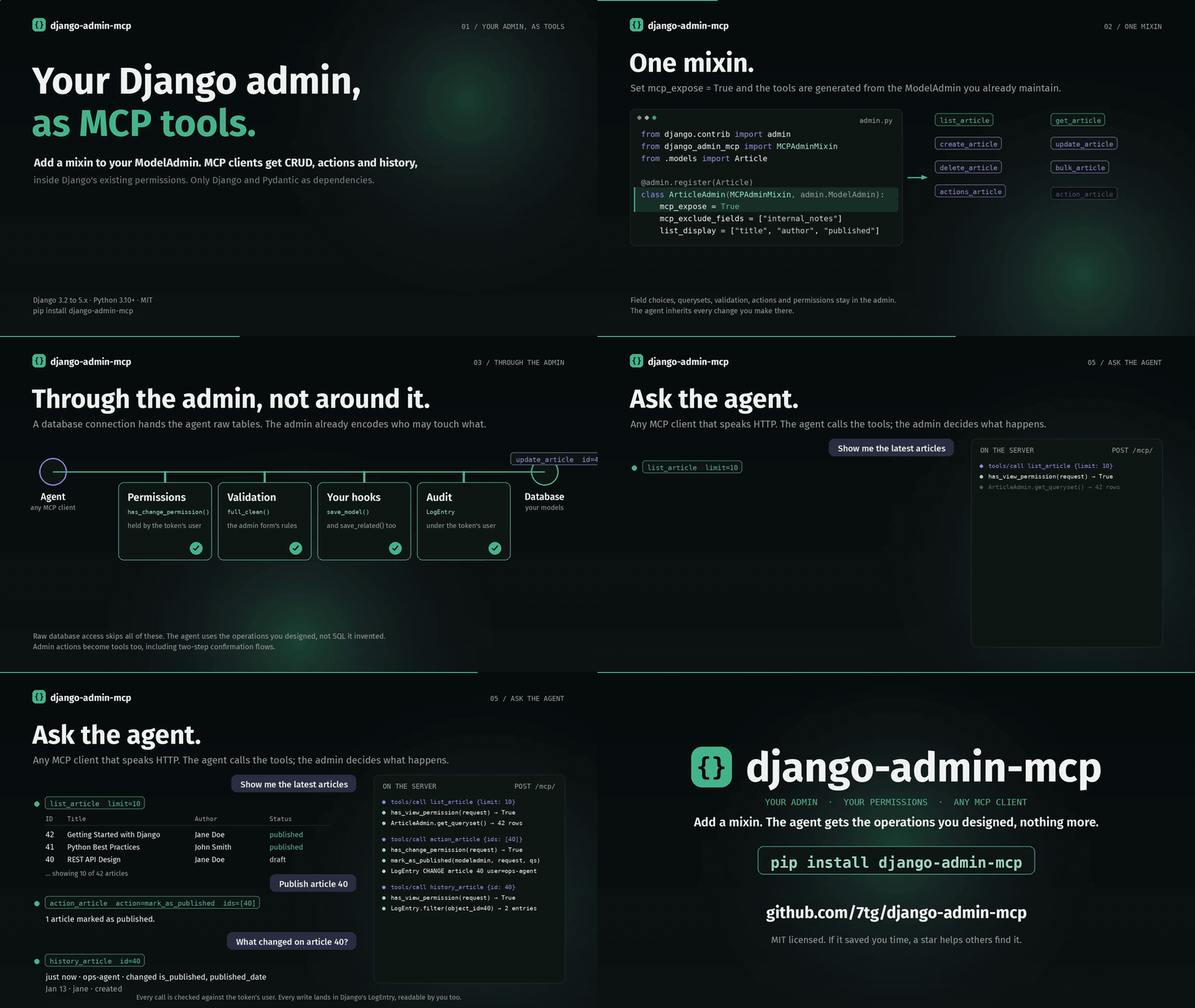
One mixin, the request's path through the admin, a token, a conversation with the agent, then getting started. 50 seconds · 1080p · 60 fps · original soundtrack. Watch the film.
Why not just give the agent database access?
A database connection hands the agent raw tables. The Django admin is where your project already encodes who may touch what, how records are validated, and what the sanctioned bulk operations are. This package puts the agent behind that layer instead of around it:
- Permissions — every call goes through
ModelAdmin.has_*_permission(). A token can only do what its linked user can do, and starts with no access until you grant it. - Validation — writes run
full_clean()and yoursave_model()/save_related()hooks, so the agent cannot save a record the admin form would reject. - Audit history — every create, update, delete and action is written to Django's
LogEntryunder the token's user. You can see what the agent changed, and the agent can read the history too. - Admin actions — "publish", "refund", "export CSV" and your other registered actions become tools, including two-step confirmation flows. The agent uses the operations you designed rather than inventing SQL.
- Scoped exposure —
mcp_fields/mcp_exclude_fieldskeep password hashes and secrets out of the agent's view;get_queryset()still limits which rows it can see.
How it compares
A generic Django MCP server or a hand-rolled FastMCP wrapper asks you to define tools, schemas and permission checks yourself, one function at a time. This package reads the ModelAdmin classes you already maintain and generates the tools from them, so field choices, querysets, validation, actions and permissions stay in one place and the agent inherits every change you make to the admin. It also ships as a plain Django app with no MCP SDK or extra HTTP stack.
Installation
pip install django-admin-mcp
# settings.py
INSTALLED_APPS = [
    'django_admin_mcp',
    # ...
]

# urls.py
urlpatterns = [
    path('mcp/', include('django_admin_mcp.urls')),
    # ...
]
python manage.py migrate django_admin_mcp
Quick start
1. Expose a model. Set mcp_expose = True to generate tools for it. Models with the mixin but without the flag are discoverable through find_models only.
from django.contrib import admin
from django_admin_mcp import MCPAdminMixin
from .models import Article, Author

@admin.register(Article)
class ArticleAdmin(MCPAdminMixin, admin.ModelAdmin):
    mcp_expose = True                    # list_article, get_article, create_article, ...
    mcp_exclude_fields = ['internal_notes']
    list_display = ['title', 'author', 'published']

@admin.register(Author)
class AuthorAdmin(MCPAdminMixin, admin.ModelAdmin):
    pass                                 # discoverable, no direct tools
2. Create a token in the admin at /admin/django_admin_mcp/mcptoken/. Grant it exactly the permissions and groups the agent needs. The linked user caps what the token can do and is the identity its changes are logged under.
3. Point your MCP client at it, for example in a .mcp.json for Claude Code:
{
  "mcpServers": {
    "django-admin": {
      "type": "http",
      "url": "http://localhost:8000/mcp/",
      "headers": { "Authorization": "Bearer YOUR_TOKEN" }
    }
  }
}
4. Ask the agent.
User: Show me the latest 10 articles
Agent: [calls list_article with limit=10]

User: Mark articles 1, 2 and 3 as published
Agent: [calls action_article with action="mark_as_published", ids=[1, 2, 3]]

User: What changed on article 42?
Agent: [calls history_article with id=42]
Tools
For each exposed model (here Article) the server generates:
| Tool | Does |
|---|---|
list_article, get_article |
Read with pagination and filtering (needs view) |
create_article, update_article, delete_article |
Write single records (needs add / change / delete) |
bulk_article |
Create, update or delete many records at once |
actions_article, action_article |
List and run registered admin actions, including file-returning exports |
describe_article |
Field definitions, types and constraints |
related_article |
Follow foreign keys and reverse relations |
history_article |
Django admin change history |
autocomplete_article |
Search suggestions for foreign-key fields |
Plus find_models to discover everything exposed, MCP prompts for common workflows, and read-only resources at models:// and data:// URIs. The endpoint speaks JSON-RPC 2.0 over HTTP with GET /mcp/health/ for health checks. Full reference in the docs.
Security in brief
- Tokens look like
mcp_<key>.<secret>; only a salted hash of the secret is stored. - Each token carries its own permissions and groups, intersected with its user's permissions. Deactivating the user disables its tokens.
- Expiry is configurable; revoke a token by deactivating or deleting it in the admin.
- Sensitive values are redacted from log messages, and large action downloads are capped by
MCP_ACTION_MAX_FILE_BYTES(default 5 MiB).
See Permissions and Token Management for details.
Requirements
Python 3.10 to 3.14, Django 3.2 to 6.0, Pydantic 2. Tested against every Django release in that range.
Support the project
If this saved you time, a star on GitHub helps others find it. Issues and PRs are welcome; see the contributing guide.
License
MIT
README fetched from the repository just now. The original is authoritative.