About Env Doctor
Env Doctor is an MCP server published by mitulgarg in the Developer Tools category: diagnose and Fix CUDA / GPU environments compatibility issues locally, in Docker, and CI/CD. CLI + MCP server available.
The repository has 172 stars and 10 forks, with the last commit 16 days ago. Recent commit activity is the strongest signal that reported issues will get attention.
Install
git clone https://github.com/mitulgarg/env-doctorThis server has no ConduID identity, so agent calls to it are not receipted. Pin the version you install and review the source before granting it credentials.
Ask AI
Ask AI about Env Doctor
Powered by Claude · Grounded in docs
Security checks
Static checks derived from the repository 7 hours ago. Heuristics on the source, not an audit.
- ✓README presentThe repository ships documentation.
- ✓License declaredUsable under a stated license.
- ✓Tests presentA test suite exists in the repository.
- ✓Dependencies pinnedA lockfile pins dependency versions.
- !No dynamic code executionSource scan found eval or shell execution. Review how tool inputs reach it before granting credentials.
- !Scoped permissionsDoesn't declare a permission scope. Assume it can do anything its process can.
Releases
README
"Why does my PyTorch crash with CUDA errors when I just installed it?"
Because your driver supports CUDA 11.8, but
pip install torchgave you CUDA 12.4 wheels.
Env-Doctor diagnoses and fixes the #1 frustration in GPU computing: mismatched CUDA versions between your NVIDIA driver, system toolkit, cuDNN, and Python libraries.
It takes 5 seconds to find out if your environment is broken - and exactly how to fix it.
Doctor "Check" (Diagnosis)
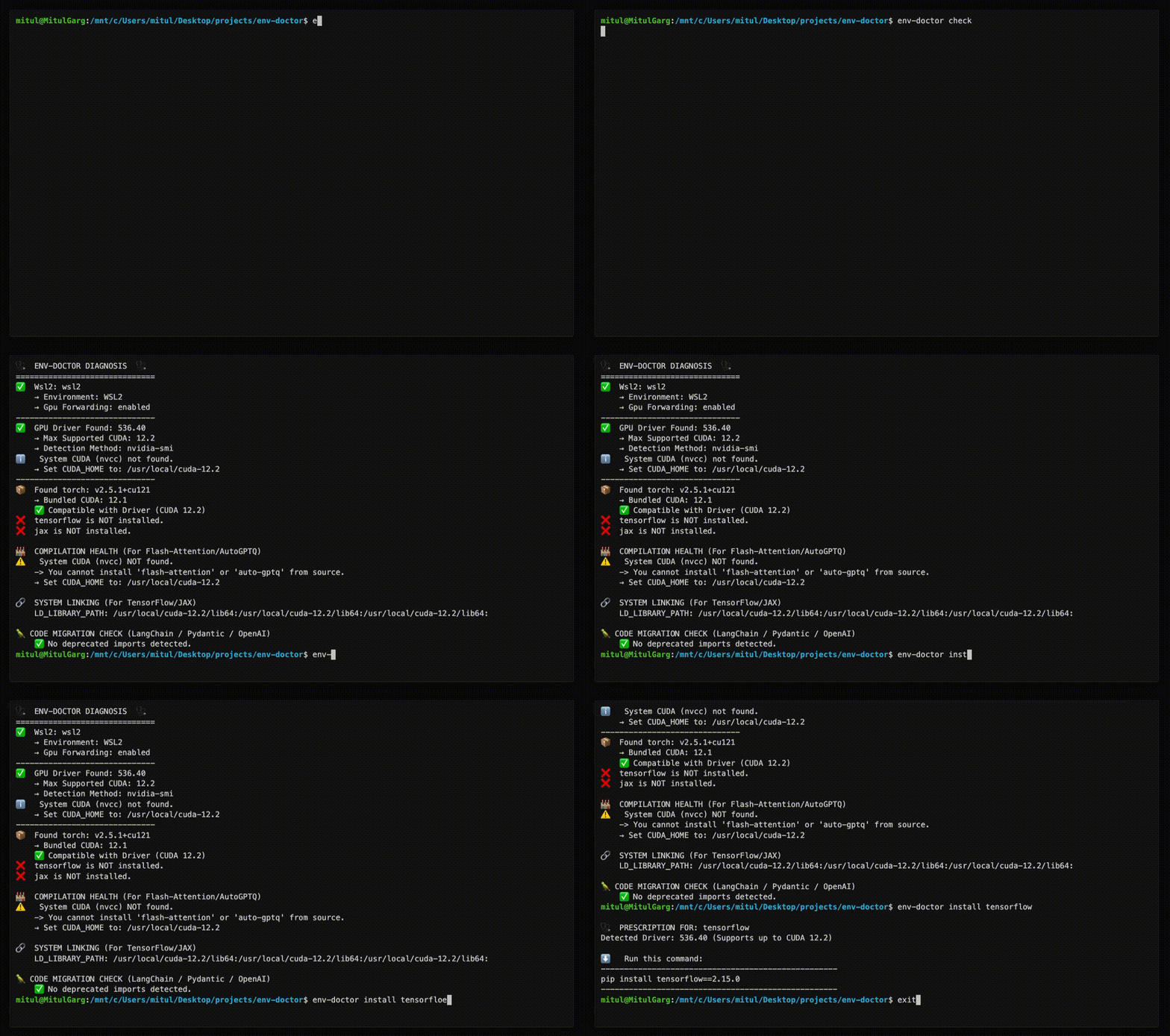
Features
| Feature | What It Does |
|---|---|
| One-Command Diagnosis | Check compatibility: GPU Driver → CUDA Toolkit → cuDNN → PyTorch/TensorFlow/JAX |
| Compute Capability Check | Detect GPU architecture mismatches — catches why torch.cuda.is_available() returns False on new GPUs (e.g. Blackwell) even when driver and CUDA are healthy |
| Python Version Compatibility | Detect Python version conflicts with AI libraries and dependency cascade impacts |
| Jupyter / Notebook Output | from env_doctor import check; check() renders a rich HTML diagnosis inline in Jupyter, Colab, or VS Code notebooks — falls back to text in the terminal |
| CUDA Auto-Installer | Execute CUDA Toolkit installation directly with --run; CI-friendly with --yes; preview with --dry-run |
| Safe Install Commands | Get the exact pip install command that works with YOUR driver |
| Inference Engine Resolver | Resolve vLLM / SGLang → torch → CUDA build → kernel libs against your driver; get the install command that actually runs instead of a default CUDA 13 wheel on a CUDA 12 box |
| Extension Library Support | Install compilation packages (flash-attn, SageAttention, auto-gptq, apex, xformers) with CUDA version matching |
| AI Model Compatibility | Check if LLMs, Diffusion, or Audio models fit on your GPU before downloading |
| WSL2 GPU Support | Validate GPU forwarding, detect driver conflicts within WSL2 env for Windows users |
| Deep CUDA Analysis | Find multiple installations, PATH issues, environment misconfigurations |
| Container Validation | Catch GPU config errors in Dockerfiles before you build |
| MCP Server | Expose diagnostics to AI assistants (Claude Desktop, Zed) via Model Context Protocol |
| CI/CD Ready | JSON output, proper exit codes, and CI-aware env-var persistence (GitHub Actions, GitLab CI, CircleCI, Azure Pipelines, Jenkins) |
| Fleet Dashboard (optional) | Web UI for monitoring multiple GPU machines — aggregate status, drill-down diagnostics, history timeline. Install with pip install "env-doctor[dashboard]" |
Installation
Core CLI
The core CLI has no heavy dependencies — installs in seconds.
pip install env-doctor
# Or with uv (faster, isolated)
uv tool install env-doctor
uvx env-doctor check
With Fleet Dashboard
If you want to manage a distributed system of multiple GPU nodes, this dashboard can help you from a observability POV. It adds a web UI for monitoring multiple GPU machines and has no effect on the core CLI. You will be able to soon take action directly from the dashboard via distributed env-doctor cli instances on each VM!
pip install "env-doctor[dashboard]"
This adds: fastapi, uvicorn, sqlalchemy, aiosqlite
pip install env-doctor |
pip install "env-doctor[dashboard]" |
|
|---|---|---|
env-doctor check |
✅ | ✅ |
| All CLI commands | ✅ | ✅ |
| MCP server | ✅ | ✅ |
env-doctor check --report-to |
✅ | ✅ |
env-doctor report install/status |
✅ | ✅ |
env-doctor dashboard (web UI) |
✗ | ✅ |
MCP Server (AI Assistant Integration)
Env-Doctor includes a built-in Model Context Protocol (MCP) server that exposes 11 diagnostic tools to AI assistants like Claude Code and Claude Desktop.
Quick Setup
// Claude Desktop config (~/.config/Claude/claude_desktop_config.json)
{
  "mcpServers": {
    "env-doctor": {
      "command": "env-doctor-mcp"
    }
  }
}
Ask your AI assistant things like "Check my GPU environment", "Can I run Llama 3 70B on my GPU?", or "Validate this Dockerfile for GPU issues".
Learn more: MCP Integration Guide
Fleet Dashboard (optional)
The core CLI works standalone. The dashboard is an observability layer for teams running multiple GPU machines.
pip install "env-doctor[dashboard]" unlocks a web UI that aggregates diagnostic results from every machine in your fleet into a single view — no SSH required.
Quick Start
1. Start the dashboard (any machine — no GPU needed):
pip install "env-doctor[dashboard]"
env-doctor dashboard
# → Serving at http://localhost:8765
# → Generated API token at ~/.env-doctor/api-token
2. Report from each GPU machine:
pip install env-doctor

# One-time report
env-doctor check --report-to http://<dashboard-host>:8765 --token <token>

# Automatic reporting every 2 minutes (cron on Linux, Task Scheduler on Windows)
env-doctor report install --url http://<dashboard-host>:8765 --token <token> --interval 2m
What You Get
- Fleet overview — sortable table with status, GPU, driver, CUDA, torch, and group filtering
- Topology view — force-directed graph of all machines, colour-coded by health, grouped into clusters
- Activity log — cross-fleet command log with status, output, and filtering
- Machine detail — full diagnostics + snapshot history timeline
- Remote remediation — queue
env-doctorcommands from the UI, executed on next check-in (no SSH needed)
Smart change detection means stable machines only POST ~1 heartbeat every 30 minutes, not on every poll.
Learn more: Fleet Monitoring Guide
Usage
Diagnose Your Environment
env-doctor check
Example output:
🩺 ENV-DOCTOR DIAGNOSIS
============================================================

🖥️  Environment: Native Linux

🎮 GPU Driver
   ✅ NVIDIA Driver: 535.146.02
   └─ Max CUDA: 12.2

🔧 CUDA Toolkit
   ✅ System CUDA: 12.1.1

📦 Python Libraries
   ✅ torch 2.1.0+cu121

✅ All checks passed!
On new-generation GPUs (e.g. RTX 5070 / Blackwell), env-doctor catches compute capability mismatches — the reason torch.cuda.is_available() returns False even when your driver and CUDA are healthy:
🎯  COMPUTE CAPABILITY CHECK
    GPU: NVIDIA GeForce RTX 5070 (Compute 12.0, Blackwell, sm_120)
    PyTorch compiled for: sm_50, sm_60, sm_70, sm_80, sm_90, compute_90
    ❌ ARCHITECTURE MISMATCH: Your GPU needs sm_120 but PyTorch 2.5.1 doesn't include it.

    FIX: Install PyTorch nightly with sm_120 support:
       pip install --pre torch torchvision torchaudio --index-url https://download.pytorch.org/whl/nightly/cu126
Notebook / Jupyter Output
Inside a Jupyter, Colab, or VS Code notebook, the Python API renders a rich, self-contained HTML report inline:
from env_doctor import check
check()   # auto-renders HTML in notebooks, prints text in terminals
Install the optional extra for notebook support: pip install "env-doctor[notebook]".
You can also force HTML from the CLI with env-doctor check --format html > report.html.
Check Python Version Compatibility
env-doctor python-compat
🐍  PYTHON VERSION COMPATIBILITY CHECK
============================================================
Python Version: 3.13 (3.13.0)

❌  2 compatibility issue(s) found:

    tensorflow: supports Python <=3.12, but you have Python 3.13
    torch: supports Python <=3.12, but you have Python 3.13

⚠️   Dependency Cascades:
    tensorflow [high]: propagates to keras, tensorboard
    torch [high]: propagates to torchvision, torchaudio, triton

💡  Consider using Python 3.12 or lower for full compatibility
============================================================
Get Safe Install Command
env-doctor install torch
⬇️ Run this command to install the SAFE version:
---------------------------------------------------
pip install torch torchvision --index-url https://download.pytorch.org/whl/cu118
---------------------------------------------------
Install vLLM / SGLang Without Breaking CUDA
env-doctor install vllm # or: env-doctor check --engine vllm
❌ Default `pip install vllm==0.30.0` pulls a CUDA 13.0 build (torch 2.13.0), but the driver supports up to CUDA 12.6.
→ Fix options (best first):
  1. Install the CUDA 12.9 build of vLLM 0.30.0 — via CUDA minor-version compatibility
  2. Upgrade the NVIDIA driver to ≥ 580 ...  ⚠ RISKY
📋 Copy-to-fix: uv pip install vllm==0.30.0 --extra-index-url https://wheels.vllm.ai/0.30.0/cu129 --torch-backend=cu129
Prefers a different CUDA build of the same version, then a different engine version, and only last a driver change. SGLang's sgl-kernel / FlashInfer / torch co-pins are resolved the same way. Installed engines are checked automatically by env-doctor check.
Install CUDA Toolkit
Display instructions or execute the installation directly:
# Show platform-specific steps (default)
env-doctor cuda-install

# Preview what would run — no changes made
env-doctor cuda-install --dry-run

# Execute interactively (asks [y/N] before running)
env-doctor cuda-install --run

# Execute headlessly — great for CI/scripts
env-doctor cuda-install --run --yes

# Install a specific version, headless
env-doctor cuda-install 12.6 --run --yes
Example dry-run output (Windows):
[DRY RUN] [1/1] winget install Nvidia.CUDA --version 12.2

[DRY RUN] [1/1] nvcc --version

CUDA 12.2 installation completed successfully.
Verification: PASSED

Full log: C:\Users\you\.env-doctor\install.log
Every run writes a timestamped log to ~/.env-doctor/install.log for debugging.
Supported Platforms:
- Ubuntu 20.04, 22.04, 24.04
- Debian 11, 12
- RHEL 8, 9 / Rocky Linux / AlmaLinux
- Fedora 39+
- WSL2 (Ubuntu)
- Windows 10/11 (via
winget) - Conda (all platforms)
Exit codes for CI pipelines:
| Code | Meaning |
|---|---|
0 |
Installation succeeded and verified |
1 |
An installation step failed |
2 |
Installed but nvcc --version failed |
Install Compilation Packages (Extension Libraries)
For packages like flash-attn, SageAttention, auto-gptq, apex, and xformers that compile from source, env-doctor detects CUDA mismatches and provides two fix paths:
env-doctor install flash-attn
🩺  PRESCRIPTION FOR: flash-attn

⚠️   CUDA VERSION MISMATCH DETECTED
     System nvcc: 12.1.1 | PyTorch CUDA: 12.4.1

🔧  Two options:
    📦 OPTION 1: Downgrade PyTorch to match nvcc (12.1) — no system changes
    ⚙️  OPTION 2: Upgrade nvcc to match PyTorch (12.4) — better long-term

    (Full step-by-step commands shown for both options)
Check Model Compatibility
env-doctor model llama-3-8b
🤖  Checking: LLAMA-3-8B (8.0B params)

🖥️   Your Hardware: RTX 3090 (24GB)

💾  VRAM Requirements:
  ✅  FP16: 19.2GB - fits with 4.8GB free
  ✅  INT4:  4.8GB - fits with 19.2GB free

✅  This model WILL FIT on your GPU!
List all models: env-doctor model --list
Cloud GPU Recommendations:
# Get cloud GPU recommendations for a model that doesn't fit
env-doctor model llama-3-70b --recommend

# Direct VRAM lookup (no model name needed)
env-doctor model --vram 80000 --recommend
☁️   Cloud GPU Recommendations

  FP16 (~140.0 GB):
    $27.20 /hr  azure  ND96asr_v4              8x A100 (40GB each)          180.0GB free
    $29.39 /hr  gcp    a2-highgpu-8g            8x A100 (40GB each)          180.0GB free
    ...
Automatic HuggingFace Support (New ✨) If a model isn't found locally, env-doctor automatically checks the HuggingFace Hub, fetches its parameter metadata, and caches it locally for future runs — no manual setup required.
# Fetches from HuggingFace on first run, cached afterward
env-doctor model bert-base-uncased
env-doctor model sentence-transformers/all-MiniLM-L6-v2
Output:
🤖  Checking: BERT-BASE-UNCASED
    (Fetched from HuggingFace API - cached for future use)
    Parameters: 0.11B
    HuggingFace: bert-base-uncased

🖥️   Your Hardware:
    RTX 3090 (24GB VRAM)

💾  VRAM Requirements & Compatibility
  ✅  FP16:  264 MB - Fits easily!

💡  Recommendations:
1. Use fp16 for best quality on your GPU
Validate Dockerfiles
env-doctor dockerfile
🐳  DOCKERFILE VALIDATION

❌  Line 1: CPU-only base image: python:3.10
    Fix: FROM nvidia/cuda:12.1.0-runtime-ubuntu22.04

❌  Line 8: PyTorch missing --index-url
    Fix: pip install torch --index-url https://download.pytorch.org/whl/cu121
More Commands
| Command | Purpose |
|---|---|
env-doctor check |
Full environment diagnosis |
env-doctor python-compat |
Check Python version compatibility with AI libraries |
env-doctor cuda-install |
Step-by-step CUDA Toolkit installation guide |
env-doctor install <lib> |
Safe install command for PyTorch/TensorFlow/JAX, inference engines (vLLM, SGLang), extension libraries (flash-attn, auto-gptq, apex, xformers, SageAttention, etc.) |
env-doctor check --engine vllm[@ver] |
Check an inference engine against your driver before installing |
env-doctor model <name> |
Check model VRAM requirements |
env-doctor cuda-info |
Detailed CUDA toolkit analysis |
env-doctor cudnn-info |
cuDNN library analysis |
env-doctor dockerfile |
Validate Dockerfile |
env-doctor docker-compose |
Validate docker-compose.yml |
env-doctor init --github-actions |
Generate GitHub Actions workflow |
env-doctor scan |
Scan for deprecated imports |
env-doctor debug |
Verbose detector output |
env-doctor dashboard |
Start fleet monitoring web UI (requires [dashboard] extra) |
env-doctor report install |
Set up periodic reporting via cron (Linux) or Task Scheduler (Windows) |
CI/CD Integration
Generate a GitHub Actions workflow with one command:
env-doctor init --github-actions
This creates .github/workflows/env-doctor.yml — review, commit, and push. Your CI will validate the ML environment on every push and PR.
Or add manually:
# JSON output for scripting
env-doctor check --json

# CI mode with exit codes (0=pass, 1=warn, 2=error)
env-doctor check --ci
Exit code semantics for check --json / check --ci:
| Code | Meaning |
|---|---|
0 |
All detected components are compatible (uninstalled libraries do not count as failures) |
1 |
Installed components have warnings or version conflicts |
2 |
One or more components are in an error state |
GitHub Actions example:
- run: pip install env-doctor
- run: env-doctor check --ci
Documentation
Full documentation: https://mitulgarg.github.io/env-doctor/
- Getting Started
- Command Reference
- MCP Integration Guide
- WSL2 GPU Guide
- CI/CD Integration
- Architecture
Video Tutorial: Watch Demo on YouTube
Platform Support
Env-Doctor is built for Linux and Windows — the platforms where NVIDIA GPUs and CUDA are available. All GPU diagnostics (driver, CUDA, cuDNN, library compatibility) target these platforms.
macOS is supported for non-GPU features: Fleet Dashboard hosting, model memory checks (env-doctor model), Python compatibility, project import scanning, and the MCP server. This makes a Mac a great centralised dashboard host while your Linux/Windows VMs handle the GPU workloads.
macOS uses zsh, which treats
[]as a glob pattern. Quote extras when installing:pip install "env-doctor[dashboard]"
Contributing
Contributions welcome! See CONTRIBUTING.md for details.
License
MIT License - see LICENSE
README fetched from the repository 7 hours ago. The original is authoritative.