About io.github.DanielBlomma/cortex
io.github.DanielBlomma/cortex is an MCP server in the Search category: local repo context for coding assistants with semantic search and graph relationships.
Install
claude mcp add io-github-danielblomma-cortex -- npx -y @danielblomma/cortex-mcpnpx -y @danielblomma/cortex-mcpThis server has no ConduID identity, so agent calls to it are not receipted. Pin the version you install and review the source before granting it credentials.
Ask AI
Ask AI about io.github.DanielBlomma/cortex
Powered by Claude · Grounded in docs
Security checks
- ✓README presentThe repository ships documentation.
5 checks have not been run yet.
README
Cortex
The context layer for AI-assisted software engineering.



What Cortex is
Cortex is a local, repository-scoped context engine for coding assistants. It parses your source code with tree-sitter, indexes it into a structured knowledge graph of entities (files, symbols, rules, ADRs) and their relationships (calls, defines, constrains, implements, supersedes), and serves that context to AI assistants over the Model Context Protocol (MCP).
Where a general-purpose AI assistant sees your codebase as a pile of text files, Cortex gives it a precise map: what exists, how it is connected, which rules govern it, and which parts are source-of-truth versus deprecated.
Cortex runs entirely on the developer's machine. Source code never leaves the host.
When to use Cortex
Cortex is designed for engineering teams that rely on AI assistants for non-trivial work on real codebases. Use it when:
- Your codebase is large or fragmented enough that assistants waste context window on irrelevant files.
- You need assistants to respect architectural rules, deprecations, and source-of-truth decisions already made by the team.
- You work across multiple languages and want consistent, structured retrieval across all of them.
- Security or compliance requires that source code stay on-premise and that all AI interactions remain auditable.
- You want retrieval to surface existing functionality before an assistant proposes new code — reducing duplication and drift.
Cortex is not a replacement for your editor, your version control, or your coding assistant. It is the grounding layer that makes those assistants act with knowledge of your specific repository.
Benefits
- Higher-quality suggestions. Assistants see the right files and rules instead of guessing from filenames.
- Lower token cost. Targeted retrieval replaces broad file reads. Typical sessions use a fraction of the context a raw assistant would consume.
- Architectural governance. Rules and ADRs are surfaced with every answer, so assistants follow the team's established patterns rather than generic best practices.
- Multi-language coverage. A single engine indexes multiple languages through tree-sitter grammars, giving polyglot teams consistent tooling.
- Privacy by design. Your code and its derived index stay on your machine. No upload, no cloud dependency for the core product.
- Low friction. One command (
cortex init --bootstrap) scaffolds everything: indexing, git hooks, MCP registration for Claude Code, Claude Desktop, and Codex.
How it works
Cortex operates as a five-stage pipeline between your repository and your AI assistant.
- Ingestion. Source files are parsed with tree-sitter, producing structured entities (files, functions, classes, rules, ADRs) and relations (
CALLS,DEFINES,CONSTRAINS,IMPLEMENTS,IMPORTS,SUPERSEDES). - Storage. Entities and relations are persisted to a local graph database (RyuGraph). An optional vector index provides semantic search across entity content.
- Retrieval. MCP tools combine semantic search with graph traversal to assemble the smallest context package that answers the task.
- Policy. Architectural rules and source-of-truth markers filter conflicting or deprecated content before it reaches the assistant.
- Assembly. Results are delivered to the assistant as a compact, ranked context package over MCP.
Git hooks keep the index fresh on every checkout, pull, commit, and rewrite. A live TUI dashboard (cortex dashboard) shows what Cortex adds to the repository in real time.
Why it works
Modern coding assistants are bottlenecked by context, not by model capability. Feeding a model more files rarely helps; feeding it the right files almost always does.
Cortex is built on one principle: prefer retrieval quality over analysis completeness. A smaller, sharper context package outperforms a broad dump of files. Every component — from tree-sitter parsing to graph traversal to rule filtering — exists to raise the signal-to-noise ratio of what the assistant sees.
The result is an assistant that behaves as if it already knows your codebase, because — through Cortex — it does.
Quick demo
Core capabilities
- Semantic search across code, rules, and ADRs.
- Graph relationships between entities and architectural constraints.
- Call-graph traversal, caller lookup, and impact analysis.
- Architectural rules and ADR enforcement at retrieval time.
- Incremental index updates driven by git hooks.
- Live TUI dashboard showing what Cortex adds to your repository.
- First-class integrations with Claude Code, Claude Desktop, and Codex.
Requirements
- Node.js 18+
- Git repository
- Optional for auto-connection:
claudeand/orcodexCLI inPATH
Install
npm i -g @danielblomma/cortex-mcp
Quick Start
From the repository you want to index:
cortex init --bootstrap
This will:
- scaffold
.context/,scripts/,mcp/,.githooks/, and docs files - activate git hooks for checkout, pull/merge, commit, and rewrite events
- build and prepare the local MCP server
- try to auto-register MCP connections for Claude/Codex (if installed)
- start background sync unless disabled
Disable watcher setup:
cortex init --bootstrap --no-watch
Check context status:
cortex status
Verify MCP Connection
Claude:
claude mcp list
Codex:
codex mcp list
Claude Plugin Marketplace
Install via Claude Code plugin marketplace:
/plugin marketplace add DanielBlomma/cortex
/plugin install cortex@cortex-marketplace
/plugin enable cortex
Then initialize Cortex in your target repository:
cortex init --bootstrap
Manual MCP Configuration
If auto-registration is unavailable, configure MCP manually.
Claude Desktop (~/Library/Application Support/Claude/claude_desktop_config.json):
{
  "mcpServers": {
    "cortex": {
      "command": "cortex",
      "args": ["mcp"],
      "env": {
        "CORTEX_PROJECT_ROOT": "/absolute/path/to/your-project"
      }
    }
  }
}
Codex (~/.config/codex/mcp-config.json):
{
  "mcpServers": {
    "cortex-myproject": {
      "command": "cortex",
      "args": ["mcp"],
      "cwd": "/absolute/path/to/your-project"
    }
  }
}
WSL Mode (Windows)
If you run Node.js inside WSL but use Claude Desktop or another MCP client on Windows:
- Install Cortex inside WSL:
# In a WSL terminal
npm i -g @danielblomma/cortex-mcp
cd /mnt/c/Users/yourname/your-project
cortex init --bootstrap
- Configure Claude Desktop (
%APPDATA%\Claude\claude_desktop_config.json):
{
  "mcpServers": {
    "cortex": {
      "command": "wsl.exe",
      "args": ["--distribution", "Ubuntu", "--exec", "cortex", "mcp"],
      "env": {
        "CORTEX_PROJECT_ROOT": "C:\\Users\\yourname\\your-project",
        "CORTEX_AUTO_BOOTSTRAP_ON_MCP": "1"
      }
    }
  }
}
Cortex automatically converts Windows paths (e.g. C:\Users\...) to WSL paths (/mnt/c/Users/...).
For projects on the WSL filesystem (e.g. ~/projects/myapp), use the WSL path directly:
{
  "mcpServers": {
    "cortex": {
      "command": "wsl.exe",
      "args": ["--distribution", "Ubuntu", "--exec", "cortex", "mcp"],
      "env": {
        "CORTEX_PROJECT_ROOT": "/home/yourname/projects/myapp",
        "CORTEX_AUTO_BOOTSTRAP_ON_MCP": "1"
      }
    }
  }
}
Notes:
- File watching on
/mnt/paths (Windows filesystem) automatically uses poll mode sinceinotifyis unreliable across filesystem boundaries. - For best performance, keep projects on the WSL filesystem (
~/...) rather than/mnt/c/....
MCP Tools
context.search
Ranked context search across indexed entities.
Input:
query(string, required)top_k(int, 1-20, default5)include_deprecated(bool, defaultfalse)include_content(bool, defaultfalse)
context.get_related
Fetch entity relationships from the graph.
Input:
entity_id(string, required)depth(int, 1-3, default1)include_edges(bool, defaulttrue)
context.find_callers
Return chunk callers for a chunk or file entity using the indexed call graph.
Input:
entity_id(string, required)depth(int, 1-4, default1)include_edges(bool, defaulttrue)
context.trace_calls
Trace call graph neighbors from a chunk or file entity in the requested direction.
Input:
entity_id(string, required)depth(int, 1-4, default2)direction("outgoing"|"incoming"|"both", default"outgoing")include_edges(bool, defaulttrue)
context.impact_analysis
Analyze likely impacted call-graph entities starting from an entity id or search query.
Input:
entity_id(string, optional) — eitherentity_idorqueryis requiredquery(string, optional)depth(int, 1-4, default2)top_k(int, 1-20, default8)direction("incoming"|"outgoing"|"both", default"incoming")include_edges(bool, defaulttrue)
context.get_rules
List indexed rules and optionally include inactive rules.
Input:
scope(string, optional)include_inactive(bool, defaultfalse)
context.reload
Reload the RyuGraph connection after updates/maintenance.
Input:
force(bool, defaulttrue)
Example Prompts
- "Find files that handle authentication."
- "Show related files for this ADR."
- "What active architectural rules apply to this API?"
Dashboard
A live TUI that shows what Cortex adds to your repository at a glance.
cortex dashboard
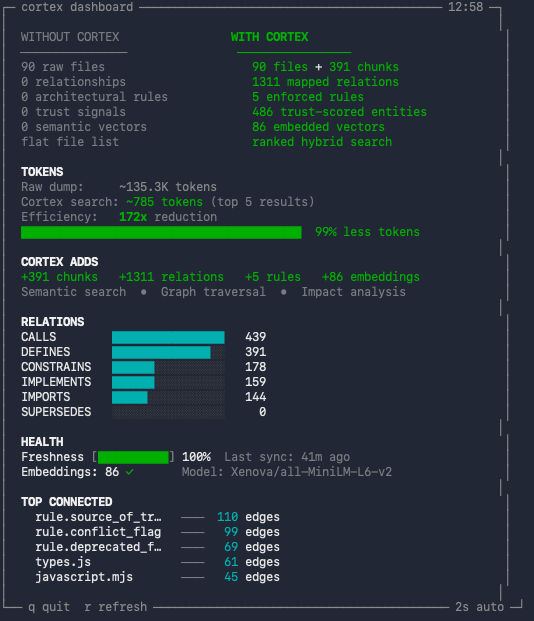
The dashboard displays:
- WITHOUT vs WITH CORTEX — side-by-side comparison of raw files versus indexed entities (files, chunks, relations, rules, embeddings, trust signals).
- TOKENS — per-task token estimate comparing typical LLM file reads without Cortex (~12 files) versus Cortex searches (~3 queries). Shows the reduction ratio and percentage.
- CORTEX ADDS — summary of what Cortex layers on top: chunks, relations, rules, embeddings, and which capabilities are unlocked (semantic search, graph traversal, impact analysis).
- RELATIONS — bar chart of relation types in the graph (CALLS, DEFINES, CONSTRAINS, IMPLEMENTS, IMPORTS, SUPERSEDES) and their counts.
- HEALTH — freshness percentage (how up-to-date the index is relative to uncommitted changes), last sync timestamp, and embedding status with model name.
- TOP CONNECTED — the five most connected entities in the graph by edge count, showing which files or rules are central to the codebase.
Options:
--interval <sec>— auto-refresh interval (default: 2 seconds).- Press
rto force refresh,qto quit. - Non-TTY output (piped) produces a single snapshot with ANSI stripped.
Common Commands
cortex init [path] [--force] [--bootstrap] [--connect] [--no-connect] [--watch] [--no-watch]
cortex connect [path] [--skip-build]
cortex mcp
cortex bootstrap
cortex update
cortex status
cortex dashboard [--interval <sec>]
cortex watch [start|stop|status|run|once] [--interval <sec>] [--debounce <sec>] [--mode <auto|event|poll>]
cortex help
Automated Release
This repository includes two GitHub Actions workflows:
-
Release Bump(.github/workflows/release-bump.yml)- Manual
workflow_dispatchfrommain - Bumps semver (
patch/minor/major) - Syncs release metadata files (
package.json,server.json, plugin manifests) - Runs tests
- Commits and tags
vX.Y.Z
- Manual
-
Release Publish(.github/workflows/release-publish.yml)- Triggers on tag push
v*.*.* - Verifies tag/version sync
- Runs root tests + MCP build/tests
- Publishes
@danielblomma/cortex-mcpto npm
- Triggers on tag push
Required GitHub secret:
NPM_TOKEN(npm automation token with publish rights for@danielblomma/cortex-mcp)
Limitations
- Requires repo initialization (
cortex init --bootstrap). - Each repository has its own local Cortex context instance.
- No cloud sync by design (privacy-first local storage).
Security and Privacy
- Cortex stores context data locally under
.context/. - No source code upload is required for core functionality.
Troubleshooting
mcp/dist/server.jsmissing: Runcortex bootstrap(or re-runcortex init --bootstrap).claudeorcodexnot found during init: Auto-registration is skipped; use manual config above.- MCP tools return stale context:
Run
cortex update, then reconnect MCP or callcontext.reloadfrom your MCP client.
Support
- Issues: https://github.com/DanielBlomma/cortex/issues
- Marketplace prep notes: docs/MCP_MARKETPLACE.md
License
MIT
README copy captured when this server was indexed; it may lag the repository. The original is authoritative.