About io.github.mgriffen/tapsite
io.github.mgriffen/tapsite is an MCP server in the Content category: mCP server for web inspection, design system extraction, and accessibility audits.
Install
claude mcp add io-github-mgriffen-tapsite -- npx -y tapsitenpx -y tapsiteThis server has no ConduID identity, so agent calls to it are not receipted. Pin the version you install and review the source before granting it credentials.
Tools (8)
tapsite_closeClose the browser session
Parameters not published.
tapsite_inspectNavigate to URL and inspect the DOM (nav, headings, buttons, forms, tables, links)
Parameters not published.
tapsite_interactClick or fill an indexed element from the last inspect
Parameters not published.
tapsite_login_checkVerify authenticated session state
Parameters not published.
tapsite_login_manualOpen headed browser for manual login + MFA
Parameters not published.
tapsite_run_jsExecute arbitrary JavaScript and return the result
Parameters not published.
tapsite_screenshotTake a screenshot of the current page
Parameters not published.
tapsite_scrollScroll the page
Parameters not published.
Ask AI
Ask AI about io.github.mgriffen/tapsite
Powered by Claude · Grounded in docs
Security checks
- ✓README presentThe repository ships documentation.
5 checks have not been run yet.
README
tapsite



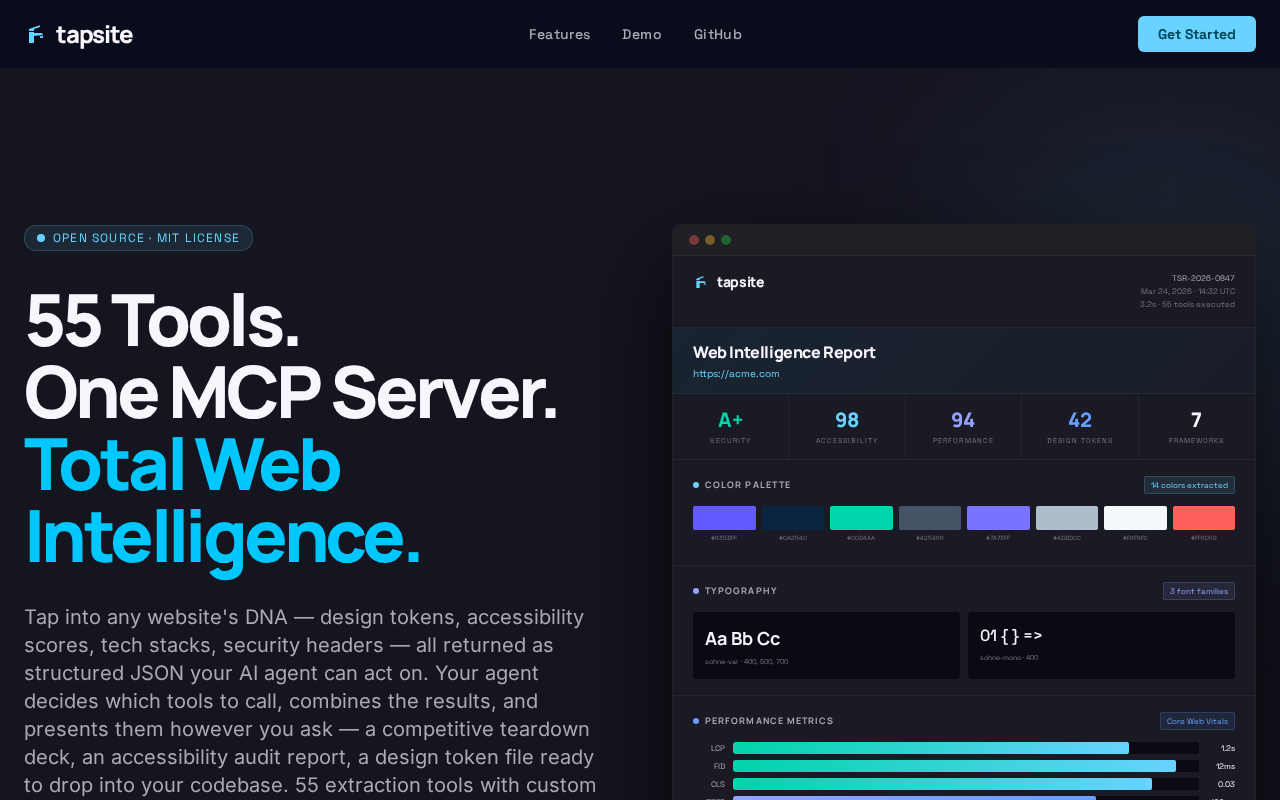
The MCP server for web intelligence extraction. 55 tools that give AI agents the ability to understand websites — not just drive a browser, but extract structured intelligence about design systems, accessibility, performance, content, and more.
Other MCP browser tools let agents click buttons. tapsite lets agents extract a complete color palette, audit WCAG contrast ratios, diff two sites' design tokens, detect tech stacks, or pull structured data with custom CSS/XPath/regex selectors — all as structured JSON that agents can reason about.
55 Tools · 11 Categories · 4 Workflows · Multi-Format Export
Works with Claude, Cursor, Windsurf, and any MCP-compatible AI agent. LangChain/LangGraph integration coming soon.
Installation
# Quick start (no install required)
npx -y tapsite

# Or install globally
npm install -g tapsite
npx playwright install chromium
npx playwright install-deps chromium
Add to your AI agent's MCP config:
{
  "mcpServers": {
    "tapsite": {
      "command": "npx",
      "args": ["-y", "tapsite"]
    }
  }
}
First run: Playwright will install Chromium automatically if not already present (~150MB one-time download).
Also available on the MCP Registry and Glama.
What makes tapsite different
| Other browser MCPs | tapsite |
|---|---|
| Click buttons | Extract full design systems |
| Fill forms | Audit WCAG accessibility |
| Take screenshots | Diff sites over time |
| Read raw HTML | Detect tech stacks & APIs |
| Custom CSS / XPath / regex extraction | |
| Anti-bot resilience & proxy rotation |
Extract design systems — colors, fonts, spacing scales, breakpoints, components, shadows, icons, CSS variables, and contrast ratios from any website. Output as structured JSON or W3C design tokens.
Audit quality — accessibility scoring with WCAG contrast analysis, performance timing (Core Web Vitals), tech stack detection, dark mode support, and animation inventory.
Compare and track — diff two sites side by side, or track a single site over time with snapshot-based temporal diffs. Regressions and improvements are flagged automatically. Disk caching means crawls resume where they left off, and results are reused across sessions.
Work behind login walls — persistent browser sessions with full MFA support. A 3-tier anti-bot escalation system handles protected sites automatically — from stealth scripts to proxy rotation. Log in once manually, then extract across tool calls without re-authenticating. Credentials never enter the chat.
Tools (55)
Session (8)
| Tool | Description |
|---|---|
tapsite_login_manual |
Open headed browser for manual login + MFA |
tapsite_login_check |
Verify authenticated session state |
tapsite_inspect |
Navigate to URL and inspect the DOM (nav, headings, buttons, forms, tables, links) |
tapsite_screenshot |
Take a screenshot of the current page |
tapsite_interact |
Click or fill an indexed element from the last inspect |
tapsite_scroll |
Scroll the page |
tapsite_run_js |
Execute arbitrary JavaScript and return the result |
tapsite_close |
Close the browser session |
Content Extraction (6)
| Tool | Description |
|---|---|
tapsite_extract_table |
Extract a specific table as structured data |
tapsite_extract_links |
Extract all links with text and href |
tapsite_extract_metadata |
Extract page metadata (title, description, OG tags, etc.) |
tapsite_extract_content |
Extract main readable content (article body, headings, paragraphs) |
tapsite_extract_forms |
Extract all forms with fields, labels, and actions |
tapsite_extract_markdown |
Extract page content as clean Markdown (raw, fit, or citations mode) with optional chunking |
Custom Extraction (2)
| Tool | Description |
|---|---|
tapsite_extract_custom |
Extract structured data using custom schemas (CSS selectors, XPath, or regex) |
tapsite_extract_schema_suggest |
Analyze page DOM and auto-suggest extraction schemas |
Design Tokens (5)
| Tool | Description |
|---|---|
tapsite_extract_colors |
Extract color palette (hex values + usage counts) |
tapsite_extract_fonts |
Extract font families, sizes, weights |
tapsite_extract_css_vars |
Extract CSS custom properties |
tapsite_extract_spacing |
Extract spacing scale values |
tapsite_extract_shadows |
Extract box-shadow and text-shadow patterns |
Visual Assets (4)
| Tool | Description |
|---|---|
tapsite_extract_images |
Extract all images with src, alt, dimensions |
tapsite_download_images |
Download images to local output directory |
tapsite_extract_svgs |
Extract inline SVGs |
tapsite_extract_favicon |
Extract favicon URLs and sizes |
Layout Intelligence (3)
| Tool | Description |
|---|---|
tapsite_extract_layout |
Extract layout tree (inline text representation) |
tapsite_extract_components |
Detect repeated UI components and patterns |
tapsite_extract_breakpoints |
Extract responsive breakpoints from CSS media queries |
Quality & Compliance (7)
| Tool | Description |
|---|---|
tapsite_extract_a11y |
Accessibility audit (ARIA, roles, contrast issues) |
tapsite_extract_contrast |
Audit WCAG contrast ratios between text and background |
tapsite_extract_perf |
Extract performance metrics (Core Web Vitals, resource sizes) |
tapsite_extract_security |
Audit security headers (CSP, HSTS, SRI, permissions policy) |
tapsite_extract_darkmode |
Detect dark mode support and extract dark palette |
tapsite_extract_pwa |
Detect PWA support (manifest, service worker, installability) |
tapsite_extract_i18n |
Extract internationalization signals (lang, hreflang, translations) |
Technology Detection (10)
| Tool | Description |
|---|---|
tapsite_extract_stack |
Detect frontend framework, libraries, and tech stack |
tapsite_extract_animations |
Extract CSS animations and transitions |
tapsite_extract_icons |
Detect icon libraries and extract icon usage |
tapsite_extract_graphql |
Detect GraphQL endpoints and introspect schemas |
tapsite_extract_aiml |
Detect AI/ML integrations (models, embeddings, inference endpoints) |
tapsite_extract_canvas |
Extract canvas and WebGL usage patterns |
tapsite_extract_wasm |
Detect WebAssembly modules and usage |
tapsite_extract_web_components |
Detect custom elements and shadow DOM usage |
tapsite_extract_third_party |
Inventory third-party scripts, trackers, and services |
tapsite_extract_storage |
Audit client-side storage (cookies, localStorage, sessionStorage, IndexedDB) |
Network & API (2)
| Tool | Description |
|---|---|
tapsite_capture_network |
Capture network requests during a page load |
tapsite_extract_api_schema |
Infer API schema from observed network traffic |
Multi-page (2)
| Tool | Description |
|---|---|
tapsite_crawl |
Crawl multiple pages from a start URL |
tapsite_diff_pages |
Compare two URLs (cross-site) or track changes over time (temporal) using real extractors |
Export (2)
| Tool | Description |
|---|---|
tapsite_export |
Export inspection results as JSON + Markdown + HTML report + CSV tables + screenshots |
tapsite_export_design_report |
Full design system report: report.html (visual), design-tokens.json (W3C format), design-tokens.css (copy-pasteable :root vars) |
Engine
Resilient extraction engine. Parallel browser pooling for concurrent page extraction. Persistent disk caching — crawls resume where they left off and results are reused across sessions. 3-tier anti-bot escalation with automatic proxy rotation for protected sites.
Workflows (4)
| Tool | Description |
|---|---|
tapsite_teardown |
Comprehensive competitive design teardown (all extractors) |
tapsite_audit |
Pre-launch quality audit (a11y, contrast, perf, SEO, darkmode) |
tapsite_harvest |
Inventory all site assets (images, SVGs, forms, fonts, links) |
tapsite_designsystem |
Extract design tokens as W3C JSON and CSS variables |
LangChain / LangGraph integration (coming soon)
Native LangChain and LangGraph integration is on the roadmap. When released, it will provide a dedicated Python wrapper with tool subsets and managed session lifecycle.
Security
Prompt injection defense (hidden element filtering + output sanitization), HTTPS enforced, private IPs blocked, auth headers redacted. Credentials never enter the chat — log in manually with full MFA support.
Prompt injection defense
Extractors skip hidden elements (display:none, visibility:hidden, opacity:0, zero-size, clip-hidden) to prevent invisible text injection. All output is scanned for prompt injection patterns — instruction overrides, role hijacking, exfiltration attempts, and tool manipulation are flagged inline as [INJECTION_DETECTED].
Credential safety
Never pass credentials through the chat. Use tapsite_login_manual to open a headed browser, log in manually (including MFA), then tapsite_login_check to confirm. Credentials never touch the AI provider's servers or local transcripts.
Docker
tapsite ships a Dockerfile and docker-compose.yml for headless-only use — CI pipelines, server deployments, or anywhere you don't want a local Node.js install.
docker build -t tapsite .
docker compose up
tapsite_login_manual is not available in Docker (it requires a display). To use authenticated sessions in Docker, log in locally first, then mount the profiles/ directory into the container:
volumes:
  - ./output:/app/output
  - ./profiles:/app/profiles
Security note:
profiles/contains live session cookies. Don't commit it to version control (it's already in.gitignore).
Development setup
git clone https://github.com/mgriffen/tapsite
cd tapsite
npm install
npx playwright install chromium
npx playwright install-deps chromium
MCP config pointing to local source:
{
  "mcpServers": {
    "tapsite": {
      "command": "node",
      "args": ["/absolute/path/to/tapsite/src/server.js"]
    }
  }
}
Project structure
src/
  server.js        — MCP server entry point
  browser.js       — shared Chromium context (ensureBrowser, closeBrowser)
  helpers.js       — shared helpers (safeNavigate, summarizeResult, indexPage)
  sanitizer.js     — prompt injection detection
  diff.js          — per-extractor diff logic and extractor name/args mapping
  snapshots.js     — temporal snapshot I/O (saveSnapshot, loadLatestSnapshot)
  browser-pool.js  — parallel browser context pooling
  cache.js         — persistent disk caching with TTL
  markdown.js      — HTML-to-Markdown converter (raw/fit/citations)
  chunker.js       — LLM-friendly text chunking (fixed/semantic/sentence)
  content-filter.js — BM25 relevance filtering
  anti-bot.js      — block detection and tier escalation
  proxy.js         — proxy rotation with failure tracking
  stealth-setup.js — Puppeteer-extra stealth plugin registration
  extraction-strategies.js — CSS/XPath/regex flexible extractors
  extractors.js    — browser-context extraction functions (page.evaluate())
  exporter.js      — file export: JSON, Markdown, HTML, CSV
  inspector.js     — DOM extraction for inspect tools
  cli.js           — standalone CLI (login, inspect, session)
  config.js        — paths and defaults
  tools/
    session.js     — login, inspect, screenshot, interact, scroll, run_js, close
    extraction.js  — all extract_* tools
    network.js     — capture_network, extract_api_schema, extract_stack
    multipage.js   — crawl, diff_pages
    export.js      — export, export_design_report
    workflows.js   — teardown, audit, harvest, designsystem
profiles/          — browser state / session cookies (gitignored)
output/            — export results + snapshots (gitignored)
Output formats
output/run-{timestamp}/—tapsite_export: JSON, Markdown, HTML, screenshots, CSV tablesoutput/design-report-{timestamp}/—tapsite_export_design_report:report.html,design-tokens.json,design-tokens.cssoutput/snapshots/{domain}/—tapsite_diff_pagestemporal snapshots
License
MIT
README copy captured when this server was indexed; it may lag the repository. The original is authoritative.