About io.github.zero-abd/draw2agent
io.github.zero-abd/draw2agent is an MCP server published by zero-abd in the Developer Tools category: draw on your website, let your AI agent see it. Visual context for code generation via MCP.
The repository has 3 stars and 1 forks, with the last commit 5 months ago. Recent commit activity is the strongest signal that reported issues will get attention.
Install
claude mcp add io-github-zero-abd-draw2agent -- npx -y draw2agentnpx -y draw2agentThis server has no ConduID identity, so agent calls to it are not receipted. Pin the version you install and review the source before granting it credentials.
Tools (4)
get_drawing_stateReturns screenshot, DOM nodes, and annotations for the current state
Parameters not published.
launch_canvasOpens your dev page with the drawing overlay
Parameters not published.
launch_ipad_canvasServes the page on your LAN and returns a QR code for drawing from iPad/mobile
Parameters not published.
launch_scratchOpens a standalone Excalidraw whiteboard for freehand sketching
Parameters not published.
Ask AI
Ask AI about io.github.zero-abd/draw2agent
Powered by Claude · Grounded in docs
Security checks
- ✓README presentThe repository ships documentation.
5 checks have not been run yet.
README
draw2agent ✏️


Draw on your website. Your AI agent sees it.
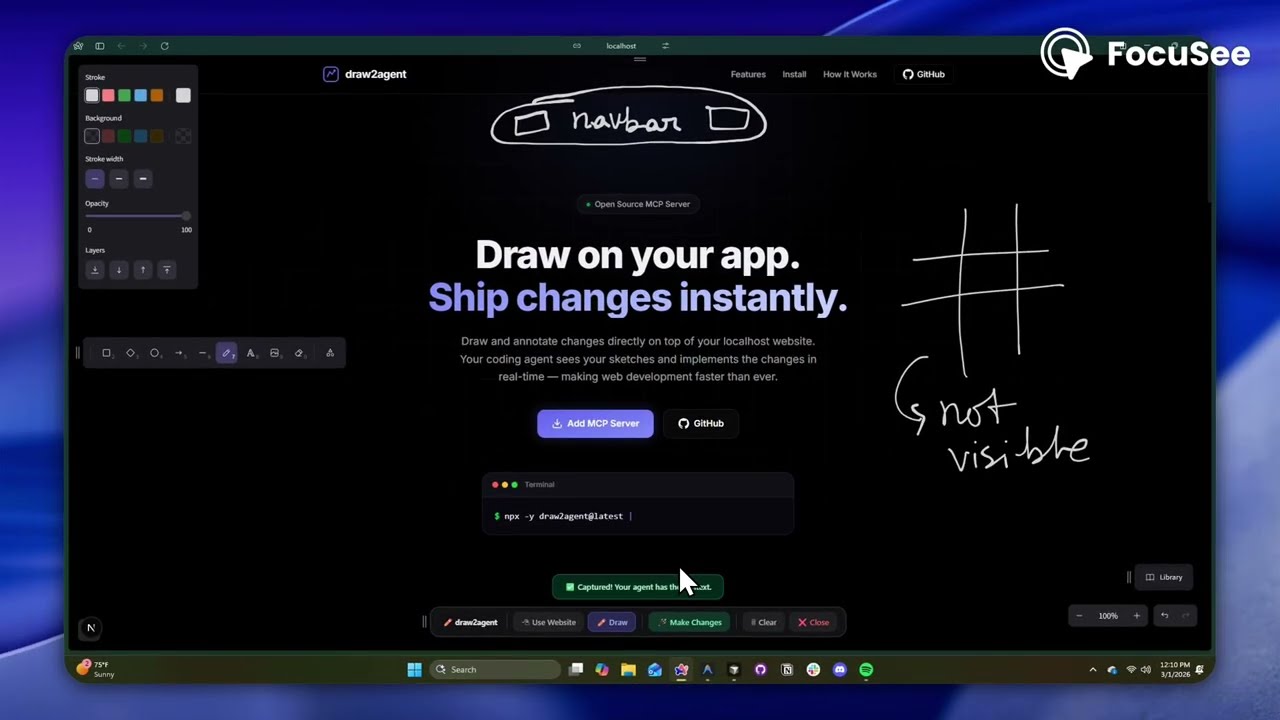
draw2agent is an MCP server that lets you draw annotations directly on top of your local dev page. When you submit, your IDE agent receives a screenshot, structured DOM data, and annotation context to make precise code edits.
👉 Try it out at: draw2agent.vercel.app
Demo
Quick Start
1. Add to your IDE (one-time)
Cursor (~/.cursor/mcp.json):
{
  "mcpServers": {
    "draw2agent": {
      "command": "npx",
      "args": ["-y", "draw2agent@latest"]
    }
  }
}
2. Use it
Tell your agent:
"Use draw2agent to fix the navbar"
- 🌐 Agent opens your browser with drawing tools on your page
- ✏️ Draw circles, arrows, text directly on your website
- 📸 Click Submit
- 🤖 Agent reads the visual context and applies code changes
How It Works
Your Dev Page (proxied)
├── Your original page content
└── Excalidraw overlay (transparent, on top)
    ├── Draw mode: annotate directly on the page
    ├── Select mode: interact with the page normally (Esc)
    └── Submit: screenshot + DOM + annotations → agent
Tools
The MCP server exposes the following tools:
| Tool | Description |
|---|---|
launch_canvas |
Opens your dev page with the drawing overlay |
launch_ipad_canvas |
Creates a tunnel and returns a QR code for remote drawing from iPad/mobile |
launch_scratch |
Opens a standalone Excalidraw whiteboard for freehand sketching |
get_drawing_state |
Returns screenshot, DOM nodes, and annotations for the current state |
launch_canvas
The core tool — proxies your localhost dev server and injects an Excalidraw overlay. Draw annotations directly on your running app, then submit to send visual context to your agent. The tool blocks until you submit.
launch_ipad_canvas
Same as launch_canvas, but exposes the proxy over the internet via a secure tunnel. Automatically opens a new browser tab on your computer with a QR code. Scan it from your iPad or phone to draw annotations with touch. Perfect for whiteboard-style feedback sessions.
launch_scratch
Opens a blank Excalidraw whiteboard — no target URL needed. Sketch UI mockups, wireframes, or diagrams from scratch. Your agent receives the drawing and implements the design.
get_drawing_state
Returns the last captured drawing state (screenshot, DOM nodes, annotations) without launching a new session. Useful for re-fetching context.
License
MIT
README copy captured when this server was indexed; it may lag the repository. The original is authoritative.