About client
client is an MCP server published by git+netsendo in the Developer Tools category: model Context Protocol client for NetSendo email marketing platform - connect AI assistants to your NetSendo instance.
Install
npx @netsendo/mcp-clientclaude mcp add netsendo -- npx -y @netsendo/mcp-clientnpx -y @netsendo/mcp-clientThis server has no ConduID identity, so agent calls to it are not receipted. Pin the version you install and review the source before granting it credentials.
Ask AI
Ask AI about client
Powered by Claude · Grounded in docs
Security checks
- ✓README presentThe repository ships documentation.
- !Scoped permissionsDoesn't declare a permission scope. Assume it can do anything its process can.
4 checks have not been run yet.
README

NetSendo
Professional Email Marketing & Automation Platform





📖 Documentation • 🎓 Courses • 💬 Forum • 🐛 Report Bug
🇺🇸 English | 🇵🇱 Polski | 🇩🇪 Deutsch | 🇪🇸 Español
🚀 About NetSendo
NetSendo is a modern email marketing and automation platform that enables:
- 📧 Email Marketing - Create and send email campaigns with advanced MJML editor
- 🎥 Webinars & Auto-Webinars - Host live sessions or schedule automated evergreen webinars with simulated chat
- 👥 Live Visitors - Real-time visitor tracking and analytics using WebSockets
- 🛍️ E-commerce & Funnels - Sell digital products via Stripe, Polar, & Shopify with built-in sales funnels
- 🤖 AI Suite - Campaign Auditor, Advisor, and Smart Content Generation (OpenAI, Claude, Gemini)
- 🔌 MCP Server - Model Context Protocol integration for AI assistants (Claude, Cursor, VS Code)
- 📱 SMS Marketing - Send SMS messages to your subscribers
- 🔄 Automations - Build complex scenarios and workflows
- 📦 Integrations - Native support for WordPress, WooCommerce, n8n, and more
- 📊 Analytics - Detailed open, click, and conversion statistics
- 🎨 Templates - Drag & drop email template builder
- 👥 CRM - Manage subscribers, groups, and tags
- 🔒 NMI - Professional mail infrastructure with dedicated IPs, IP warming, DKIM, and blacklist monitoring
📸 Dashboard Preview
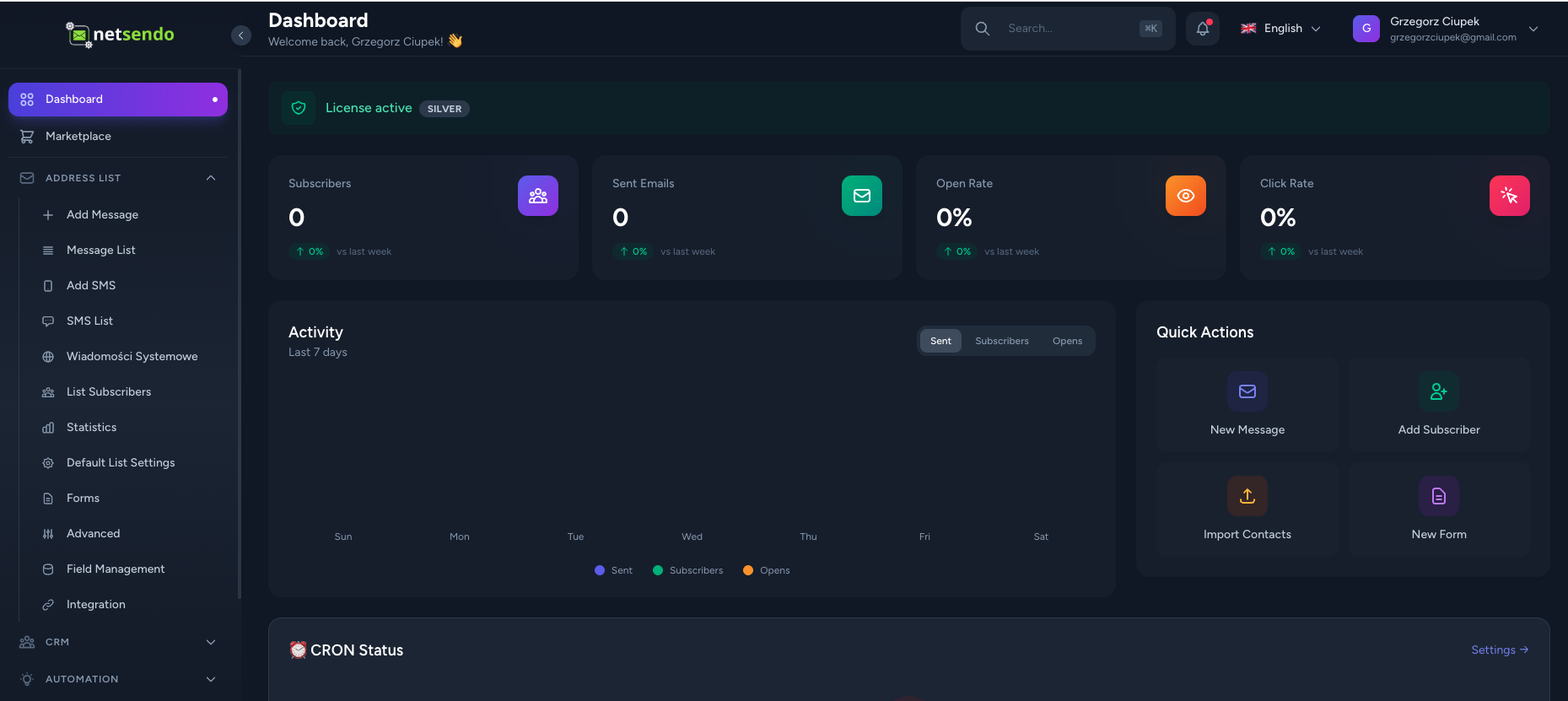
Modern, intuitive dashboard with real-time analytics and campaign management
📋 Requirements
- Docker Desktop (recommended) or:
- PHP 8.5+
- MySQL 8.0+
- Redis
- Node.js 25+
- Composer
- PHP GD Extension (optional, for automatic color extraction from images)
[!TIP] The PHP GD extension enables automatic color palette extraction from uploaded images in the Media Library. If GD is not installed, image uploads will still work, but color extraction will be skipped.
🐳 Installation (Docker)
[!IMPORTANT] > Required Configuration Before Starting Docker
Before running Docker, you MUST configure the following environment variables in
src/.env.docker:1. APP_KEY (Required - Docker will NOT build without this!):
# Find the line: APP_KEY=
# Replace with (IMPORTANT: must start with base64:):
APP_KEY=base64:YOUR_32_BYTE_KEY_HERE
Generate a key using:
openssl rand -base64 322. DB_PASSWORD (Required - change from default):
DB_PASSWORD=your_secure_password3. AI API Keys (Optional - for AI features):
OPENAI_API_KEY=sk-...
ANTHROPIC_API_KEY=sk-ant-...
GOOGLE_AI_API_KEY=...
🚀 Production Deployment
Option 1: Quick Install Script (Recommended)
curl -fsSL https://raw.githubusercontent.com/NetSendo/NetSendo/main/install.sh | bash
To install a specific version:
VERSION=1.0.0 curl -fsSL https://raw.githubusercontent.com/NetSendo/NetSendo/main/install.sh | bash
Option 2: Manual Production Deployment
# Clone repository
git clone https://github.com/NetSendo/NetSendo.git
cd NetSendo

# Create .env file from example
cp .env.example .env
# Edit .env with your production settings

# Start production stack (uses pre-built images)
docker compose up -d

# Or specify a version
NETSENDO_VERSION=1.0.0 docker compose up -d
| Service | URL | Description |
|---|---|---|
| NetSendo | http://localhost:5029 | Main dashboard |
| Mailpit | http://localhost:5031 | Test email inbox |
| MySQL | localhost:5030 | Database |
| Reverb | localhost:8085 | WebSocket Server |
[!TIP] All ports are bound to
127.0.0.1for security. Use a reverse proxy (nginx, Caddy) for public access.
🛠️ Development Setup
git clone https://github.com/NetSendo/NetSendo.git
cd NetSendo

# Start development stack (builds from source)
docker compose -f docker-compose.dev.yml up -d --build
On first run, the container will automatically:
- ✅ Install Composer and NPM dependencies
- ✅ Generate application key
- ✅ Run database migrations
- ✅ Build frontend assets
| Service | URL | Description |
|---|---|---|
| NetSendo | http://localhost:8080 | Main dashboard |
| Mailpit | http://localhost:8025 | Test email inbox |
| MySQL | localhost:3306 | Database |
| Reverb | localhost:8085 | WebSocket Server |
| Vite HMR | http://localhost:5173 | Hot Module Replacement |
🔑 Licensing
NetSendo requires an active license to operate.
License Plans
| Plan | Price | Features |
|---|---|---|
| SILVER | Free | All basic features, unlimited contacts |
| GOLD | $97/mo | Advanced automations, priority support, API, white-label |
License Activation
- Launch the application and go to the main page
- Register an administrator account
- On the license page, select SILVER (free) or GOLD plan
- Enter your email - the license will be automatically activated
🛠️ Docker Commands
Production
# Start production stack
docker compose up -d

# Stop
docker compose down

# View logs
docker compose logs -f app

# Shell access
docker exec -it netsendo-app bash

# Artisan commands
docker exec netsendo-app php artisan <command>
Development
# Start development stack
docker compose -f docker-compose.dev.yml up -d --build

# Stop
docker compose -f docker-compose.dev.yml down

# View logs
docker compose -f docker-compose.dev.yml logs -f app

# Shell access
docker exec -it netsendo-app bash

# Artisan commands
docker exec netsendo-app php artisan <command>

# Composer
docker exec netsendo-app composer <command>

# NPM
docker exec netsendo-app npm <command>
📁 Project Structure
NetSendo/
├── docker/                     # Docker configuration
│   ├── nginx/                 # Nginx config
│   └── php/                   # PHP Dockerfile + entrypoint
├── src/                        # Laravel source code
│   ├── app/                   # Application logic
│   ├── config/                # Configuration
│   ├── database/              # Migrations and seeders
│   ├── resources/             # Frontend (Vue.js, CSS)
│   ├── routes/                # Routing
│   └── public/                # Public files
├── backups/                    # Database backups
│   └── db/                    # MySQL backup files
├── docker-compose.yml          # Production configuration (main)
├── docker-compose.dev.yml      # Development configuration
└── README.md                  # This file
🔧 Configuration
Configuration is stored in src/.env (automatically created from src/.env.docker).
[!CAUTION] > You MUST configure these variables before building Docker!
Required Environment Variables
# REQUIRED: Application Key (must start with base64:)
# Generate with: openssl rand -base64 32
APP_KEY=base64:YOUR_GENERATED_KEY_HERE

APP_URL=http://localhost:8080
APP_LOCALE=en

# Database (Docker) - CHANGE THE PASSWORD!
DB_HOST=db
DB_DATABASE=netsendo
DB_USERNAME=netsendo
DB_PASSWORD=your_secure_password_here

# Redis
REDIS_HOST=redis

# Mail (Mailpit in Docker)
MAIL_HOST=mailpit
MAIL_PORT=1025
Optional: AI Integration Keys
# OpenAI (for GPT features)
OPENAI_API_KEY=sk-...

# Anthropic Claude
ANTHROPIC_API_KEY=sk-ant-...

# Google AI (Gemini)
GOOGLE_AI_API_KEY=...
WebSocket Configuration (Reverb)
[!IMPORTANT] > WebSocket server is required for real-time features like Live Visitors, notifications, and real-time analytics.
NetSendo uses Laravel Reverb as a WebSocket server. The configuration is already included in docker-compose.yml and docker-compose.dev.yml.
Required environment variables:
# Enable broadcasting via Reverb
BROADCAST_CONNECTION=reverb

# Backend configuration (for PHP/Laravel)
REVERB_APP_ID=netsendo
REVERB_APP_KEY=netsendo-reverb-key
REVERB_APP_SECRET=netsendo-reverb-secret
REVERB_HOST=reverb                    # Docker service name
REVERB_PORT=8085
REVERB_SCHEME=http

# Frontend configuration (for browser)
VITE_REVERB_APP_KEY="${REVERB_APP_KEY}"
VITE_REVERB_HOST=localhost             # Or your domain for production
VITE_REVERB_PORT=8085
VITE_REVERB_SCHEME=http
Key points:
REVERB_HOST=reverb- for backend (Docker internal network)VITE_REVERB_HOST=localhost- for browser (external access)- Port
8085is exposed by thereverbcontainer - After changing
VITE_*variables, rebuild frontend:npm run build
Production Configuration
[!TIP] > Auto-detected settings: NetSendo automatically configures these from
APP_URL:
SESSION_DOMAIN- extracted from APP_URL hostnameSESSION_SECURE_COOKIE- set totrueif APP_URL useshttps://
# === REQUIRED ===
APP_URL=https://your-domain.com    # Your production URL (with https://)
APP_KEY=base64:...                 # Generate with: openssl rand -base64 32
APP_ENV=production
APP_DEBUG=false

# Database
DB_CONNECTION=mysql
DB_HOST=db
DB_DATABASE=netsendo_prod
DB_USERNAME=netsendo_user
DB_PASSWORD=your_secure_password   # CHANGE THIS!

# Redis (recommended for sessions/cache)
REDIS_HOST=redis
SESSION_DRIVER=redis
CACHE_DRIVER=redis
QUEUE_CONNECTION=redis

# Mail configuration
MAIL_MAILER=smtp
MAIL_HOST=your-smtp-server.com
MAIL_PORT=587
MAIL_USERNAME=your_username
MAIL_PASSWORD=your_password
MAIL_ENCRYPTION=tls
MAIL_FROM_ADDRESS=noreply@your-domain.com
MAIL_FROM_NAME="${APP_NAME}"

# === OPTIONAL OVERRIDES ===
# These are auto-detected from APP_URL, only set if you need custom values:

# SESSION_DOMAIN=.your-domain.com       # Auto-detected from APP_URL
# SESSION_SECURE_COOKIE=true            # Auto-detected (true for https://)
# TRUSTED_PROXIES=*                     # Set if behind load balancer/CDN
[!IMPORTANT] > Reverse Proxy Configuration: If using nginx/Caddy as reverse proxy, ensure your proxy passes the correct headers:
proxy_set_header X-Forwarded-Proto $scheme;
proxy_set_header X-Forwarded-Host $host;
proxy_set_header X-Real-IP $remote_addr;
🌍 Internationalization
NetSendo supports the following languages:
- 🇺🇸 English (default)
- 🇵🇱 Polski
- 🇩🇪 Deutsch
- 🇪🇸 Español
Language switcher is available in the application header.
📈 Updates
Check for available updates:
- In the app: Settings → Updates
- On GitHub: Releases
Update Process (Standard Docker Workflow)
# Stop containers
docker compose down

# Pull latest images
docker compose pull

# Start with new version
docker compose up -d
[!TIP] That's it! No rebuilding or cache clearing required. Works just like n8n and other Docker apps.
Update to specific version:
NETSENDO_VERSION=1.1.0 docker compose up -d
📖 For detailed instructions, see DOCKER_INSTALL.md
🔧 Troubleshooting
Container Won't Start
# Check logs
docker compose logs app

# Verify database is healthy
docker compose exec db mysqladmin ping -h localhost
Clear Caches
docker compose exec app php artisan cache:clear
docker compose exec app php artisan config:clear
docker compose exec app php artisan view:clear
Browser Cache Issues
If changes don't appear after update:
- Hard refresh:
Ctrl+Shift+R(Windows/Linux) orCmd+Shift+R(Mac) - Clear browser cache or use incognito mode
WebSocket Connection Failed
If you see errors like:
WebSocket connection to 'ws://localhost:8080/app/...' failed
Cause: Reverb is not configured or not running.
Solution:
-
Check Reverb configuration in
.env:BROADCAST_CONNECTION=reverb REVERB_PORT=8085 VITE_REVERB_PORT=8085 -
Verify Reverb container is running:
docker compose ps # Should show netsendo-reverb with status "Up" -
Check Reverb logs:
docker compose logs reverb # Should show: "Starting server on 0.0.0.0:8085" -
Restart Reverb and rebuild frontend:
docker compose restart reverb docker compose exec app npm run build -
Verify port 8085 is accessible:
curl http://localhost:8085
# Should return Reverb response
📖 For more troubleshooting, see DOCKER_INSTALL.md
🤝 Support
- 📖 Documentation: https://docs.netsendo.com
- 💬 Forum: https://forum.netsendo.com
- 🎓 Courses: https://netsendo.com/courses
- 🐛 Report Bug: https://support.netsendo.com
- 📧 Email: support@netsendo.com
🤝 Contributing
We welcome contributions! Whether it's fixing bugs, improving documentation, or adding new features.
👉 Read our Contributing Guide to get started.
Quick ways to help:
- ⭐ Star this repo — helps others discover NetSendo
- 🐛 Report bugs — open an issue
- 📝 Improve docs — fix typos, add examples
- 🌍 Translate — help with translations
Community
- 💬 Telegram — questions & discussions
- 📖 Forum — longer conversations
- 🎓 Courses — learn NetSendo
📄 License
NetSendo is proprietary software. See LICENSE for details.
🇵🇱 O NetSendo (PL)
NetSendo to nowoczesna platforma e-mail marketingu i automatyzacji. Umożliwia tworzenie kampanii emailowych, SMS, automatyzacji sprzedażowych i szczegółowej analityki.
Instalacja
git clone https://github.com/NetSendo/NetSendo.git
cd NetSendo
docker compose up -d --build
Aplikacja dostępna pod: http://localhost:8080
🇩🇪 Über NetSendo (DE)
NetSendo ist eine moderne E-Mail-Marketing- und Automatisierungsplattform. Erstellen Sie E-Mail-Kampagnen, SMS, Verkaufsautomatisierungen und detaillierte Analysen.
Installation
git clone https://github.com/NetSendo/NetSendo.git
cd NetSendo
docker compose up -d --build
Anwendung verfügbar unter: http://localhost:8080
🇪🇸 Acerca de NetSendo (ES)
NetSendo es una plataforma moderna de email marketing y automatización. Cree campañas de correo electrónico, SMS, automatizaciones de ventas y análisis detallados.
Instalación
git clone https://github.com/NetSendo/NetSendo.git
cd NetSendo
docker compose up -d --build
Aplicación disponible en: http://localhost:8080
Made with ❤️ by NetSendo Team

README copy captured when this server was indexed; it may lag the repository. The original is authoritative.