About Node MCP Server
Node MCP Server is an MCP server published by iamtraction in the Developer Tools category: this repository contains the tools written in Node.
The repository has 3 stars and 1 forks, with the last commit a year ago. Six months or more without a commit doesn't mean the server is broken, but check the open issues before depending on it in production.
Install
claude mcp add node-mcp-server -- npx -y @my-mcp-hub/node-mcp-servernpx -y @my-mcp-hub/node-mcp-serverThis server has no ConduID identity, so agent calls to it are not receipted. Pin the version you install and review the source before granting it credentials.
Ask AI
Ask AI about Node MCP Server
Powered by Claude · Grounded in docs
Security checks
- ✓README presentThe repository ships documentation.
5 checks have not been run yet.
README
MCP Server
A TypeScript template repository for creating Model Context Protocol (MCP) servers with support for both stdio (Standard Input/Output) and SSE (Server-Sent Events) transports. This template provides a solid foundation for building MCP servers with a well-organized structure and essential features.
Features
- 🚀 Built with TypeScript for type safety and better developer experience
- 🔄 Supports both stdio and SSE transports
- 📦 Includes example prompts, resources, and tools
- ⚡ Uses FastMCP for rapid development
Prerequisites
- Node.js
- npm or yarn package manager
Getting Started
-
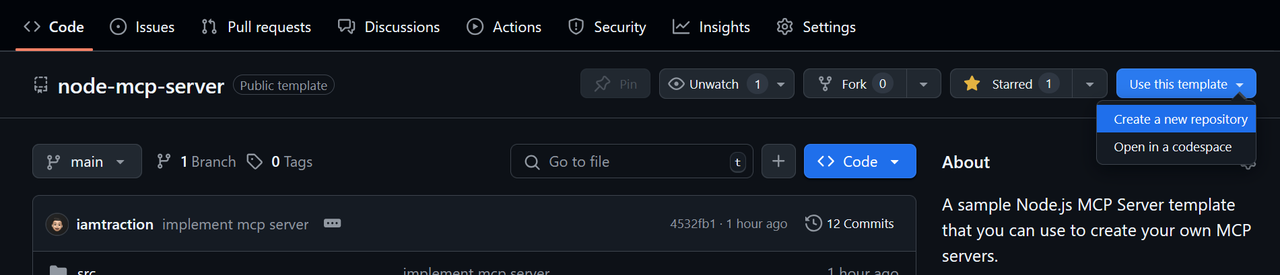
Create a repo from this template
Click Use this template > Create a new repository
-
Clone your repository
git clone https://github.com/iamtraction/node-mcp-server.git cd node-mcp-server -
Install dependencies
npm install -
Start development server
npm run dev
Project Structure
src/
├── prompts/     # MCP prompts
├── resources/   # MCP resources
├── tools/       # MCP tools
└── server.ts    # Main server file
Available Scripts
npm run dev- Start development server with hot reloadnpm run build- Build the TypeScript codenpm run start- Start the production servernpm run watch- Watch for TypeScript changesnpm run lint- Run ESLint to check code quality and style
Adding New Features
Adding a Prompt
Create a new file in src/prompts/ and add it to server.ts. Learn more about MCP Prompts:
import myPrompt from "./prompts/my-prompt.js";
server.addPrompt(myPrompt);
Adding a Resource
Create a new file in src/resources/ and add it to server.ts. Learn more about MCP Resources:
import myResource from "./resources/my-resource.js";
server.addResource(myResource);
Adding a Tool
Create a new file in src/tools/ and add it to server.ts. Learn more about MCP Tools:
import myTool from "./tools/my-tool.js";
server.addTool(myTool);
Configuration
The server can be configured in server.ts. By default, it runs on port 3000 with SSE transport. You can modify the configuration in the server.start() options.:
server.start({
    transportType: "httpStream", // or "stdio"
    httpStream: {
        port: 3000,
    },
});
Learn more about Transports.
Using the MCP Server
stdio Server Setup
{
    "mcpServers": {
        "example-server": {
            "command": "node",
            "args": [ "dist/server.js" ]
         }
    }
}
SSE Server Setup
{
    "mcpServers": {
        "example-server": {
            "url": "https://example-server.com/sse"
         }
    }
}
Contributing
Contributions are welcome! Please feel free to submit a Pull Request.
Showcase
Have you built something cool with this template? Add it to the showcase!
To add your project to the showcase:
- Edit this README.md file
- Add your project to the list above using this format:
- [Your Project Name](link-to-your-project) - Brief description- Submit a pull request
License
This project is licensed under the MIT License - see the LICENSE file for details.
Acknowledgments
- Model Context Protocol - The protocol specification
- MCP TypeScript SDK - The official TypeScript SDK
- FastMCP - The underlying MCP framework
README copy captured when this server was indexed; it may lag the repository. The original is authoritative.