About Nvim Gemini Companion
Nvim Gemini Companion is an MCP server published by gutsavgupta in the Developer Tools category: a Neovim plugin to integrate Gemini CLI well (+ Qwen-code now).
The repository has 84 stars and 9 forks, with the last commit 3 months ago. Recent commit activity is the strongest signal that reported issues will get attention.
Install
git clone https://github.com/gutsavgupta/nvim-gemini-companionThis server has no ConduID identity, so agent calls to it are not receipted. Pin the version you install and review the source before granting it credentials.
Ask AI
Ask AI about Nvim Gemini Companion
Powered by Claude · Grounded in docs
Security checks
Static checks derived from the repository 4 days ago. Heuristics on the source, not an audit.
- ✓README presentThe repository ships documentation.
- !License declaredNo license file. Legally you have no right to use it in a product.
- ✓Tests presentA test suite exists in the repository.
- !Dependencies pinnedNo lockfile. Installs can pull different code over time.
- !Scoped permissionsDoesn't declare a permission scope. Assume it can do anything its process can.
1 check has not been run yet.
Releases
README
nvim-gemini-companion
🚀 Now with Triple Agent Support (Gemini, Qwen & Claude Code)! 🤖
nvim-gemini-companion brings the power of AI agents like Gemini, Qwen and Claude Code directly into your Neovim workflow. 🌟 Enjoy seamless diff views, agent management, and smart file modifications without leaving your editor. Inspired by the vscode-gemini-companion extension
Unlike other Gemini plugins for Neovim, nvim-gemini-companion is built around the MCP backend, which keeps your editor session tightly integrated with your IDE for much better experience ✨
https://github.com/user-attachments/assets/90370aa6-1ae2-477c-8529-0f26e32bdff8
🚀 Quick Start
Pre-requisites
Install any (or all) of these CLI tools and ensure they're in your system's PATH:
The plugin auto-detects which of these are installed, so no extra configuration is needed to get started.
Installation
Install with your favorite plugin manager:
{
  "gutsavgupta/nvim-gemini-companion",
  dependencies = { "nvim-lua/plenary.nvim" },
  event = "VeryLazy",
  config = function()
    require("gemini").setup()
  end,
  keys = {
    { "<leader>gg", "<cmd>GeminiToggle<cr>", desc = "Toggle Gemini sidebar" },
    { "<leader>gc", "<cmd>GeminiSwitchToCli<cr>", desc = "Spawn or switch to AI session" },
    { '<leader>gS', '<cmd>GeminiSend<cr>', mode = { 'x' }, desc = 'Send selection to Gemini' },

  }
}
🛠️ Essential Commands & Features
Core Commands
:GeminiToggle- Toggle the AI sidebar:GeminiSwitchToCli- Spawn or Switch to tmux/sidebar sessions:GeminiSend- Send selected text to AI (use in visual mode):GeminiSendLineDiagnostic- Send line diagnostics to AI:GeminiSendFileDiagnostic- Send file diagnostics to AI:GeminiSwitchSidebarStyle- Switch the appearance/style of the sidebar
Sidebar Terminal Switching
When multiple commands are configured (e.g., both gemini and qwen), you can switch between active sidebar terminals using default key mappings:
<M-]>- Switch to the next active terminal (Alt + ])<M-[>- Switch to the previous active terminal (Alt + [)
To customize these key bindings, you can override the default mappings in your setup function:
require("gemini").setup({
  cmds = { "gemini", "qwen" },
  -- Override default key mappings
  on_buf = function(buf)
    -- Add your own custom mappings
    vim.api.nvim_buf_set_keymap(buf, 't', '<Tab>',
      '<Cmd>lua require("gemini.ideSidebar").switchSidebar()<CR>',
      { noremap = true, silent = true }
    )
    vim.api.nvim_buf_set_keymap(buf, 't', '<S-Tab>',
      '<Cmd>lua require("gemini.ideSidebar").switchSidebar("prev")<CR>',
      { noremap = true, silent = true }
    )
  end
})
Note: Be aware that <Tab> and <S-Tab> may already be mapped to other functionality by the Gemini/Qwen CLIs themselves, so using these keys for terminal switching might interfere with their built-in features. Consider using alternative key bindings such as <C-Tab> and <C-S-Tab> or the default Alt-based mappings instead.
Diff Management
When AI suggests changes, you can:
:wor:wq- Accept changes:qor:q!- Reject changes:GeminiAccept/:GeminiReject- Plugin-specific commands
Tmux Integration (Optional)
Run AI agents in persistent tmux sessions:
:GeminiSwitchToCli tmux gemini- Use Gemini in tmux:GeminiSwitchToCli sidebar qwen- Use Qwen in sidebar
🎛️ Customization Options
Sidebar Styles
Choose from multiple sidebar presets:
require("gemini").setup({
  win = {
    preset = "floating",  -- Options: "right-fixed", "left-fixed", "bottom-fixed", "floating"
    width = 0.8,
    height = 0.8,
  }
})
Multi-Agent Support
By default the plugin auto-detects which agents are installed (gemini, qwen, claude) and enables all of them — so most users don't need to set cmds at all. An explicit cmds/cmd always takes precedence over auto-detection:
require("gemini").setup()                          -- auto-detect installed agents (recommended)

require("gemini").setup({ cmds = { "claude" } })   -- use only Claude Code
require("gemini").setup({ cmds = { "gemini", "qwen", "claude" } }) -- pin all three
Claude Code: the Claude integration uses a WebSocket MCP server with lock-file discovery (under
~/.claude/ide/) and a per-session auth token. It starts automatically only whenclaudeis both installed and part of the effectivecmds. Launchclaudefrom the sidebar/tmux and it connects on its own — diffs, selection, open editors, and diagnostics all work out of the box.
⚙️ Advanced Configuration
Enhanced Picker Integration
Replace default selection UI with fzf-lua/telescope:
-- For fzf-lua integration
vim.ui.select = function(items, opts, onChoice)
  require('fzf-lua').fzf_exec(items, {
    prompt = opts.prompt or 'Select from items',
    actions = {
      ['default'] = function(selected) onChoice(selected[1]) end,
    },
    winopts = { height = math.min(0.2 + #items * 0.05, 0.6) },
  })
end
Key Mappings for Quick Access
keys = {
  { "<leader>g1", "<cmd>GeminiSwitchToCli tmux gemini<cr>", desc = "Tmux Gemini" },
  { "<leader>g2", "<cmd>GeminiSwitchToCli tmux qwen<cr>", desc = "Tmux Qwen" },
  { "<leader>gs", "<cmd>GeminiSwitchSidebarStyle<cr>", desc = "Switch sidebar style" },
}
📸 Screenshots
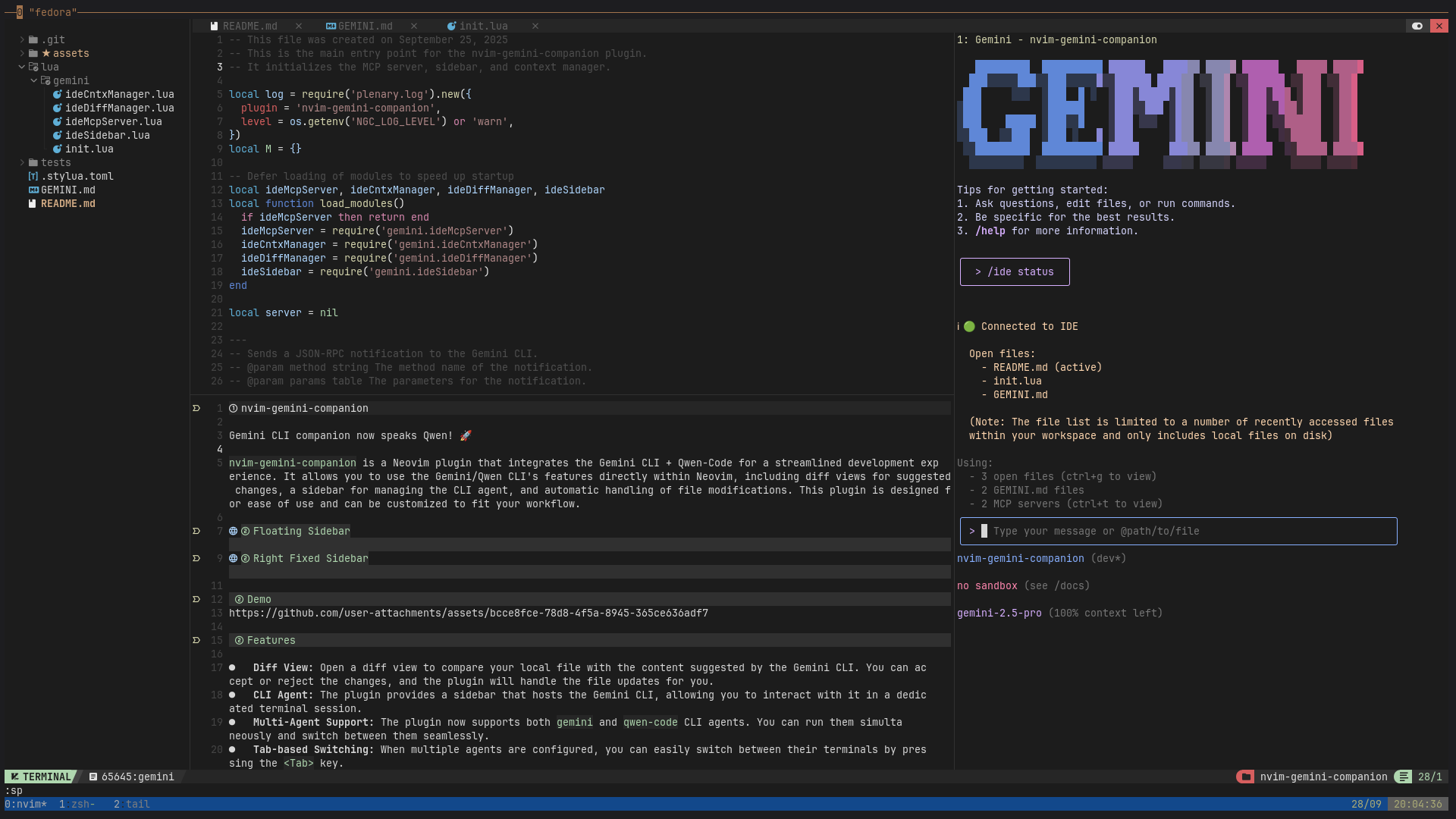
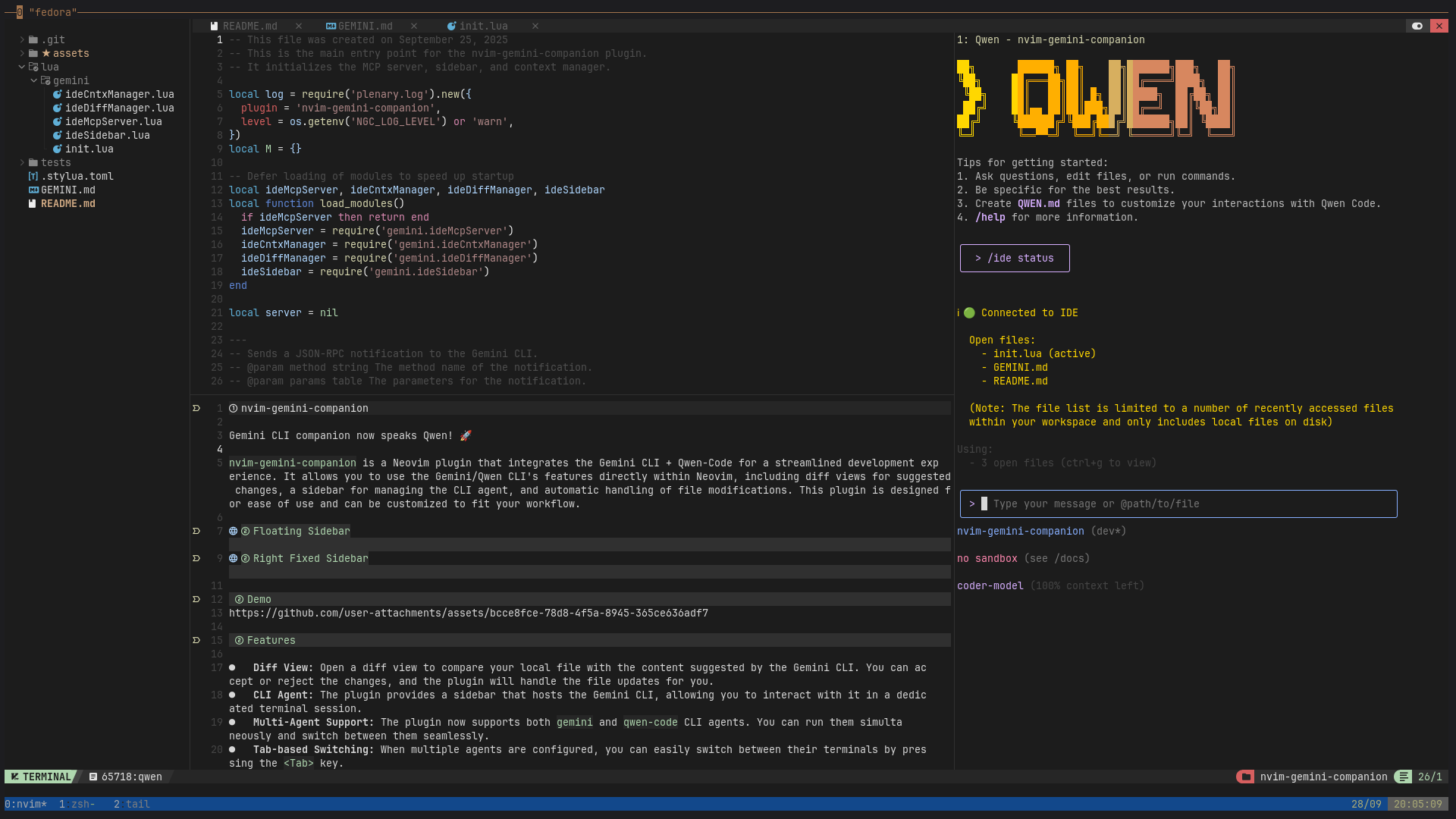
✨ Key Features
- Diff Control: Auto diff views, accept or reject suggestions directly from vim using
:wqor:q. - CLI Agent: Dedicated terminal session for interacting with AI agents
- Multi-Agent Support: Run
gemini,qwen-code, andclaude-codeagents simultaneously - Claude Code Integration: WebSocket MCP transport with lock-file discovery + auth; auto-connects, native diffs, live context
- Tmux Integration: Persistent sessions with state across nvim restarts
- Context Management: Tracks open files, cursor position, and selections for AI context
- LSP Diagnostics: Send file/line diagnostics to AI agents for enhanced debugging
- Visual Selection: Send selected text + prompt directly to AI agents using
:GeminiSend - Flexible Sidebar: Choose between
right-fixed,left-fixed,bottom-fixed, orfloatingstyles - Highly Customizable: Configure commands, window styles, and key bindings to your liking
🔧 For Developers
Run tests with:
XDG_CONFIG_HOME=./tests nvim --headless -c "PlenaryBustedDirectory tests"
🔄 Roadmap
- Amazon-cli agent
- More cli-agents (similar to gemini-cli or forked versions)
- ACP Protocol: Implement ACP protocol support for deeper integration.
README fetched from the repository 4 days ago. The original is authoritative.