About Oke MCP Server
Oke MCP Server is an MCP server published by ronsevetoci in the Developer Tools category: an MCP Server to communicate with OCI OKE clusters.
Six months or more without a commit doesn't mean the server is broken, but check the open issues before depending on it in production.
Install
git clone https://github.com/ronsevetoci/oke-mcp-serverThis server has no ConduID identity, so agent calls to it are not receipted. Pin the version you install and review the source before granting it credentials.
Ask AI
Ask AI about Oke MCP Server
Powered by Claude · Grounded in docs
Security checks
- ✓README presentThe repository ships documentation.
- ✓License declaredUsable under a stated license.
- !Scoped permissionsDoesn't declare a permission scope. Assume it can do anything its process can.
3 checks have not been run yet.
Releases
README
OKE MCP Server
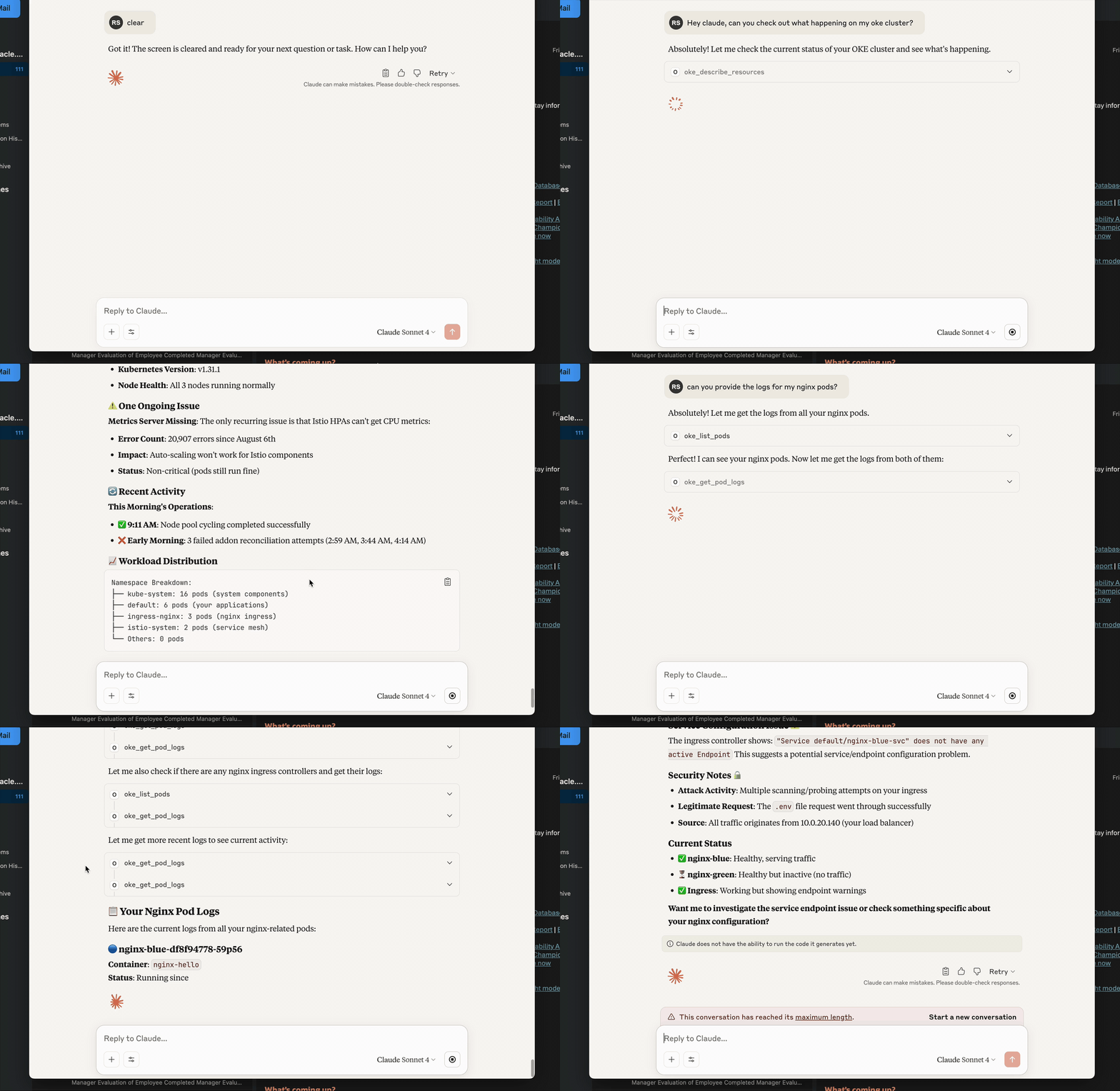
Model Context Protocol (MCP) server for Oracle Container Engine for Kubernetes (OKE). It lets MCP‑aware chat clients (e.g. Claude Desktop, VS Code Agent, custom CLI) inspect, query and troubleshoot your OKE clusters through a small set of safe, composable tools.
✨ Highlights
- Lean, LLM‑friendly APIs – small, consistent payloads (
{items,next,error}/{item,error}) with optionalverboseandhints. - OCI auth that “just works” – supports security token (local dev) and API keys.
- No venv required – run with uvx:
uvx oke-mcp-server --transport stdio. - Token rotation – refresh without restart using the
auth_refreshtool. - Production‑ready ergonomics – clear errors, pagination, predictable shapes.
Requirements
- Python 3.10+ (3.11+ recommended)
- uv (recommended): https://github.com/astral-sh/uv
- OCI credentials configured locally (see below)
Optional:
- MCP host/client (Claude Desktop, VS Code Agent Mode, etc.)
Install & Run (recommended)
Run the published package with uvx:
uvx oke-mcp-server --transport stdio
Or run a specific version:
uvx --from oke-mcp-server==0.2.* oke-mcp-server --transport stdio
The server speaks MCP over stdio. Most MCP hosts handle initialization automatically. For raw testing you can still send JSON‑RPC (see “Quick JSON‑RPC test”).
Configure Authentication
Option A — Security Token (best for local dev)
- Sign in via the OCI Console/CLI to obtain a security token.
- In your
~/.oci/configprofile (e.g.DEFAULT) include:[DEFAULT] tenancy=ocid1.tenancy.oc1..aaaa... region=eu-frankfurt-1 user=ocid1.user.oc1..aaaa... # usually present; not used by STS signer key_file=/path/to/your/api_key.pem # keep if you also use API key flows fingerprint=XX:XX:... # same as above security_token_file=/path/to/token # REQUIRED for STS - Export (or set in your MCP host env):
export OCI_CLI_AUTH=security_token - (When the token expires) call the MCP tool:
{"jsonrpc":"2.0","id":1,"method":"tools/call","params":{"name":"auth_refresh","arguments":{}}}
Option B — API Key
Use your standard ~/.oci/config profile with user, key_file, fingerprint, tenancy, region. Do not set OCI_CLI_AUTH=security_token.
The server also honors
OKE_COMPARTMENT_IDandOKE_CLUSTER_IDenvironment variables as defaults.
Using with an MCP Host
Claude Desktop (example)
Settings → MCP Servers → Add:
{
  "name": "oke",
  "command": "uvx",
  "args": ["oke-mcp-server", "--transport", "stdio"],
  "env": {
    "OCI_CLI_AUTH": "security_token",
    "OKE_COMPARTMENT_ID": "ocid1.compartment.oc1..aaaa...",
    "OKE_CLUSTER_ID": "ocid1.cluster.oc1.eu-frankfurt-1.aaaa..."
  }
}
That’s it—Claude will list the tools and can call them during chat.
Quick JSON‑RPC test (manual)
Start the server:
uvx oke-mcp-server --transport stdio
Then send:
{"jsonrpc":"2.0","id":0,"method":"initialize","params":{"protocolVersion":"2024-11-05","capabilities":{},"clientInfo":{"name":"manual","version":"0.0.0"}}}
{"jsonrpc":"2.0","method":"notifications/initialized","params":{}}
{"jsonrpc":"2.0","id":1,"method":"tools/list"}
{"jsonrpc":"2.0","id":2,"method":"tools/call","params":{"name":"meta_health","arguments":{}}}
Tools (stable set)
All list tools return:
{ "items": [...], "next": "<token|null>", "error": null, "meta": { ... } }
Single‑item tools return:
{ "item": { ... }, "error": null, "meta": { ... } }
Common inputs:
limit(default 20),continue_token(pagination)verbose: bool(include extra details)hints: bool(include lightweight graph hints where applicable)auth: "security_token" | null(override; otherwise server uses env/defaults)
Meta / Config
- meta_health →
{server, version, defaults, effective} - meta_env → redacted env snapshot for diagnostics
- auth_refresh → re‑loads auth (use after rotating security token)
- config_get_effective_defaults / config_set_defaults → manage fallback OCIDs
OKE / Kubernetes
- k8s_list — list Pods, Services, Namespaces, Nodes, Deployments, ReplicaSets, Endpoints, EndpointSlices, Ingress, Gateway, HTTPRoute, PVC, PV, StorageClass
- k8s_get — get a single resource by kind/namespace/name
- oke_get_pod_logs — stream recent logs from a container (supports
tail_lines,since_seconds,previous,timestamps) - oke_list_clusters / oke_get_cluster — cluster discovery and details (OCI)
For public logs on OKE, ensure worker nodes allow the API->kubelet path: TCP/10250 from the control‑plane CIDR/NSG. Timeouts when calling
read_namespaced_pod_logtypically mean this network path is blocked.
Troubleshooting
| Symptom | Likely Cause | Fix |
|---|---|---|
{'user':'missing'} from OCI SDK |
No valid signer or profile | Set OCI_CLI_AUTH=security_token or ensure ~/.oci/config has user/key_file/fingerprint |
| TLS bundle not found | Wrong Python cert path | Ensure certifi is installed in the environment running the server |
Logs 500 / i/o timeout to :10250 |
Control‑plane → node kubelet blocked | Open TCP/10250 from API endpoint CIDR in Security List / NSG |
Tool says cluster_id required |
No defaults present | Set OKE_CLUSTER_ID env or call config_set_defaults |
Project Structure
oke_mcp_server/
  __init__.py
  main.py
  auth.py
  config_store.py
  tools/
    k8s.py
    oke_cluster.py
pyproject.toml
Makefile
README copy captured when this server was indexed; it may lag the repository. The original is authoritative.