About OpenDigger MCP Server
OpenDigger MCP Server is an MCP server published by X-lab2017 in the Developer Tools category: mCP server of OpenDigger.
The repository has 8 stars and 5 forks, with the last commit a year ago. Six months or more without a commit doesn't mean the server is broken, but check the open issues before depending on it in production.
Install
git clone https://github.com/X-lab2017/open-digger-mcp-serverThis server has no ConduID identity, so agent calls to it are not receipted. Pin the version you install and review the source before granting it credentials.
Tools (6)
1**`get_open_digger_metric`**
Parameters not published.
2**`get_open_digger_metrics_batch`**
Parameters not published.
3**`compare_repositories`**
Parameters not published.
4**`analyze_trends`**
Parameters not published.
5**`get_ecosystem_insights`**
Parameters not published.
6**`server_health`**
Parameters not published.
Ask AI
Ask AI about OpenDigger MCP Server
Powered by Claude · Grounded in docs
Security checks
Static checks derived from the repository 6 days ago. Heuristics on the source, not an audit.
- ✓README presentThe repository ships documentation.
- ✓License declaredUsable under a stated license.
- !Tests presentNo tests found. Behaviour changes may go unnoticed between versions.
- !Dependencies pinnedNo lockfile. Installs can pull different code over time.
- ✓No dynamic code executionSource scan found no eval, dynamic Function, or shell execution.
- !Scoped permissionsDoesn't declare a permission scope. Assume it can do anything its process can.
README
OpenDigger MCP Server
A Model Context Protocol (MCP) server for OpenDigger enabling advanced repository analytics and insights through tools and prompts.
Quick Start
# Setup
git clone https://github.com/X-lab2017/open-digger-mcp-server.git

# (Optional) Ensure you're on the master branch
git checkout master

cd open-digger-mcp-server && cd mcp-server
npm install
npm run build

# Start server
npm start
[!IMPORTANT]
Don't forget to configure Cursor (update path in .cursor/mcp.json)
Expected output:
OpenDigger MCP Server running (on stdio)...
[!IMPORTANT]
If you are using Cursor AI IDE, you should see the MCP server (open-digger-mcp) toast in the bottom-left corner. You should enable it, & now you can start using the tools and prompts provided by the MCP server. To verify, open Cursor Settings and check the MCP Servers section → you should seeopen-digger-mcplisted there.
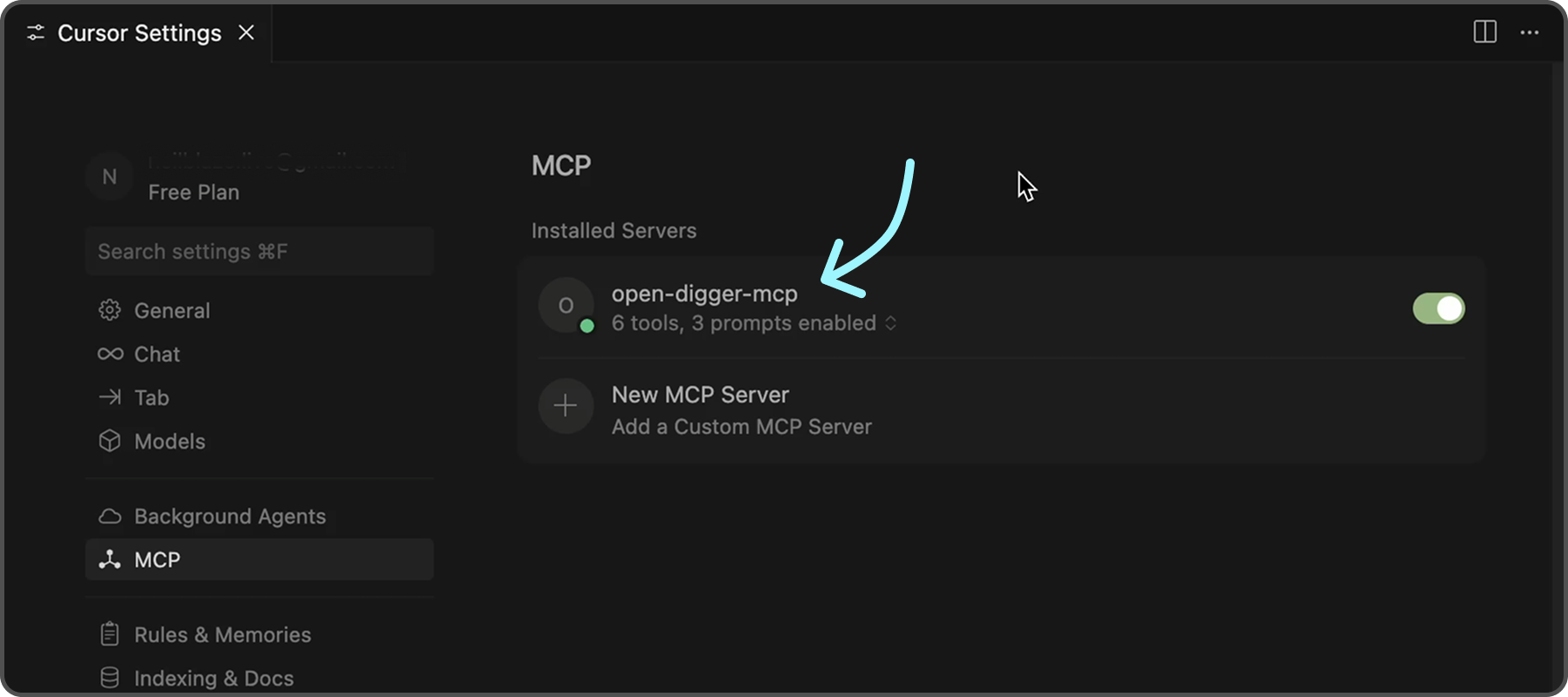
To further confirm that the server is functioning correctly, you can check the following indicators in Cursor:
- ✅ Green dot next to "open-digger-mcp" title
- ✅ "6 tools" displayed in server status
- ✅ "3 prompts" displayed in server status
- ✅ No error messages or red indicators
[!TIP] Please refer to
Installation.mdfor detailed installation instructions and configuration options for different IDEs.
Features
Tools (6 Available)
| No. | Tool | Description |
|---|---|---|
| 1 | get_open_digger_metric |
Fetch single repository metrics |
| 2 | get_open_digger_metrics_batch |
Batch operations for multiple metrics |
| 3 | compare_repositories |
Multi-repository comparative analysis |
| 4 | analyze_trends |
Growth trend analysis over time periods |
| 5 | get_ecosystem_insights |
Ecosystem analytics & insights |
| 6 | server_health |
System diagnostics and health monitoring (Beta) |
Prompts (3 Available)
repo_health_analysis- Comprehensive repository health reportsrepo_comparison- Competitive repository analysisdeveloper_insights- Developer activity and contribution analysis
Metrics
-
Core Metrics:
openrank,stars,forks,contributors,participants,issues_new,issues_closed,pull_requests,commits,activity -
Extended Metrics:
technical_fork,bus_factor,releases,inactive_contributors,maintainer_count,community_activity -
Additional Metrics:
change_requests,pull_requests_accepted,pull_requests_merged,issue_comments,issue_response_time,code_change_lines,developer_network
💡 Usage Examples
💠 Repository Comparison
Compare microsoft/vscode and facebook/react using the compare_repositories tool
💠 Health Analysis
Generate a health report for microsoft/vscode using the repo_health_analysis prompt
💠 Trend Analysis
Analyze the growth trends for contributors in microsoft/vscode over 2 years
Server Status Check
After starting the server, verify it's working:
# In a new terminal
echo '{"jsonrpc":"2.0","id":1,"method":"tools/list","params":{}}' | node dist/index.js
Expected response should list all 6 tools.
Configuration
Environment Variables (.env)
# Cache configuration (recommended)
CACHE_TTL_SECONDS=300

# Optional SSE server
SSE_PORT=3001
SSE_HOST=127.0.0.1
Cursor MCP (.cursor/mcp.json)
{
  "mcpServers": {
    "open-digger": {
      "command": "node",
      "args": ["/full/path/to/dist/index.js"],
      "cwd": "/full/path/to/project",
      "env": {
        "CACHE_TTL_SECONDS": "300"
      }
    }
  }
}
[!TIP] Replace
/full/path/to/open-digger-mcp-serverwith your actual project directory path. Usepwdto get the current directory path.
Development
npm run watch           # Development mode
npm run build           # Compile TypeScript
npm run clean           # Clean build files
npm run sse:test        # Test SSE server
[!TIP] Beside Cursor, you can also use other MCP clients like VS Code, Claude Chat, or the official MCP Inspector.
Troubleshooting
Common Issues
Server not appearing in Cursor:
- Verify absolute paths in
.cursor/mcp.json - Restart Cursor completely (Cmd+Q / Alt+F4)
- Check MCP Settings section for error messages
Permission errors:
chmod +x dist/index.js
Build errors:
npm run clean
npm install
npm run build
Cache issues:
# Clear npm cache
npm cache clean --force

# Rebuild
npm run clean && npm run build
Contributing
- Fork the repository
- Create your feature branch (
git checkout -b feature/amazing-feature) - Commit changes (
git commit -m 'Add amazing feature') - Push to branch (
git push origin feature/amazing-feature) - Open a Pull Request
License
Apache-2.0 License - see LICENSE file for details.
README fetched from the repository 6 days ago. The original is authoritative.