
Python FastMCP WatchList
No description available
Ask AI about Python FastMCP WatchList
Powered by Claude · Grounded in docs
I know everything about Python FastMCP WatchList. Ask me about installation, configuration, usage, or troubleshooting.
0/500
Reviews
Documentation
`
Watchlist MCP Server
This project implements a Movie Watchlist Model Context Protocol (MCP) server using FastMCP. It provides a simple API to manage a movie watchlist, including marking movies as watched/unwatched, adding ratings, retrieving lists of movies, and generating LLM-powered summaries of your watchlist.
Demo Recording
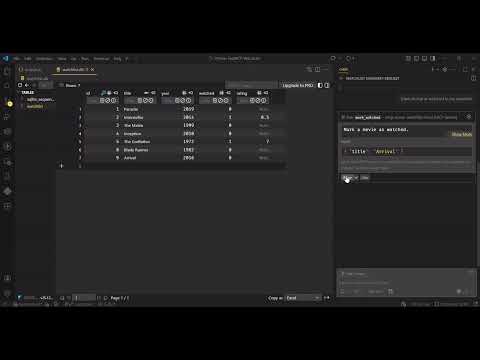
Watch a demo of the project here:
Features
-
LLM Sampling:
- Generate friendly, AI-powered summaries of your movie watchlist. The
summarize_watchlisttool uses LLM sampling to send your movie list to a language model, which returns a brief, insightful summary. This can highlight genres, trends, or fun facts about your watchlist, making your experience more interactive and personalized.
- Generate friendly, AI-powered summaries of your movie watchlist. The
-
Elicitation:
- Collect additional information from the user when required. For example, when marking a movie as watched, the server will prompt the user to provide a rating for the movie (out of 10) using an elicitation flow. Elicitation is handled automatically by the MCP server and is highlighted in the
mark_watchedtool.
- Collect additional information from the user when required. For example, when marking a movie as watched, the server will prompt the user to provide a rating for the movie (out of 10) using an elicitation flow. Elicitation is handled automatically by the MCP server and is highlighted in the
-
Database Schema:
- Each movie has:
title(str),year(int),watched(bool), andrating(float, optional, out of 10).
- Each movie has:
-
Tools:
add_movie(title: str, year: int)— Add a movie to the watchlist.mark_watched(title: str)— Mark a movie as watched (elicits a rating from the user).unwatch_movie(title: str)— Mark a movie as unwatched (removes rating).delete_movie(title: str)— Delete a movie from the watchlist.summarize_watchlist()— Get a friendly, LLM-generated summary of your watchlist (uses LLM sampling).
-
Resources:
watchlist://{title}— Get details of a movie by title.watchlist://all— Get all movies in the watchlist.watchlist://unwatched— Get all unwatched movies.watchlist://watched— Get all watched movies.
-
Prompts:
prompt_add_movie(title: str, year: int)— Prompt to add a movie.prompt_unwatch_movie(title: str)— Prompt to mark a movie as unwatched.prompt_delete_movie(title: str)— Prompt to delete a movie.prompt_mark_watched(title: str)— Prompt to mark a movie as watched.
All tools and resources return formatted strings with the movie's title, year, watched status, and rating (if available). Elicitation is used where additional user input is required, such as collecting a rating when marking a movie as watched.
Requirements
- Python: 3.12 or newer (see
pyproject.toml) - Node.js: Required for running the MCP Inspector (via
npx). Download Node.js - MCP CLI: Installed automatically as a dependency (
mcp[cli]inpyproject.toml)
Getting Started
1. Install uv
macOS:
brew install uv
Windows:
winget install --id=astral-sh.uv -e
Or see the uv docs for other platforms.
2. Install dependencies
To install dependencies (from pyproject.toml, uv.lock, or requirements.txt), run:
uv sync
3. Install the package in editable mode
uv pip install -e .
4. Run the server locally
You can run the server using the module directly:
python -m mcp_server_watchlist.server
Or, if you installed in editable mode, you can use the script entry point (as defined in pyproject.toml):
mcp-server-watchlist
5. Open the MCP Inspector
In a separate terminal, run:
npx @modelcontextprotocol/inspector
Note: The Inspector requires Node.js. For more details, see the MCP Inspector documentation.
Endpoints & Testing
You can test your MCP server using the MCP Inspector, a web interface for interacting with your tools, resources, and prompts.
How to use MCP Inspector:
- Make sure your server is running and the Inspector is started (see Getting Started above).
- Open the Inspector UI (usually at http://localhost:6274) in your browser. Use it to invoke tools, resources, and prompts interactively.
Sample VS Code MCP User Config
Depending on your setup, use one of the following configurations in your VS Code user or workspace settings:
1. Local Setup (run your own server)
Follow all steps in the Getting Started section above, then use this config:
{
  "servers": {
    "mcp-server-watchlist-local": {
      "url": "http://127.0.0.1:8000/mcp/",
      "type": "http"
    }
  },
  "inputs": []
}
2. Direct Use (hosted server, no setup required)
If you want to use the hosted server directly, use this config:
{
  "servers": {
    "mcp-server-watchlist-remote": {
      "url": "https://python-fastmcp-watchlist.onrender.com/mcp/",
      "type": "http"
    }
  },
  "inputs": []
}
Use only the relevant section above based on whether you want to run the server locally or use the remote server.
Troubleshooting & FAQ
- Inspector won't start: Make sure Node.js is installed and available in your PATH. Try running
node -vandnpx -vto verify. - Port 8000 already in use: Stop any other process using port 8000 or change the port in your server code.
- Inspector UI not opening: Ensure the Inspector process is running and check your browser for http://localhost:6274.
- Python version issues: Ensure you are using Python 3.12 or newer (as required by
pyproject.toml). Check withpython --version.
For more help, see the FastMCP documentation or open an issue in this repository.
License
This project is licensed under the MIT License. See the LICENSE file for details.