About Red Tldr
Red Tldr is an MCP server in the Search category: red-tldr is a lightweight text search tool, which is used to help red team staff quickly find the commands and key points they want to execute, so it is more suitable for use by red team personnel with certain experience.
Install
git clone https://github.com/Rvn0xsy/red-tldrThis server has no ConduID identity, so agent calls to it are not receipted. Pin the version you install and review the source before granting it credentials.
Tools (3)
get_command_detailsGet full details of a specific command entry
Parameters not published.
list_techniquesList available MITRE ATT&CK techniques in the database
Parameters not published.
search_redteam_commandsSearch commands by keyword, platform, category, tactic, or technique
Parameters not published.
Ask AI
Ask AI about Red Tldr
Powered by Claude · Grounded in docs
Security checks
- ✓README presentThe repository ships documentation.
5 checks have not been run yet.
README

Red Team TL;DR

What is Red Team TL;DR?
red-tldr is a lightweight red team command lookup tool. It helps experienced red team operators quickly find the commands, techniques, and key points they need — like a man command built for offensive security.
Starting from v0.5.0, red-tldr also ships with a built-in MCP server, so AI assistants like Claude Desktop and Cursor can query your red team knowledge base directly.
Why Red Team TL;DR?
In daily red team work, you need to memorize hundreds of commands — and usually you only remember the first few characters. Searching through documentation or search engines is slow and noisy. red-tldr gives you instant, offline, deterministic answers from a curated database you control.
Features
- Full-text search — Bleve-powered BM25 search with weighted scoring (name×5, tags×3, data×1) and fuzzy matching
- Multi-format output —
text(colored terminal),json,markdown - MCP Server — Built-in Model Context Protocol server for AI assistant integration (stdio + Streamable HTTP)
- MITRE ATT&CK mapping — Entries can be tagged with tactics and techniques
- Enhanced data model — category, platforms, mitre_attack, metadata (author/source/confidence), related entries
- Backward compatible — Works with existing YAML databases, new fields are optional
- Offline-first — No cloud dependencies, no API keys, fully deterministic
- Secure — Zip-slip vulnerability fixed, path validation on all archive operations
Quick Start
Install
macOS
$ brew install red-tldr
Arch Linux
# AUR: https://aur.archlinux.org/packages/red-tldr
$ sudo pacman -S red-tldr
From Source
$ git clone https://github.com/Rvn0xsy/red-tldr
$ cd red-tldr
$ go build
Binary
Download from Releases.
$ tar -zxvf red-tldr_latest_linux_amd64.tar.gz
$ ./red-tldr
It is recommended to add red-tldr to your PATH.
Usage
Search
# Keyword search
$ red-tldr mimikatz

# Fuzzy matching — type a few characters
$ red-tldr mi

When multiple results are found, select by number:

Output Formats
# JSON output
$ red-tldr mimikatz -f json

# Markdown output
$ red-tldr mimikatz -f markdown
Update & Upgrade
# Rebuild local index (JSON + Bleve)
$ red-tldr update

# Download latest database from GitHub
$ red-tldr upgrade
MCP Server
red-tldr includes a built-in MCP server that exposes your red team knowledge base to AI assistants.
Tools
| Tool | Description |
|---|---|
search_redteam_commands |
Search commands by keyword, platform, category, tactic, or technique |
get_command_details |
Get full details of a specific command entry |
list_techniques |
List available MITRE ATT&CK techniques in the database |
stdio Mode (Claude Desktop / Cursor)
$ red-tldr serve
Add to your Claude Desktop config (claude_desktop_config.json):
{
  "mcpServers": {
    "red-tldr": {
      "command": "red-tldr",
      "args": ["serve"]
    }
  }
}
Streamable HTTP Mode
$ red-tldr serve --http --addr localhost:8080 --endpoint /mcp
Configuration
Default config path: ~/.red-tldr/config.toml
[red-tldr]
  index-update = false
  github-update = false
  path = ""
  color = true
| Item | Description | Type |
|---|---|---|
| index-update | Auto-rebuild index on search | Bool |
| github-update | Auto-download database from GitHub | Bool |
| path | Database storage path | String |
| color | Colored terminal output | Bool |
Data Model
Each entry is a YAML file in the red-tldr-db repository. The enhanced format (v0.5.0+) supports additional fields while remaining backward compatible:
name: mimikatz-sekurlsa
tags:
  - mimikatz
  - credentials
  - lsass
data: |
  # Mimikatz Sekurlsa
privilege::debug sekurlsa::logonpasswords
category: credential-access
platforms:
- windows
mitre_attack:
tactics:
  - credential-access
techniques:
  - T1003.001
metadata:
author: Rvn0xsy
confidence: high
related:
- mimikatz-dpapi
All new fields (category, platforms, mitre_attack, metadata, related) are optional — existing YAML files work without modification.
Contributing
We welcome contributions!
- Report bugs via Issues.
- Submit bug fixes as Pull Requests to the dev branch.
- For new features, create an issue first to discuss the approach before submitting a PR.
- Documentation improvements are always welcome.
- Contact: rvn0xsy@gmail.com
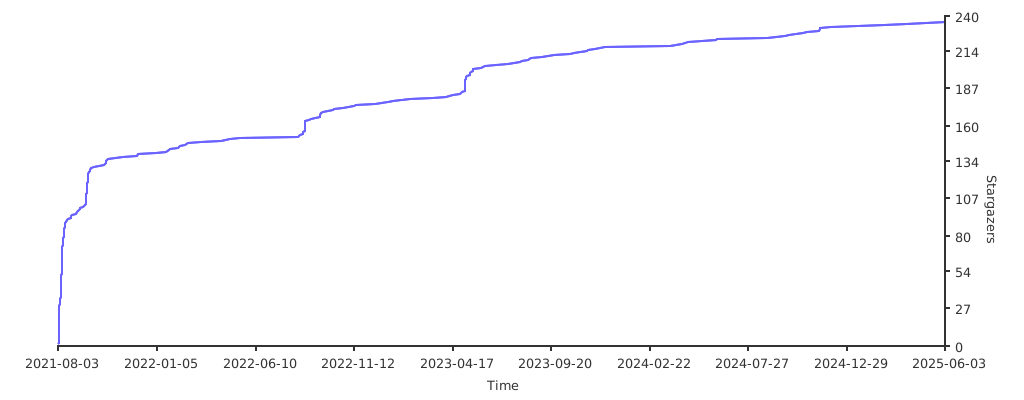
Stargazers over time
README copy captured when this server was indexed; it may lag the repository. The original is authoritative.