About Spark Eventlog MCP
Spark Eventlog MCP is an MCP server published by yhyyz in the Developer Tools category: spark eventlog analysis.
Six months or more without a commit doesn't mean the server is broken, but check the open issues before depending on it in production.
Install
git clone https://github.com/yhyyz/spark-eventlog-mcpThis server has no ConduID identity, so agent calls to it are not receipted. Pin the version you install and review the source before granting it credentials.
Ask AI
Ask AI about Spark Eventlog MCP
Powered by Claude · Grounded in docs
Security checks
- ✓README presentThe repository ships documentation.
- ✓License declaredUsable under a stated license.
- !Scoped permissionsDoesn't declare a permission scope. Assume it can do anything its process can.
3 checks have not been run yet.
README
Spark EventLog MCP Server
中文版本 | English
A comprehensive Spark event log analysis MCP server built on FastMCP 2.0 and FastAPI, providing in-depth performance analysis, resource monitoring, and optimization recommendations.
Features
- 🌐 FastMCP & FastAPI Integration: MCP protocol support and analysis report APIs powered by FastAPI & FastMCP
- 📊 Performance Analysis: Shuffle analysis, resource utilization monitoring, task execution analysis
- 📈 Visual Reports: Auto-generated interactive HTML reports with direct browser access
- ☁️ Cloud Data Sources: Support for S3 buckets and HTTP URLs with automatic path detection
- 💡 Intelligent Optimization: Automated optimization recommendations based on analysis results
- 🔧 Modular Architecture: Clean separation of concerns with specialized modules for tools, middleware, and configuration
- 📝 Enhanced Logging: Comprehensive request/response logging with detailed debugging information
Quick Start
MCP Client Integration
uvx Mode (Recommended - Direct from GitHub)
{
  "mcpServers": {
    "spark-eventlog": {
      "type": "stdio",
      "command": "uvx",
      "args": [
        "--from",
        "git+https://github.com/yhyyz/spark-eventlog-mcp",
        "spark-eventlog-mcp"
      ],
      "env": {
        "MCP_TRANSPORT": "stdio"
      }
    }
  }
}
stdio Mode (Local Development)
{
  "mcpServers": {
    "spark-eventlog": {
      "command": "uv run python",
      "args": ["/path/to/spark-eventlog-mcp/start.py"],
      "env": {
        "MCP_TRANSPORT": "stdio"
      }
    }
  }
}
HTTP Mode
1. Start HTTP Server:
export MCP_TRANSPORT=streamable-http
export MCP_HOST=localhost
export MCP_PORT=7799

uv run python start.py
2. Configure Remote MCP:
{
  "mcpServers": {
    "spark-eventlog": {
      "url": "http://localhost:7799/mcp",
      "type": "http"
    }
  }
}
3. Access Services:
- API Documentation: http://localhost:7799/docs
- Health Check: http://localhost:7799/health
- Reports List: http://localhost:7799/api/reports
- MCP Endpoint: http://localhost:7799/mcp
Analysis Examples

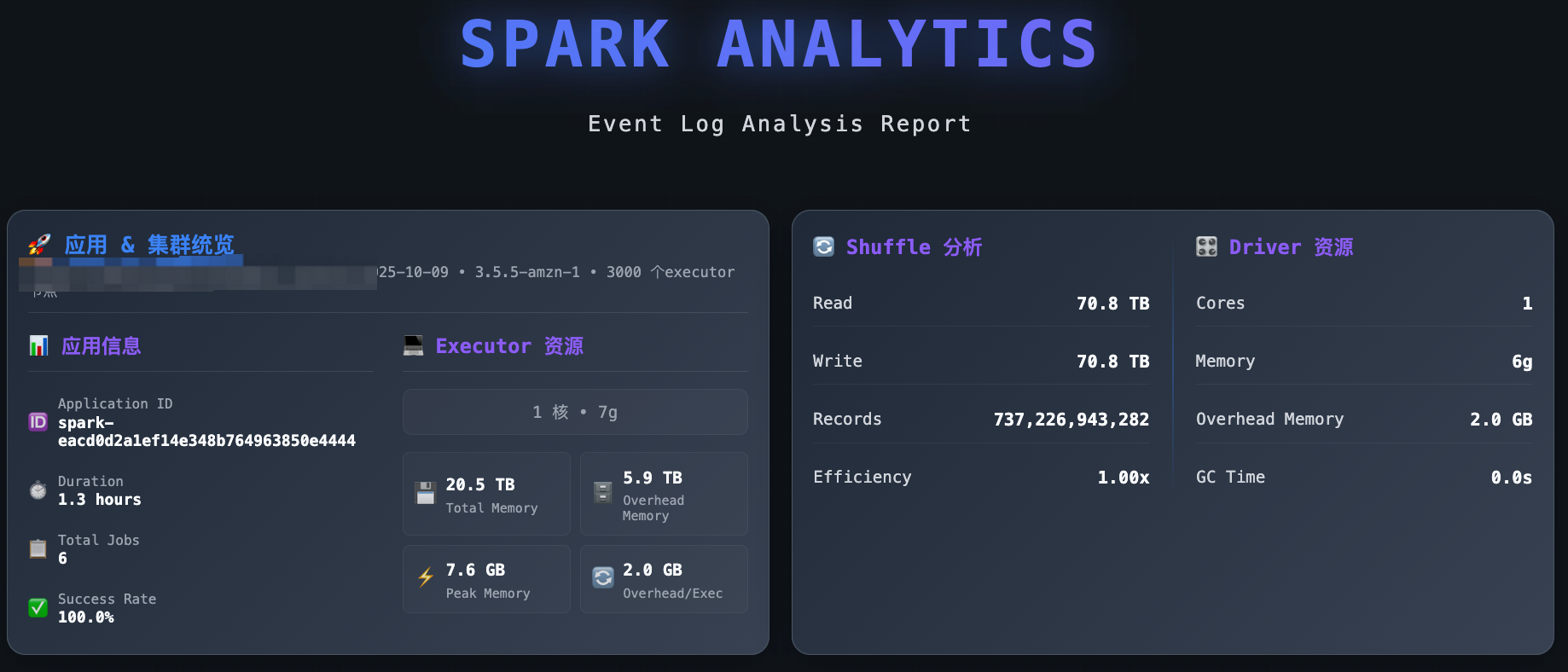
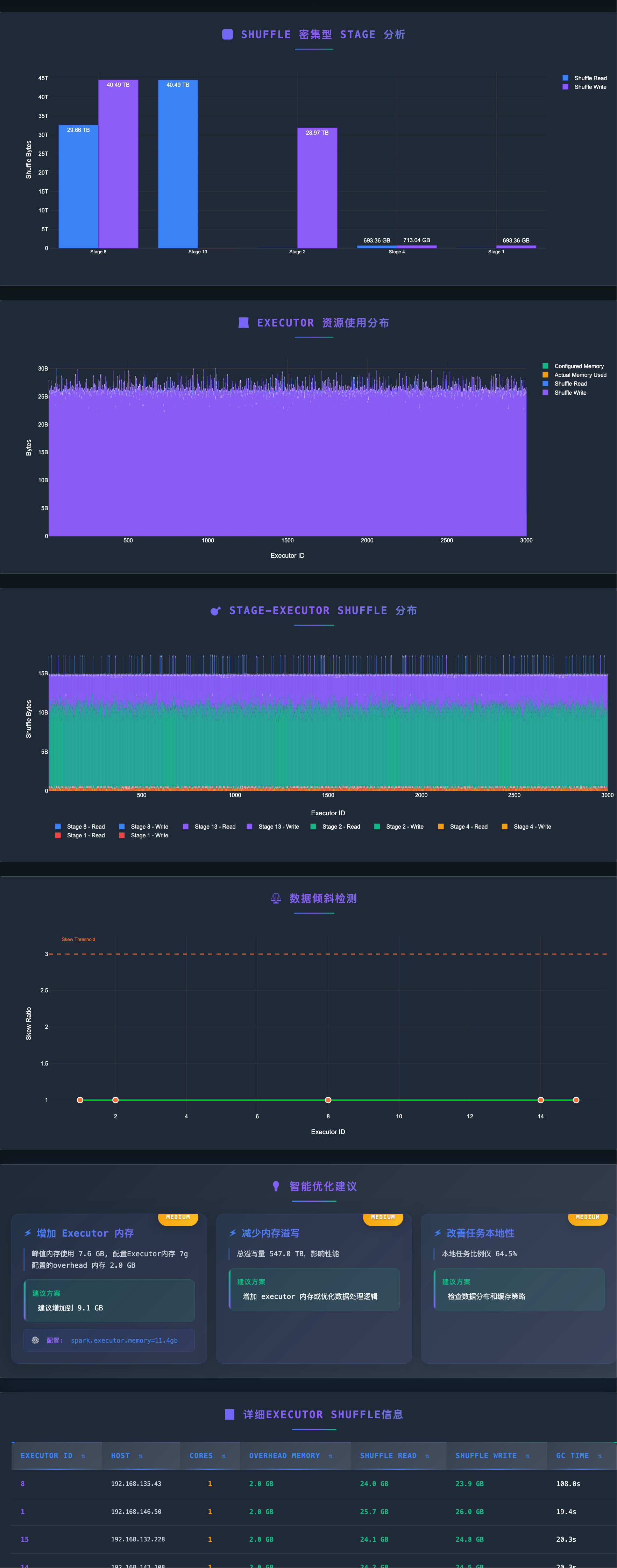
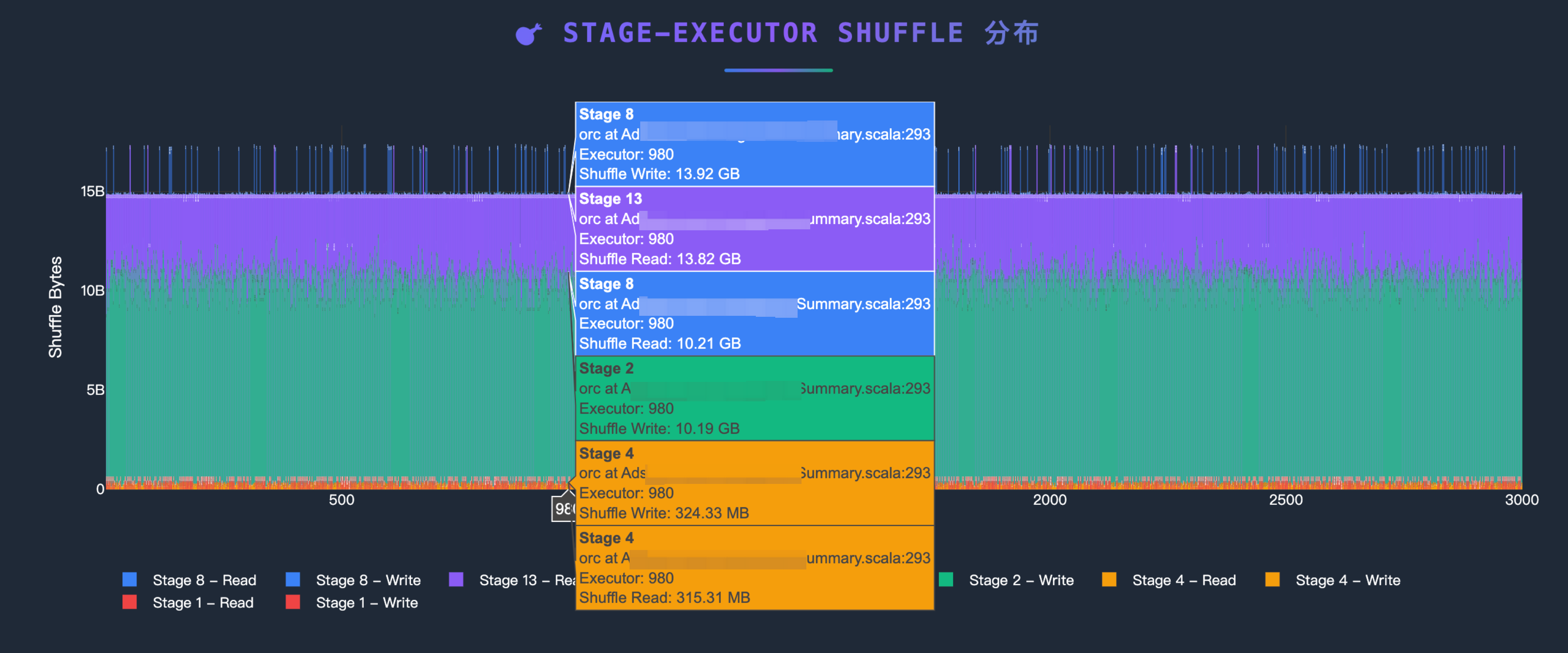

Project Structure
spark-eventlog-mcp/
├── src/spark_eventlog_mcp/
│   ├── server.py              # Main FastAPI + MCP integrated server (refactored)
│   ├── core/
│   │   └── mature_data_loader.py    # Data loader (S3/URL)
│   ├── tools/
│   │   ├── mcp_tools.py      # MCP tool implementations (NEW)
│   │   ├── mature_analyzer.py       # Event log analyzer
│   │   └── mature_report_generator.py  # HTML report generator
│   ├── models/
│   │   ├── schemas.py        # Pydantic data models
│   │   └── mature_models.py  # Analysis result models
│   └── utils/
│       ├── helpers.py         # Utility functions and logging config
│       ├── middleware.py      # FastAPI request logging middleware (NEW)
│       └── uvicorn_config.py  # Uvicorn logging configuration (NEW)
├── report_data/               # Generated reports storage
├── start.py                   # Launch script
├── README.md                 # This file (English)
└── README_zh.md              # Chinese version
MCP Tools
| Tool Name | Description | Parameters |
|---|---|---|
generate_report |
End-to-end report generation - Auto-detects S3/URL, analyzes data, generates HTML reports | path: str (S3 or HTTP URL) |
get_analysis_status |
Query current analysis session status and metrics | None |
clear_session |
Clear session cache and reset server state | None |
Simplified Tool Usage
The refactored MCP tools focus on simplicity and automation:
{
  "jsonrpc": "2.0",
  "method": "tools/call",
  "params": {
    "name": "generate_report",
    "arguments": {
      "path": "s3://my-bucket/spark-logs/"
    }
  },
  "id": 1
}
RESTful API Endpoints
Basic Endpoints
GET /- Service informationGET /health- Health checkGET /docs- API documentation (Swagger UI)
Report Management
GET /api/reports- List all reportsGET /api/reports/{filename}- View HTML reportGET /reports/{filename}- Direct access to report filesDELETE /api/reports/{filename}- Delete report
MCP Tool Calls
POST /mcp- MCP protocol endpoint
Configuration
Environment Variables
# Server Configuration
MCP_TRANSPORT=http          # stdio or streamable-http
MCP_HOST=0.0.0.0           # HTTP mode listen address
MCP_PORT=7799              # HTTP mode port
LOG_LEVEL=INFO             # Log level

# AWS S3 Configuration (Optional)
# Not needed if AWS CLI is configured or running on EC2 with appropriate IAM role
AWS_ACCESS_KEY_ID=xxx
AWS_SECRET_ACCESS_KEY=xxx
AWS_DEFAULT_REGION=us-east-1

# Cache Configuration
CACHE_ENABLED=true
CACHE_TTL=300

# Default Data Source
DEFAULT_SOURCE_TYPE=s3  # s3, url, or local
Enhanced Logging Features
The refactored architecture provides comprehensive request/response logging:
FastAPI Request Logging:
2025-12-18 10:30:45 - INFO - Request started - POST /mcp
2025-12-18 10:30:45 - INFO - Client: 192.168.1.100 | User-Agent: Java SDK MCP Client/1.0.0
2025-12-18 10:30:45 - INFO - Content-Type: application/json | Accept: application/json, text/event-stream
2025-12-18 10:30:45 - INFO - Request body: {"jsonrpc":"2.0","method":"tools/call",...}
2025-12-18 10:30:45 - INFO - Request completed - Status: 200 | Duration: 2.156s
Application Logging:
2025-12-18 10:30:45 - INFO - [mcp_tools.py:243:generate_report_tool] - spark-eventlog-mcp - Starting end-to-end report generation
Format: Timestamp - Level - [Filename:Line:Function] - Logger Name - Message
Data Source Support
S3
{
    "source_type": "s3",
    "path": "s3://bucket-name/path/to/eventlogs/"
}
HTTP URL
{
    "source_type": "url",
    "path": "https://example.com/eventlog.zip"
}
Local File
{
    "source_type": "local",
    "path": "/path/to/local/eventlog.zip"
}
Report Features
Generated HTML reports include:
- 📊 Application Overview (task counts, success rate, duration)
- 💻 Executor Resource Usage Distribution
- 🔄 Shuffle Performance Analysis
- ⚖️ Data Skew Detection
- 💡 Intelligent Optimization Recommendations
- 📈 Interactive Visualizations
Troubleshooting
Port Already in Use
# Change port
MCP_PORT=9090 python start.py
Missing Dependencies
# Reinstall dependencies
uv pip install -e .
AWS Credentials Issues
# Check AWS configuration
aws configure list

# Or configure in .env
AWS_ACCESS_KEY_ID=xxx
AWS_SECRET_ACCESS_KEY=xxx
Debug Logging
# Enable DEBUG logs
LOG_LEVEL=DEBUG uv run python start.py
Recent Improvements (2025-12-18)
Major Code Refactoring
- 🎯 Simplified MCP Tools:
generate_reportnow requires only a single string parameter (S3 or URL path) - 📦 Modular Architecture: Extracted MCP tool implementations from main server to dedicated modules
- 📝 Enhanced Logging: Added comprehensive request/response logging with client info, headers, and request body
- 🔧 Centralized Configuration: Moved uvicorn and middleware configuration to separate utility modules
- 📉 Reduced Complexity: Main server.py reduced from ~1150 to ~370 lines (70% reduction)
Architecture Changes
- New Module:
tools/mcp_tools.py- Contains all MCP tool implementations - New Module:
utils/middleware.py- FastAPI request logging middleware - New Module:
utils/uvicorn_config.py- Centralized uvicorn logging configuration - Auto-Detection: Automatic path type detection (S3 vs URL) in
generate_reporttool - Simplified Interface: Single-parameter MCP tools with internal logic handling complexity
HTTP Transport Fixes
- MCP Protocol Compatibility: Fixed HTTP 406 errors by ensuring proper Accept headers
- Request Tracing: Added detailed request/response logging for better debugging
- Error Handling: Improved error messages and status code handling
Tech Stack
- FastMCP 2.0: MCP protocol support
- FastAPI: RESTful API framework
- Pydantic: Data validation and serialization
- Plotly: Interactive charts
- boto3: AWS S3 integration
- aiofiles: Async file operations
Development
# Clone repository
git clone <repository-url>
cd spark-eventlog-mcp

# Install development dependencies
uv pip install -e .

# MCP Inspector - stdio mode
MCP_TRANSPORT="stdio" npx @modelcontextprotocol/inspector uv run python start.py

# MCP Inspector - HTTP mode
MCP_TRANSPORT="streamable-http" uv run python start.py
npx @modelcontextprotocol/inspector --cli http://localhost:7799 --transport http --method tools/list
Support
- Documentation: Check
/docsAPI documentation - Issues: Submit GitHub Issues
- Reference: FastMCP Documentation
README copy captured when this server was indexed; it may lag the repository. The original is authoritative.