About Tomcp
Tomcp is an MCP server published by Ami3466 in the Developer Tools category: turn any website or doc into an MCP server.
The repository has 175 stars and 21 forks, with the last commit a month ago. Recent commit activity is the strongest signal that reported issues will get attention.
Install
git clone https://github.com/Ami3466/tomcpThis server has no ConduID identity, so agent calls to it are not receipted. Pin the version you install and review the source before granting it credentials.
Ask AI
Ask AI about Tomcp
Powered by Claude · Grounded in docs
Security checks
Static checks derived from the repository 4 days ago. Heuristics on the source, not an audit.
- ✓README presentThe repository ships documentation.
- ✓License declaredUsable under a stated license.
- !Tests presentNo tests found. Behaviour changes may go unnoticed between versions.
- ✓Dependencies pinnedA lockfile pins dependency versions.
- ✓No dynamic code executionSource scan found no eval, dynamic Function, or shell execution.
- !Scoped permissionsDoesn't declare a permission scope. Assume it can do anything its process can.
README
toMCP
Turn any website into an MCP server
Quick start
Put tomcp.org/ in front of any URL:
https://tomcp.org/docs.stripe.com
That address is an MCP server. Add it to your client, or paste the URL at tomcp.org instead.
Why toMCP?
specific APIs often cause AI hallucinations, and web searching is unreliable. This tool lets you serve your documentation as an MCP server, giving the AI direct access to the clear context it needs without manual copy-pasting.
Standard web_fetch tools dump raw HTML into your AI's context—navbars, scripts, footers, and noise. toMCP runs pages through a readability parser and converts to clean markdown, using a fraction of the tokens.
Persistent Documentation Context
AI assistants hallucinate API details when they lack documentation. MCP Resources are pinned as permanent, read-only context—the model won't skip or forget them. Ideal for framework docs, API references, and internal team docs.
web_fetch vs MCP Resources
| web_fetch | MCP Resource | |
|---|---|---|
| Data | Raw HTML with noise | Clean markdown |
| Tokens | High | Low |
| Persistence | Per-request | Always available |
| Hallucination | Higher | Lower |
| JS Support | Full (SPAs / Dynamic) | Static Only (SSG) |
Demo
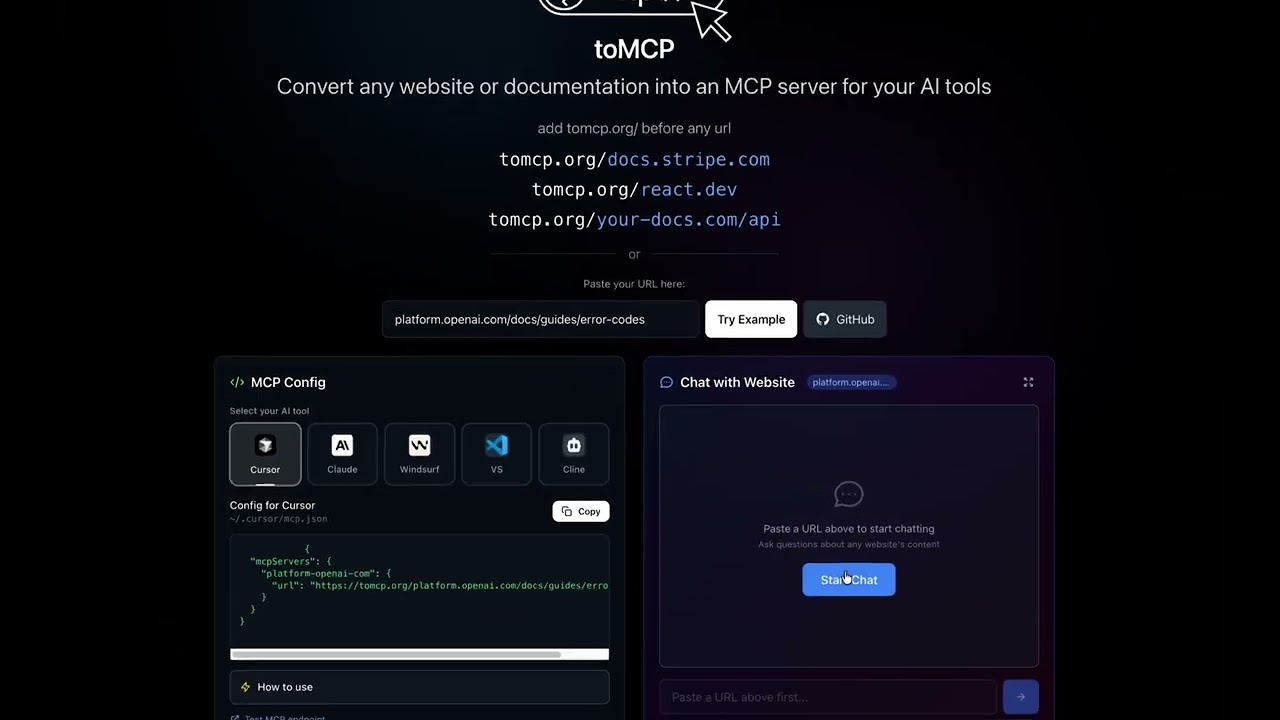
Supported AI Tools
- Cursor -
~/.cursor/mcp.json - Claude Desktop -
~/.claude/claude_desktop_config.json - Windsurf -
~/.codeium/windsurf/mcp_config.json - VS Code -
.vscode/mcp.json - Cline -
~/.cline/mcp_settings.json
How It Works
MCP Config
- Visit tomcp.org
- Enter any website URL
- Select your AI tool
- Copy the generated MCP config
- Add it to your tool's config file
- Restart your AI tool
Chat
- Visit tomcp.org
- Paste any website URL
- Click "Start Chat"
- Ask questions about the website's content
Example Config
{
  "mcpServers": {
    "docs-stripe-com": {
      "url": "https://tomcp.org/docs.stripe.com"
    }
  }
}
Chat API
curl -X POST https://tomcp.org/chat \
  -H "Content-Type: application/json" \
  -d '{"url": "docs.stripe.com", "message": "How do I create a payment intent?"}'
AI Models
Free Models (No API Key Required)
These models are available for everyone with no setup:
- Llama 3.1 8B (Meta) - Default model, fast and capable
- Hermes 2 Pro (NousResearch) - Great for reasoning
- Mistral 7B (Mistral) - Efficient instruction-following
- Gemma 7B LoRA (Google) - Lightweight and fast
paid Models (API Key Required)
Add your Cloudflare Workers AI API key to unlock these models:
- Llama 3.3 70B (Meta) - Most powerful Llama model
- DeepSeek R1 32B (DeepSeek) - Advanced reasoning
- Mistral Large (Mistral) - Enterprise-grade
- Gemma 3 12B (Google) - Latest Gemma
- GPT OSS 120B/20B (OpenAI) - Open-source GPT variants
Adding Your API Key
You can add your own Cloudflare Workers AI API key to:
- Unlock all paid models - Access larger, more capable models
- Bypass rate limits - No daily request limits
- Use your own quota - Charges go to your Cloudflare account
How to Get an API Key
- Go to Cloudflare Workers AI
- Create an API token with Workers AI permissions
- Copy the token
How to Add Your Key
- Start a chat session on tomcp.org
- Below the chat input, you'll see "Add API key from Cloudflare Workers AI"
- Paste your API key and click "Save"
- paid models will now be unlocked in the dropdown
Where Is the API Key Stored?
- Your API key is stored locally in your browser using
localStorage - Key name:
tomcp_api_key - The key is sent with each chat request but never stored on our servers
- You can remove it anytime by clicking "Remove" in the API key section
How It Works (Technical)
Model Fetching
The available models are fetched dynamically from the Cloudflare Workers AI API:
- Frontend calls
GET /modelsendpoint on page load - Worker fetches models from
api.cloudflare.com/client/v4/accounts/{id}/ai/models/search - Models are filtered to "Text Generation" tasks and cached for 5 minutes
- Frontend displays free models as enabled, paid models as disabled (until API key is added)
Chat Flow
- User enters a URL and starts chatting
- Worker fetches the static HTML and converts it to clean Markdown (JavaScript is not executed, so SPAs or dynamically-loaded content won't be captured)
- Content is sent to the selected AI model with the user's message
- Response is returned to the user
Rate Limiting
Without an API key:
- 5 requests per IP per day
With your API key:
- No rate limits (uses your Cloudflare account quota)
Tech Stack
- Frontend: Vanilla HTML/CSS/JS with Tailwind CSS
- Backend: Cloudflare Workers
- AI: Cloudflare Workers AI (multiple models)
Features
- Works with any public URL
- No setup required - just paste the config
- Free forever - powered by Cloudflare Workers
- Chat with any website using AI
- Side-by-side MCP Config + Chat interface
- Multiple AI models - Choose from Llama, Mistral, Gemma, and more
- Bring your own API key - Unlock paid models and bypass rate limits
License
Apache 2.0
README fetched from the repository 4 days ago. The original is authoritative.