About Unclog
Unclog is an MCP server in the AI category: audit MCP servers, skills, and CLAUDE.md bloat eating your Claude Code context window.
Install
git clone https://github.com/thomaschill/unclogThis server has no ConduID identity, so agent calls to it are not receipted. Pin the version you install and review the source before granting it credentials.
Ask AI
Ask AI about Unclog
Powered by Claude · Grounded in docs
Security checks
- ✓README presentThe repository ships documentation.
5 checks have not been run yet.
README
unclog


Every agent, skill, slash command, and MCP server you've installed occupies your Claude Code context window on every turn. unclog scans your install, shows you what's costing tokens, flags MCP servers you haven't called in 30 days, and lets you handpick what to delete — locally, with no telemetry, no accounts, and no network calls.
# install
uv tool install unclog

# run
unclog
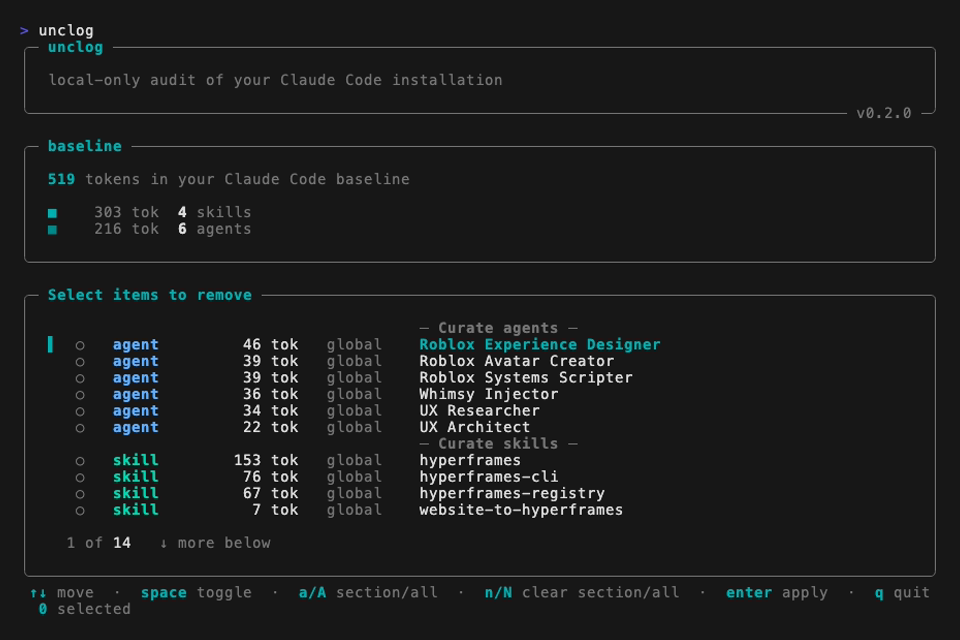
What it shows
- Every agent in
~/.claude/agents/, with its token cost. - Every skill in
~/.claude/skills/, with its token cost. - Every slash command in
~/.claude/commands/, with its token cost. - Every MCP server declared in
~/.claude.json(global and per-project), with its invocation count over the last 30 days so you can see which ones are actually pulling their weight. Servers with zero invocations get an[unused]flag. - A baseline — the total tokens loaded before you type a single message.
Why no per-MCP token count?
Modern Claude Code session logs no longer record the tools schema, so unclog cannot recover an exact token cost for each MCP server without spinning up the server and querying it. We've chosen to stay lightweight (no network, no spawning user-configured commands) and show — tok honestly rather than guess. Invocation count is the next-best signal: a server you haven't called in 30 days is paying schema rent for nothing.
Invocation counts come from walking every session JSONL under ~/.claude/projects/ (parent and subagent files) and tallying tool_use blocks per server. Counts are per server name — if the same MCP is declared at both global and project scope, both rows show the same total.
Remove what's costing you

After the scan, one sectioned picker opens. Tick the agents / skills / commands / MCPs you want to remove, hit enter, confirm once, done. A post-apply line shows how many tokens you saved and the new baseline.
Picker keys: ↑↓ move · space toggle · a / A check section / all · n / N clear section / all · enter apply · q quit.
Actions are destructive. Deleted files are removed from disk. MCP servers are deleted from ~/.claude.json. There is no undo and unclog keeps no snapshot — if you want to revive something, restore it from your own backup or reinstall.
Requirements
Python 3.11+, Claude Code ≥ 2.1.90, macOS or Linux.
Development
uv sync --all-extras --dev
uv run pytest
uv run ruff check src tests
uv run mypy src/unclog
License
MIT. See LICENSE.
README copy captured when this server was indexed; it may lag the repository. The original is authoritative.